The RRB JE CEN 04/2026 application form is an important step for candidates who want to apply for the Railway Recruitment Board Junior Engineer recruitment. The application process is completed online through the official RRB application portal.

This guide explains the complete RRB JE application process, from opening the official website and creating an account to entering personal details, adding educational qualifications, uploading documents, selecting post preferences, checking the preview and completing the fee payment.
RRB JE CEN 04/2026 Application Form 2026: Overview
| Particular | Details |
| Recruiting Authority | Railway Recruitment Board (RRB) |
| Recruitment Name | RRB Junior Engineer Recruitment 2026 |
| CEN Number | CEN 04/2026 |
| Post | Junior Engineer and related posts |
| Total Vacancies | 3,993 |
| Application Mode | Online |
| Application Start Date | 14 August 2026 |
| Last Date to Apply | 13 September 2026 |
| Last Date for Fee Payment | 15 September 2026 |
| Correction Window | 16–25 September 2026 |
| Exam Date | As per schedule |
| Official Recruitment | Indian Railways |


- Nationality, Full name, Date of birth, Gender, Father's name, Mother's name, Matriculation details
- Other required registration information
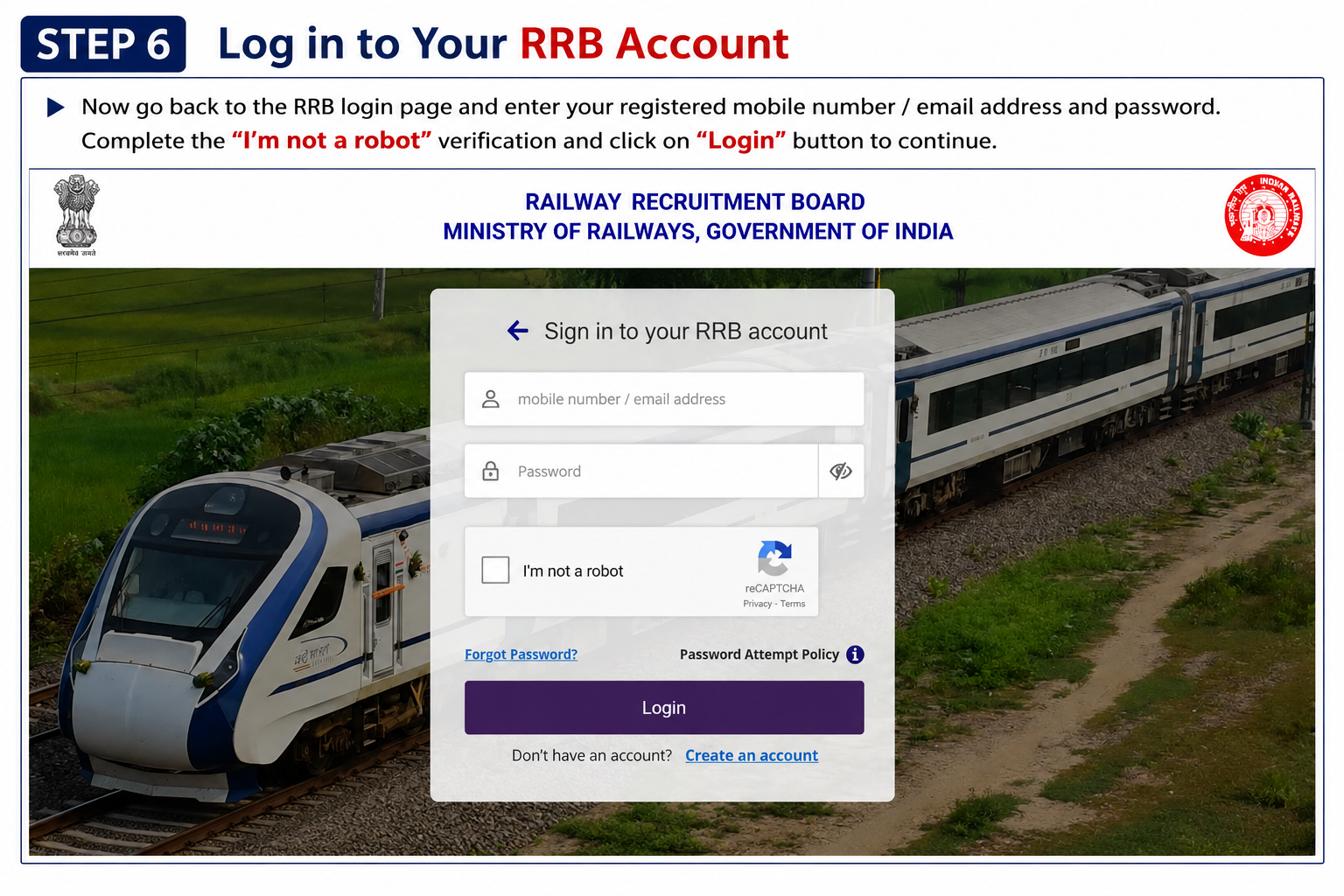
Complete all mandatory fields shown on the registration page. The guide specifically shows personal information, contact details and password creation as part of this stage.
Before moving forward, check spelling, dates and other information carefully.
Click Preview and Create an Account after completing the required details.
RRB JE Application Form 2026 Details
| Application Section | Main Information Required |
| Personal Details | Personal, community and address information |
| Other Details | Ex-serviceman, PwBD, scribe, railway and employment details |
| Educational Qualification | Qualification, board/university and passing details |
| Profile Documents | Photograph and signature |
| Preference | Eligible posts and order of preference |
| Preview | Final verification of entered information |
| Fee Payment | Applicable examination/application fee |

Fill in the required personal information, community details and postal address.
The application screen includes details such as marital status, examination language, visible identification marks and address-related information.
After checking the entries, click Save and then Next.

- Ex-serviceman details
- PwBD details
- Scribe-related information
- Serving railway applicant details
- Current employment details
- Bank details for refunds
Candidates should select the options that correctly match their circumstances.
After completing this section, click Save & Next.

The details shown in the guide include:
- Qualification
- State
- District
- Board/University/Institute
- Date of passing
- Roll number
- Certificate serial number
Select the relevant qualification from the available options and enter the required information.
After checking the details, click Update to save the qualification information.

The application guide provides specific instructions for the photograph and signature.
Photograph Instructions
- Wear non-white clothing, preferably a dark colour.
- Use good lighting.
- Choose a plain and uncluttered background.
- Keep the camera at eye level.
- Face the camera directly.
- Keep the face clearly visible and centred.
- Maintain a neutral expression.
- Avoid wearing a cap, mask or glasses while capturing the photograph.
The photograph should clearly show the candidate's face. The guide also warns that photographs not following the required guidelines may lead to rejection.
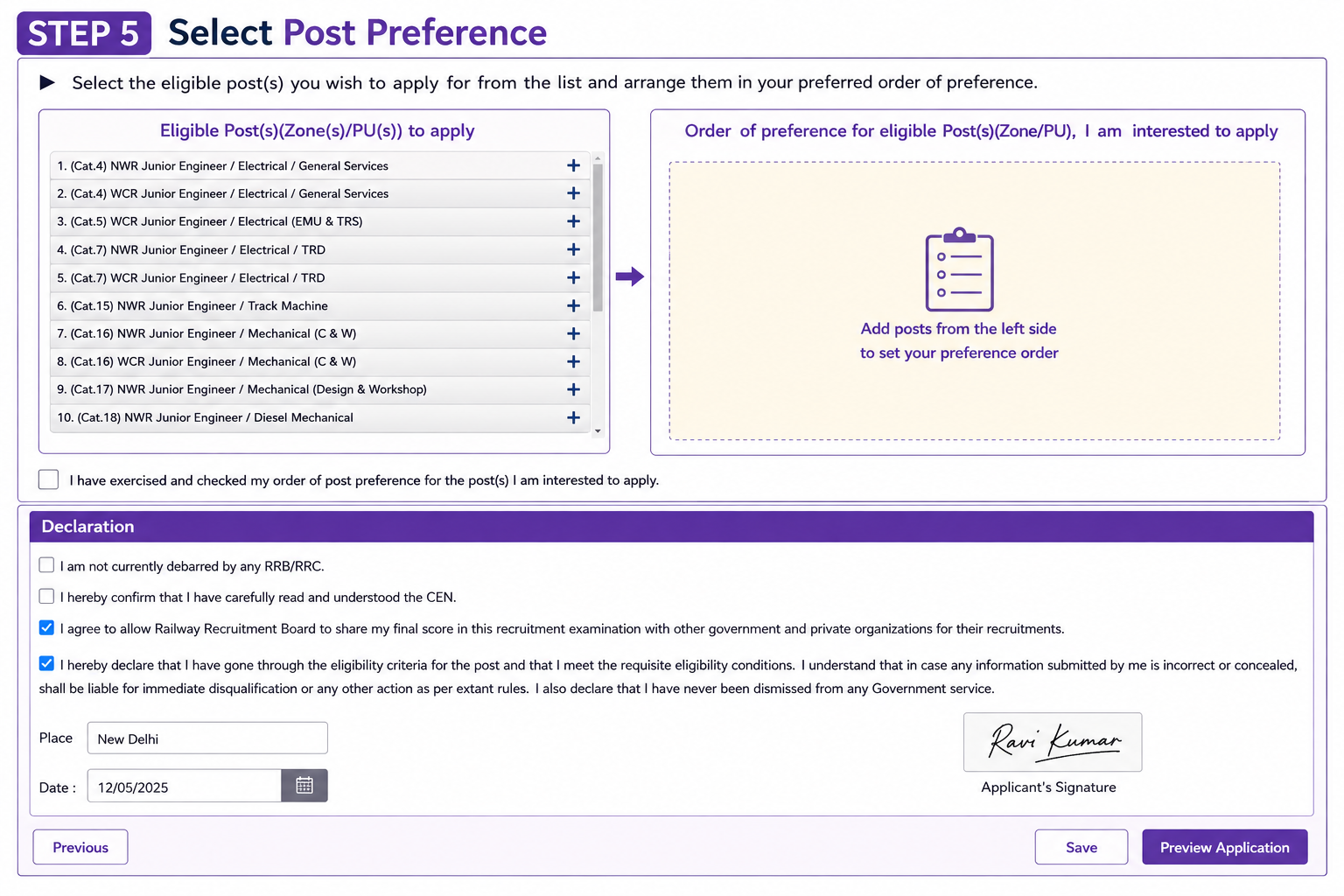
The guide shows examples of Junior Engineer posts in different railway zones and departments, including Electrical, Mechanical and Track Machine-related posts.
Candidates should carefully check the eligible posts and arrange their preferences in the desired order.
After setting the order, confirm that the preference list has been checked.

Candidates should check all the information entered in the application, including:
- Personal details
- Contact information
- Qualification details
- Other information
- Examination language
- Uploaded documents
- Post preferences
- Declaration details
If any information is incorrect, use the Edit option to make the necessary changes.
The guide specifically instructs applicants to re-check the information before final submission because changes may not be possible after submission.

The fee screen in the provided guide shows different amounts according to candidate category. Candidates should rely on the applicable CEN and the fee displayed in their application account when making payment.
Candidates should ensure that the payment transaction is successfully completed. An incomplete transaction may result in failure of the application.
Final Submission of RRB JE Application
Before leaving the portal, candidates should make sure that:
- All mandatory details have been filled in.
- Educational information has been saved.
- Photograph and signature have been uploaded correctly.
- Post preferences have been checked.
- The application preview has been verified.
- The applicable fee has been paid.
- The payment and application submission confirmation has been received.
The guide advises candidates to complete the application well before the closing time instead of waiting until the last moment
Some Useful Important Links & PDFs
| Important Resource | Click & Download Links |
| Apply Online Link | Click Here |
| Check Official Notification | Click Here |
| RRB Official Website | Click Here |
| Join airGurukul Channel | Telegram | WhatsApp |
| How to Fill Form PDF |
Frequently Asked Questions (FAQs)
Where can I fill the RRB JE CEN 04/2026 application form?
The application guide directs candidates to the official RRB application portal, rrbapply.gov.in, to begin the online application.
Do existing RRB account holders need to register again?
The guide says candidates with an account created for an RRB CEN in 2024, 2025 or 2026 can use the same username and password.
What are the signature specifications shown in the guide?
The signature should be JPG/JPEG, clear, uncropped, 30–49 KB, with a preferred size of 140 × 60 pixels.
Can application details be checked before submission?
Yes. Candidates can preview the complete application and use Edit to correct information before final submission.