Question bank

Q&A: practice questions with answers

Search questions on any topic. Filter by exam category, exam, subject and topic, try the question, then open the answer and explanation.

Courses – airGurukul

20,719 questions found.

Q17041.
In this question, a question is followed by two statements numbered (I) and (II). You have to decide whether the data provided in the statements are sufficient to answer the question. Read both the statements and decide the appropriate answer.
Question: Five people A, B, C, D and E are sitting in a straight row, facing north. Who sits second to the right of A?
Statement (I): The number of people sitting to the right of A is equal to the number of people sitting to the left of A. One person sits between A and B. D sits to the immediate left of B.
Statement (II): E sits at the extreme left end of the row. Only one person sits between E and A. B sits to the immediate right of D.
इस प्रश्न में, एक प्रश्न के बाद (I) और (II) क्रमांकित दो कथन दिए गए हैं। आपको यह निर्णय करना है कि कथनों में दिए गए आँकड़े प्रश्न का उत्तर देने के लिए पर्याप्त हैं या नहीं। दोनों कथनों को पढ़िए और उपयुक्त उत्तर का निर्णय कीजिए।
प्रश्न: पाँच व्यक्ति A, B, C, D और E एक सीधी पंक्ति में उत्तर की ओर मुख करके बैठे हैं। A के दाएँ से दूसरे स्थान पर कौन बैठा है?
कथन (I): A के दाएँ बैठे व्यक्तियों की संख्या A के बाएँ बैठे व्यक्तियों की संख्या के बराबर है। A और B के बीच एक व्यक्ति बैठा है। D, B के ठीक बाएँ बैठा है।
कथन (II): E पंक्ति के सबसे बाएँ छोर पर बैठा है। E और A के बीच केवल एक व्यक्ति बैठा है। B, D के ठीक दाएँ बैठा है।
  1. AData in statements I and II together are sufficient to answer the question.कथन I और II के आँकड़े मिलाकर प्रश्न का उत्तर देने के लिए पर्याप्त हैं।
  2. BData in Statement I alone is sufficient to answer the question while data in statement II is not.केवल कथन I के आँकड़े प्रश्न का उत्तर देने के लिए पर्याप्त हैं, जबकि कथन II के आँकड़े पर्याप्त नहीं हैं।
  3. CData in Statement II alone is sufficient to answer the question while data in statement I is not.केवल कथन II के आँकड़े प्रश्न का उत्तर देने के लिए पर्याप्त हैं, जबकि कथन I के आँकड़े पर्याप्त नहीं हैं।
  4. DData in either statement I alone or statement II alone are sufficient to answer the question.या तो केवल कथन I या केवल कथन II के आँकड़े प्रश्न का उत्तर देने के लिए पर्याप्त हैं।
Show answer

Concept: Five people facing north; "right" means towards the higher position number (1 = extreme left).
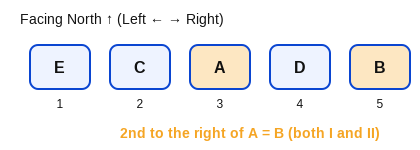
  1. Statement I: equal people on both sides of A → A at position 3. One person between A and B → B at 1 or 5. D immediately left of B is impossible if B is at 1, so B = 5, D = 4. Second to the right of A = position 5 = B. Sufficient.
  2. Statement II: E at 1, one between E and A → A at 3. D–B adjacent with B to the right of D → D = 4, B = 5 (C = 2). Second right of A = B. Sufficient.

Trick: Fix A in the middle first; the D-B pair must then fit at 4–5.

Answer: (D) Data in either statement I alone or statement II alone are sufficient to answer the question.
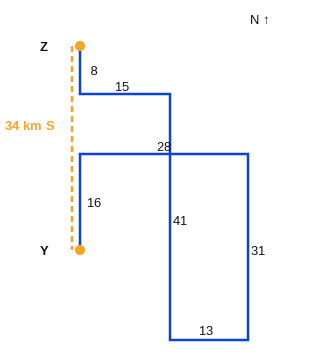
अवधारणा: पाँच लोग उत्तर की ओर मुख; "दाएँ" = बड़ी स्थिति संख्या की ओर (1 = सबसे बाएँ)।

  1. कथन I: A के दोनों ओर बराबर लोग → A स्थिति 3 पर। A और B के बीच एक → B 1 या 5 पर। B = 1 हो तो D उसके ठीक बाएँ नहीं बैठ सकता, अतः B = 5, D = 4। A के दाएँ दूसरा = स्थिति 5 = B। पर्याप्त।
  2. कथन II: E = 1, E और A के बीच एक → A = 3। B, D के ठीक दाएँ → D = 4, B = 5 (C = 2)। A के दाएँ दूसरा = B। पर्याप्त।

ट्रिक: पहले A को बीच में रखें; फिर D-B जोड़ी 4–5 पर ही बैठ सकती है।

उत्तर: (D) Data in either statement I alone or statement II alone are sufficient to answer the question.

RRB Technician Grade I (Signal)General Intelligence and ReasoningData sufficiency – seatingRRB Technician Grade I (Signal) 2024 · 20 Dec Shift 1 →
Q17042.
Based on the English alphabetical order, three of the following four letter-clusters are alike in a certain way and thus form a group. Which letter-cluster DOES NOT belong to that group?
(Note: The odd one out is not based on the number of consonants/vowels or their position in the letter-cluster.)
अंग्रेज़ी वर्णमाला क्रम के आधार पर, निम्नलिखित चार अक्षर-समूहों में से तीन किसी निश्चित प्रकार से एक समान हैं और इस प्रकार एक समूह बनाते हैं। कौन-सा अक्षर-समूह उस समूह से संबंधित नहीं है?
(नोट: असंगत विकल्प व्यंजनों/स्वरों की संख्या या अक्षर-समूह में उनकी स्थिति पर आधारित नहीं है।)
  1. AUXEK
  2. BJMTZ
  3. CCFMS
  4. DQXEG
Show answer

Concept: Compare the gaps between consecutive letters (positions A=1 … Z=26).

  1. UXEK: U(21)→X(24) +3, X→E +7 (wrapping past Z), E(5)→K(11) +6.
  2. JMTZ: +3,+7,+6; CFMS: +3,+7,+6 — same pattern.
  3. QXEG: Q(17)→X(24) +7, X→E +7, E→G +2 — different.

Trick: Check only the first gap: +3,+3,+3 vs +7 — QXEG breaks it.

Answer: (D) QXEG

अवधारणा: क्रमागत अक्षरों के अंतर देखें (A=1 … Z=26)।

  1. UXEK: U(21)→X(24) +3, X→E +7 (Z के बाद घूमकर), E(5)→K(11) +6।
  2. JMTZ: +3,+7,+6; CFMS: +3,+7,+6 — एक ही पैटर्न।
  3. QXEG: Q(17)→X(24) +7, X→E +7, E→G +2 — अलग।

ट्रिक: केवल पहला अंतर देखें: +3,+3,+3 बनाम +7 — QXEG अलग है।

उत्तर: (D) QXEG

RRB Technician Grade I (Signal)General Intelligence and ReasoningLetter-cluster odd one outRRB Technician Grade I (Signal) 2024 · 20 Dec Shift 1 →
Q17043.
Uday starts from Point Y and drives 16 km towards the North. He then takes a right turn, drives 28 km, turns right and drives 31 km. He then takes a right turn and drives 13 km. He takes a right turn and drives 41 km. He then turns left, drives 15 km, turns right and drives 8 km to stop at Point Z. How far (shortest distance) and towards which direction should he drive in order to reach Point Y again? (All turns are 90 degrees turns only unless specified)
उदय बिंदु Y से चलना शुरू करता है और उत्तर की ओर 16 km गाड़ी चलाता है। फिर वह दाएँ मुड़ता है, 28 km चलता है, दाएँ मुड़ता है और 31 km चलता है। फिर वह दाएँ मुड़ता है और 13 km चलता है। वह दाएँ मुड़ता है और 41 km चलता है। फिर वह बाएँ मुड़ता है, 15 km चलता है, दाएँ मुड़ता है और 8 km चलकर बिंदु Z पर रुक जाता है। पुनः बिंदु Y पर पहुँचने के लिए उसे कितनी दूरी (न्यूनतम दूरी) और किस दिशा में गाड़ी चलानी चाहिए? (जब तक अन्यथा न कहा गया हो, सभी मोड़ केवल 90 डिग्री के मोड़ हैं)
  1. A34 km towards South34 km दक्षिण की ओर
  2. B47 km towards North47 km उत्तर की ओर
  3. C49 km towards East49 km पूर्व की ओर
  4. D25 km towards South25 km दक्षिण की ओर
Show answer

Concept: Track the position on a grid; take Y as (0,0), North =+y, East =+x.

  1. N 16 → (0,16); right (E) 28 → (28,16); right (S) 31 → (28,−15); right (W) 13 → (15,−15).
  2. Right (N) 41 → (15,26); left (W) 15 → (0,26); right (N) 8 → (0,34) = Z.
  3. Z is directly north of Y by 34 km → he must drive 34 km South.

Trick: East–West: 28−13−15=0; North–South: 16−31+41+8=34 (north) → go 34 km South.

Answer: (A) 34 km towards South

अवधारणा: ग्रिड पर स्थिति ट्रैक करें; Y =(0,0), उत्तर =+y, पूर्व =+x।

  1. N 16 → (0,16); दाएँ (E) 28 → (28,16); दाएँ (S) 31 → (28,−15); दाएँ (W) 13 → (15,−15)।
  2. दाएँ (N) 41 → (15,26); बाएँ (W) 15 → (0,26); दाएँ (N) 8 → (0,34) = Z।
  3. Z, Y के ठीक उत्तर में 34 km है → 34 km दक्षिण जाना होगा।

ट्रिक: पूर्व–पश्चिम: 28−13−15=0; उत्तर–दक्षिण: 16−31+41+8=34 (उत्तर) → 34 km दक्षिण।

उत्तर: (A) 34 km towards South

RRB Technician Grade I (Signal)General Intelligence and ReasoningDirection senseRRB Technician Grade I (Signal) 2024 · 20 Dec Shift 1 →
Q17044.
Which of the following terms will replace the question mark (?) in the given series to make it logically complete?
IO19 KQ30 MS41 OU52 ?
निम्नलिखित में से कौन-सा पद दी गई श्रृंखला में प्रश्नचिह्न (?) के स्थान पर आकर इसे तार्किक रूप से पूर्ण करेगा?
IO19 KQ30 MS41 OU52 ?
  1. AQX64
  2. BQW63
  3. CQX63
  4. DQW64
Show answer

Concept: Treat the letter pair and the number as separate patterns.

  1. First letters: I, K, M, O → +2 each → next Q.
  2. Second letters: O, Q, S, U → +2 each → next W.
  3. Numbers: 19,30,41,52 → +11 each → 63.
  4. Next term: QW63.

Trick: Letters jump by 2, number by 11 — eliminate QX and 64 immediately.

Answer: (B) QW63

अवधारणा: अक्षर-युग्म और संख्या के पैटर्न अलग-अलग देखें।

  1. पहले अक्षर: I, K, M, O → हर बार +2 → अगला Q।
  2. दूसरे अक्षर: O, Q, S, U → +2 → अगला W।
  3. संख्याएँ: 19,30,41,52 → +11 → 63।
  4. अगला पद: QW63।

ट्रिक: अक्षर 2 बढ़ते हैं, संख्या 11 — QX और 64 तुरंत हटाएँ।

उत्तर: (B) QW63

RRB Technician Grade I (Signal)General Intelligence and ReasoningAlphanumeric seriesRRB Technician Grade I (Signal) 2024 · 20 Dec Shift 1 →
Q17045.
EDSP is related to NMBY in a certain way based on the English alphabetical order. In the same way, ONCZ is related to XWLI. To which of the following options is PODA related, following the same logic?
अंग्रेज़ी वर्णमाला क्रम के आधार पर EDSP, NMBY से एक निश्चित प्रकार से संबंधित है। उसी प्रकार ONCZ, XWLI से संबंधित है। उसी तर्क का अनुसरण करते हुए PODA निम्नलिखित में से किस विकल्प से संबंधित है?
  1. AYXMK
  2. BYUIJ
  3. CYXMJ
  4. DYUTR
Show answer

Concept: Find the position shift applied to each letter (A=1 … Z=26, wrapping after Z).

  1. EDSP → NMBY: E(5)+9=N(14), D(4)+9=M(13), S(19)+9=B(28−26=2), P(16)+9=Y(25). Every letter moves +9.
  2. Check ONCZ → XWLI: O+9=X, N+9=W, C+9=L, Z+9=I ✓.
  3. PODA: P+9=Y, O+9=X, D+9=M, A+9=J → YXMJ.

Trick: Same shift for all letters – test only the first letter (P→Y) and the last (A→J) to pick the option quickly.

Answer: (C) YXMJ

अवधारणा: हर अक्षर पर लगाया गया स्थान-परिवर्तन खोजें (A=1 … Z=26, Z के बाद फिर A से)।

  1. EDSP → NMBY: E(5)+9=N(14), D(4)+9=M(13), S(19)+9=B(28−26=2), P(16)+9=Y(25)। हर अक्षर +9 आगे।
  2. जाँच ONCZ → XWLI: O+9=X, N+9=W, C+9=L, Z+9=I ✓।
  3. PODA: P+9=Y, O+9=X, D+9=M, A+9=J → YXMJ।

ट्रिक: सभी अक्षरों पर एक ही shift – केवल पहला (P→Y) और अंतिम (A→J) अक्षर जाँचकर विकल्प तुरंत चुनें।

उत्तर: (C) YXMJ

RRB Technician Grade I (Signal)General Intelligence and ReasoningLetter analogyRRB Technician Grade I (Signal) 2024 · 20 Dec Shift 1 →
Q17046.
Select the set in which the numbers are related in the same way as are the numbers of the following sets.
(NOTE: Operations should be performed on the whole numbers, without breaking down the numbers into its constituent digits. E.g., 13 – Operations on 13 such as
adding/deleting/multiplying etc. to 13 can be performed. Breaking down 13 into 1 and 3 and then performing mathematical operations on 1 and 3 is not allowed)
(19, 6, 17)
(79, 11, 42)
उस समुच्चय का चयन कीजिए जिसमें संख्याएँ उसी प्रकार संबंधित हैं जिस प्रकार निम्नलिखित समुच्चयों की संख्याएँ संबंधित हैं।
(नोट: संक्रियाएँ पूर्ण संख्याओं पर की जानी चाहिए, संख्याओं को उनके घटक अंकों में तोड़े बिना। उदाहरण के लिए, 13 – 13 पर संक्रियाएँ जैसे
13 में जोड़ना/घटाना/गुणा करना आदि किया जा सकता है। 13 को 1 और 3 में तोड़कर फिर 1 और 3 पर गणितीय संक्रियाएँ करने की अनुमति नहीं है)
(19, 6, 17)
(79, 11, 42)
  1. A(2, 6, 5)
  2. B(15, 5, 6)
  3. C(13, 49, 2)
  4. D(14, 4, 2)
Show answer

Concept: Find one rule connecting the three numbers of each given set and apply it to the options.

  1. (19,6,17): 62−19=36−19=17 ✓.
  2. (79,11,42): 112−79=121−79=42 ✓. Rule: third = (second)2 − first.
  3. Option (D) (14,4,2): 42−14=16−14=2 ✓. Others fail: 62−2=34≠5, 52−15=10≠6, 492−13≠2.

Trick: When one number is much bigger than the third, try the square of the small middle number.

Answer: (D) (14, 4, 2)

अवधारणा: दिए गए हर समुच्चय की तीन संख्याओं को जोड़ने वाला एक नियम खोजें और विकल्पों पर लगाएँ।

  1. (19,6,17): 62−19=36−19=17 ✓।
  2. (79,11,42): 112−79=121−79=42 ✓। नियम: तीसरी = (दूसरी)2 − पहली।
  3. विकल्प (D) (14,4,2): 42−14=16−14=2 ✓। बाकी असफल: 62−2=34≠5, 52−15=10≠6, 492−13≠2।

ट्रिक: जब एक संख्या तीसरी से बहुत बड़ी हो, तो छोटी बीच वाली संख्या का वर्ग आज़माएँ।

उत्तर: (D) (14, 4, 2)

RRB Technician Grade I (Signal)General Intelligence and ReasoningNumber set relationRRB Technician Grade I (Signal) 2024 · 20 Dec Shift 1 →
Q17047.
In the following number-pairs, the second number is obtained by applying certain mathematical operations to the first number. Which numbers should replace X and Y so that the pattern followed by the two numbers on the left side of :: is same as that on the right side of ::?
(NOTE: Operations should be performed on the whole numbers, without breaking down the numbers into their constituent digits. E.g. 13 – Operations on 13 such as
adding/subtracting/multiplying to 13 can be performed. Breaking down 13 into 1 and 3 and then performing mathematical operations on 1 and 3 is not allowed.)
X : 130 :: 34 : Y
निम्नलिखित संख्या-युग्मों में, दूसरी संख्या पहली संख्या पर कुछ निश्चित गणितीय संक्रियाएँ करके प्राप्त की गई है। X और Y के स्थान पर कौन-सी संख्याएँ आनी चाहिए ताकि :: के बाईं ओर की दो संख्याओं द्वारा अनुसरण किया गया पैटर्न :: के दाईं ओर के पैटर्न के समान हो?
(नोट: संक्रियाएँ पूर्ण संख्याओं पर की जानी चाहिए, संख्याओं को उनके घटक अंकों में तोड़े बिना। उदाहरण के लिए, 13 – 13 पर संक्रियाएँ जैसे
13 में जोड़ना/घटाना/गुणा करना किया जा सकता है। 13 को 1 और 3 में तोड़कर फिर 1 और 3 पर गणितीय संक्रियाएँ करने की अनुमति नहीं है।)
X : 130 :: 34 : Y
  1. AX=26, Y=170
  2. BX=24, Y=160
  3. CX=29, Y=185
  4. DX=28, Y=190
Show answer

Concept: The same operation turns the first number into the second on both sides of ::.

  1. Test the options on the known pair 34:Y – with ×5, Y=34×5=170 and then X×5=130⇒X=26.
  2. Option (A) gives exactly X=26, Y=170; the other options do not satisfy one common rule (24×5=120, 29×5=145, 28×5=140≠130).

Trick: 130=26×5 and 170=34×5 – both end in 0 because of the ×5 rule.

Answer: (A) X = 26, Y = 170

अवधारणा: :: के दोनों ओर पहली संख्या से दूसरी संख्या एक ही संक्रिया से बनती है।

  1. ज्ञात युग्म 34:Y पर विकल्प जाँचें – ×5 से Y=34×5=170 और फिर X×5=130⇒X=26।
  2. विकल्प (A) में ठीक X=26, Y=170 है; बाकी विकल्प एक समान नियम पर खरे नहीं उतरते (24×5=120, 29×5=145, 28×5=140≠130)।

ट्रिक: 130=26×5 और 170=34×5 – ×5 नियम के कारण दोनों 0 पर खत्म होते हैं।

उत्तर: (A) X = 26, Y = 170

RRB Technician Grade I (Signal)General Intelligence and ReasoningNumber pair analogyRRB Technician Grade I (Signal) 2024 · 20 Dec Shift 1 →
Q17048.
Each of members , P, Q, R, S, T, U and V, of a certain department has to attend a seminar on different days of the same week starting from Monday to Sunday.
T has to attend the seminar immediately before P. Q has to attend the seminar on Tuesday. V has to attend the seminar on Sunday. Only U has to attend the seminar between P and R. S has to attend the seminar on one of the days before Q. Who has to attend the seminar on Monday?
किसी विभाग के सदस्यों P, Q, R, S, T, U और V में से प्रत्येक को सोमवार से रविवार तक एक ही सप्ताह के अलग-अलग दिनों में एक सेमिनार में भाग लेना है।
T को P के ठीक पहले सेमिनार में भाग लेना है। Q को मंगलवार को सेमिनार में भाग लेना है। V को रविवार को सेमिनार में भाग लेना है। P और R के बीच केवल U को सेमिनार में भाग लेना है। S को Q से पहले के किसी एक दिन सेमिनार में भाग लेना है। सोमवार को किसे सेमिनार में भाग लेना है?
  1. AS
  2. BT
  3. CR
  4. DP
Show answer

Concept: Fix the definite positions first, then fit the remaining people using the "immediately before" and "only one between" clues.

  1. Q – Tuesday, V – Sunday. S is before Q, so S – Monday.
  2. Remaining days Wed–Sat for T, P, U, R: T immediately before P and only U between P and R gives the block T–P–U–R.
  3. Final order: Mon S, Tue Q, Wed T, Thu P, Fri U, Sat R, Sun V.

Trick: "S before Q (Tuesday)" leaves only Monday for S – the answer comes in one step.

Answer: (A) S

अवधारणा: पहले निश्चित स्थान भरें, फिर "ठीक पहले" और "बीच में केवल एक" संकेतों से बाकी लोगों को बिठाएँ।

  1. Q – मंगलवार, V – रविवार। S, Q से पहले है, अतः S – सोमवार।
  2. बचे दिन बुध–शनि T, P, U, R के लिए: T, P से ठीक पहले और P व R के बीच केवल U – यानी ब्लॉक T–P–U–R।
  3. अंतिम क्रम: सोम S, मंगल Q, बुध T, गुरु P, शुक्र U, शनि R, रवि V।

ट्रिक: "S, Q (मंगलवार) से पहले" – S के लिए केवल सोमवार बचता है, उत्तर एक कदम में।

उत्तर: (A) S

RRB Technician Grade I (Signal)General Intelligence and ReasoningScheduling (days of week)RRB Technician Grade I (Signal) 2024 · 20 Dec Shift 1 →
Q17049.
If ‘A’ stands for ‘÷’, ‘B’ stands for ‘×’, ‘C’ stands for ‘+’ and ‘D’ stands for ‘−’, then what will come in place of the question mark (?) in the following equation?
45 C 30 A 10 D 7 B 2 = ?
यदि ‘A’ का अर्थ ‘÷’, ‘B’ का अर्थ ‘×’, ‘C’ का अर्थ ‘+’ और ‘D’ का अर्थ ‘−’ है, तो निम्नलिखित समीकरण में प्रश्नचिह्न (?) के स्थान पर क्या आएगा?
45 C 30 A 10 D 7 B 2 = ?
  1. A32
  2. B31
  3. C33
  4. D34
Show answer

Concept: Replace the letters by the given signs and apply BODMAS (÷ and × before + and −).

  1. 45 C 30 A 10 D 7 B 2⇒45+30÷10−7×2.
  2. 30÷10=3, 7×2=14.
  3. 45+3−14=34.

Trick: Do ÷ and × first, then add and subtract in one go: 45+3−14.

Answer: (D) 34

अवधारणा: अक्षरों की जगह दिए गए चिह्न रखें और BODMAS लगाएँ (÷ और × पहले, + और − बाद में)।

  1. 45 C 30 A 10 D 7 B 2⇒45+30÷10−7×2।
  2. 30÷10=3, 7×2=14।
  3. 45+3−14=34।

ट्रिक: पहले ÷ और ×, फिर एक साथ जोड़-घटाव: 45+3−14।

उत्तर: (D) 34

RRB Technician Grade I (Signal)General Intelligence and ReasoningMathematical operations (coded)RRB Technician Grade I (Signal) 2024 · 20 Dec Shift 1 →
Q17050.
By default, if you're in a business environment, everyone within your organisation can edit the linked file. To change these permissions, click on the arrow at the right of the attachment name to display a drop-down menu with a variety of permission options. Which of the following is NOT a permission option?
डिफ़ॉल्ट रूप से, यदि आप किसी व्यावसायिक वातावरण में हैं, तो आपके संगठन का प्रत्येक व्यक्ति लिंक की गई फ़ाइल को संपादित (edit) कर सकता है। इन अनुमतियों (permissions) को बदलने के लिए, अटैचमेंट के नाम के दाईं ओर के तीर (arrow) पर क्लिक करें जिससे विभिन्न अनुमति विकल्पों वाला एक ड्रॉप-डाउन मेनू प्रदर्शित होता है। निम्नलिखित में से कौन-सा एक अनुमति विकल्प नहीं है?
  1. ACan ReView
  2. BCan Delete
  3. CCan View
  4. DCan Edit
Show answer

Concept: When a file is attached as a link (Outlook with OneDrive/SharePoint), the permission drop-down offers only viewing/editing type options.

  1. Standard options: "Can edit" and "Can view" (and settings such as organisation / anyone / specific people).
  2. "Can delete" is not a standard sharing permission — deletion is controlled by ownership, not by share links; but "Can ReView" is not even a real option (it is a made-up word).
  3. Hence the option that is NOT a permission option is "Can ReView".

Yaad rakhein: Share-link permissions = Can edit / Can view only.

Answer: (A) Can ReView

अवधारणा: जब फ़ाइल link के रूप में attach होती है (Outlook + OneDrive/SharePoint), तो permission drop-down में केवल देखने/संपादन वाले विकल्प मिलते हैं।

  1. मानक विकल्प: "Can edit" और "Can view" (साथ में organisation / anyone / specific people जैसी settings)।
  2. "Can ReView" कोई वास्तविक विकल्प नहीं है — यह एक बनावटी शब्द है।
  3. अतः जो permission option नहीं है वह "Can ReView" है।

याद रखें: Share-link permissions = Can edit / Can view।

उत्तर: (A) Can ReView

RRB Technician Grade I (Signal)Basics of Computers and ApplicationSharing permissions (Outlook/OneDrive)RRB Technician Grade I (Signal) 2024 · 20 Dec Shift 1 →
Q17051.
Which tab would you use to add a new slide to your MS PowerPoint presentation?
अपने MS PowerPoint प्रेज़ेंटेशन में नई स्लाइड जोड़ने के लिए आप किस टैब का उपयोग करेंगे?
  1. AInsert
  2. BDesign
  3. CTransitions
  4. DHome
Show answer

Concept: In PowerPoint the "New Slide" button lives in the Slides group of the Home tab.

  1. Home → Slides → New Slide (shortcut Ctrl + M).
  2. The Insert tab also has New Slide, but the question asks which tab you would use — Home is the standard answer; Design and Transitions have nothing to do with adding slides.

Yaad rakhein: Ctrl + M = new slide; it sits on the Home tab.

Answer: (D) Home

अवधारणा: PowerPoint में "New Slide" बटन Home tab के Slides group में होता है।

  1. Home → Slides → New Slide (shortcut Ctrl + M)।
  2. Insert tab में भी New Slide है, पर मानक उत्तर Home है; Design और Transitions का स्लाइड जोड़ने से कोई संबंध नहीं।

याद रखें: Ctrl + M = नई स्लाइड; यह Home tab पर है।

उत्तर: (D) Home

RRB Technician Grade I (Signal)Basics of Computers and ApplicationMS PowerPoint – New SlideRRB Technician Grade I (Signal) 2024 · 20 Dec Shift 1 →
Q17052.
Which of the following is NOT a type of system software?
निम्नलिखित में से कौन-सा सिस्टम सॉफ़्टवेयर का एक प्रकार नहीं है?
  1. AOperating systemऑपरेटिंग सिस्टम
  2. BMicrosoft Office
  3. CUtility softwareयूटिलिटी सॉफ़्टवेयर
  4. DFirmware softwareफ़र्मवेयर सॉफ़्टवेयर
Show answer

Concept: System software runs and manages the hardware (OS, utilities, firmware, drivers); application software performs user tasks.

  1. Operating system, utility software (antivirus, disk cleanup) and firmware are all system software.
  2. Microsoft Office (Word, Excel, PowerPoint) is application software used by the end user.

Yaad rakhein: If you "use it to do your work", it is application software.

Answer: (B) Microsoft Office

अवधारणा: System software हार्डवेयर को चलाता/संभालता है (OS, utilities, firmware, drivers); application software उपयोगकर्ता के काम करता है।

  1. Operating system, utility software (antivirus, disk cleanup) और firmware — सब system software हैं।
  2. Microsoft Office (Word, Excel, PowerPoint) end user का application software है।

याद रखें: जिससे आप "अपना काम" करते हैं, वह application software है।

उत्तर: (B) Microsoft Office

RRB Technician Grade I (Signal)Basics of Computers and ApplicationSystem vs application softwareRRB Technician Grade I (Signal) 2024 · 20 Dec Shift 1 →
Q17053.
Match the following social networking sites from Group A to the allowed characters in Group B.
Group A Group B
I. Facebook A. Allowed up to 255 characters in the 'About' or bio field
II. Instagram B. Allowed up to 150 characters in your bio field.
III. Linkedin C. Allowed up to 3,000 characters in your bio field.
IV. Twitter D. It has a 160-character limit for the bio field.
समूह A में दी गई निम्नलिखित सोशल नेटवर्किंग साइटों का समूह B में दिए गए अनुमत वर्णों (characters) से मिलान कीजिए।
समूह A समूह B
I. Facebook A. ‘About’ या बायो फ़ील्ड में 255 वर्णों तक की अनुमति
II. Instagram B. आपके बायो फ़ील्ड में 150 वर्णों तक की अनुमति।
III. Linkedin C. आपके बायो फ़ील्ड में 3,000 वर्णों तक की अनुमति।
IV. Twitter D. इसमें बायो फ़ील्ड के लिए 160 वर्णों की सीमा है।
  1. AI-C, II-D, III-A, IV-B
  2. BI-B, II-A, III-D, IV-C
  3. CI-A, II-B, III-C, IV-D
  4. DI-D, II-C, III-B, IV-A
Show answer

Concept: Each social network allows a different number of characters in the bio/about field.

  1. Instagram bio – 150 characters; Twitter (X) bio – 160 characters — these two fix the matching.
  2. LinkedIn "About" (summary) allows the longest text, in the thousands of characters; Facebook short bio is the 255-character field.
  3. So I-A, II-B, III-C, IV-D.

Yaad rakhein: Insta 150, Twitter 160, LinkedIn longest.

Answer: (C) I-A, II-B, III-C, IV-D

अवधारणा: हर सोशल नेटवर्क bio/about field में अलग-अलग अक्षर-सीमा देता है।

  1. Instagram bio – 150 अक्षर; Twitter (X) bio – 160 अक्षर — इन्हीं दो से मिलान तय हो जाता है।
  2. LinkedIn "About" (summary) में सबसे लंबा पाठ (हज़ारों अक्षर) लिखा जा सकता है; Facebook का short bio 255 अक्षर वाला field है।
  3. अतः I-A, II-B, III-C, IV-D।

याद रखें: Insta 150, Twitter 160, LinkedIn सबसे लंबा।

उत्तर: (C) I-A, II-B, III-C, IV-D

RRB Technician Grade I (Signal)Basics of Computers and ApplicationSocial media bio limitsRRB Technician Grade I (Signal) 2024 · 20 Dec Shift 1 →
Q17054.
What does real-time protection in antivirus software do?
एंटीवायरस सॉफ़्टवेयर में रियल-टाइम सुरक्षा (real-time protection) क्या करती है?
  1. AContinuously monitors and scans files for malwareमैलवेयर के लिए फ़ाइलों की निरंतर निगरानी और स्कैन करती है
  2. BProvides updates for new antivirus versionsनए एंटीवायरस संस्करणों के लिए अपडेट प्रदान करती है
  3. CScans files only when manually initiatedफ़ाइलों को केवल तभी स्कैन करती है जब मैन्युअल रूप से शुरू किया जाए
  4. DCreates a backup of important filesमहत्वपूर्ण फ़ाइलों का बैकअप बनाती है
Show answer

Concept: Real-time (on-access) protection is the antivirus component that runs continuously in the background.

  1. It scans every file as it is opened, downloaded, copied or executed and blocks malware immediately.
  2. Manual/on-demand scan (option C) runs only when started by the user; updates and backups are separate features.

Yaad rakhein: Real-time = always watching, no click needed.

Answer: (A) Continuously monitors and scans files for malware

अवधारणा: Real-time (on-access) protection एंटीवायरस का वह भाग है जो पृष्ठभूमि में लगातार चलता है।

  1. यह हर फ़ाइल को खुलते, डाउनलोड, कॉपी या run होते समय स्कैन करता है और malware को तुरंत रोकता है।
  2. Manual/on-demand scan (विकल्प C) केवल उपयोगकर्ता के शुरू करने पर चलता है; updates और backup अलग फ़ीचर हैं।

याद रखें: Real-time = हमेशा निगरानी, क्लिक की ज़रूरत नहीं।

उत्तर: (A) Continuously monitors and scans files for malware

RRB Technician Grade I (Signal)Basics of Computers and ApplicationAntivirus real-time protectionRRB Technician Grade I (Signal) 2024 · 20 Dec Shift 1 →
Q17055.
Which of the following malware symptoms indicate that your computer may be infected?
I. Slow computer performance
II. Erratic computer behaviour
III. Unexplained data loss
IV. Frequent computer crashes
निम्नलिखित में से कौन-से मैलवेयर लक्षण संकेत देते हैं कि आपका कंप्यूटर संक्रमित हो सकता है?
I. कंप्यूटर का धीमा प्रदर्शन
II. कंप्यूटर का अनियमित व्यवहार
III. अस्पष्टीकृत डेटा हानि
IV. कंप्यूटर का बार-बार क्रैश होना
  1. AI, II, III, and IVI, II, III और IV
  2. BIII and IV onlyकेवल III और IV
  3. CII, III and IV onlyकेवल II, III और IV
  4. DI and II onlyकेवल I और II
Show answer

Concept: Malware consumes resources, corrupts data and destabilises the system.

  1. Slow performance and erratic behaviour (pop-ups, programs opening on their own) are classic signs.
  2. Unexplained data loss and frequent crashes/freezes are also typical infection symptoms.
  3. All four listed symptoms indicate possible infection.

Yaad rakhein: Slow, strange, lost, crashed — all four = malware warning.

Answer: (A) I, II, III, and IV

अवधारणा: Malware संसाधन खाता है, डेटा बिगाड़ता है और सिस्टम को अस्थिर करता है।

  1. धीमा प्रदर्शन और अजीब व्यवहार (pop-ups, अपने-आप प्रोग्राम खुलना) क्लासिक संकेत हैं।
  2. अकारण डेटा हानि और बार-बार crash/freeze भी संक्रमण के लक्षण हैं।
  3. चारों लक्षण संभावित संक्रमण दर्शाते हैं।

याद रखें: धीमा, अजीब, डेटा गायब, crash — चारों = malware चेतावनी।

उत्तर: (A) I, II, III, and IV

RRB Technician Grade I (Signal)Basics of Computers and ApplicationMalware symptomsRRB Technician Grade I (Signal) 2024 · 20 Dec Shift 1 →
Q17056.
What type of chart is used to compare parts of a whole in MS-Excel?
MS-Excel में किसी संपूर्ण के भागों की तुलना करने के लिए किस प्रकार के चार्ट का उपयोग किया जाता है?
  1. APie Chartपाई चार्ट (Pie Chart)
  2. BLine Chartलाइन चार्ट (Line Chart)
  3. CHistogramहिस्टोग्राम (Histogram)
  4. DColumn Chartकॉलम चार्ट (Column Chart)
Show answer

Concept: A pie chart shows how a single whole is divided into parts (percentages of a total).

  1. Each slice is proportional to its share of the whole — ideal for "parts of a whole".
  2. Line chart → trends over time; Column chart → compare values across categories; Histogram → frequency distribution.

Yaad rakhein: Share/percentage of total → Pie.

Answer: (A) Pie Chart

अवधारणा: Pie chart दिखाता है कि एक पूर्ण को भागों (कुल के प्रतिशत) में कैसे बाँटा गया है।

  1. हर टुकड़ा अपने हिस्से के समानुपाती — "parts of a whole" के लिए आदर्श।
  2. Line chart → समय के साथ प्रवृत्ति; Column chart → श्रेणियों की तुलना; Histogram → बारंबारता बंटन।

याद रखें: कुल का हिस्सा/प्रतिशत → Pie।

उत्तर: (A) Pie Chart

RRB Technician Grade I (Signal)Basics of Computers and ApplicationMS Excel chartsRRB Technician Grade I (Signal) 2024 · 20 Dec Shift 1 →
Q17057.
Which of the following file formats can be used while saving a workbook in MS Excel 2019 that is compatible with all other spreadsheet software programs?
MS Excel 2019 में वर्कबुक सहेजते (save करते) समय निम्नलिखित में से किस फ़ाइल फ़ॉर्मेट का उपयोग किया जा सकता है जो अन्य सभी स्प्रेडशीट सॉफ़्टवेयर प्रोग्रामों के साथ संगत (compatible) है?
  1. APortable Document Format (.pdf)
  2. BMicrosoft Excel Spreadsheet XML (.xlsx)
  3. CMicrosoft Excel Spreadsheet Beta (.xlsb)
  4. DComma-separated values (.csv)
Show answer

Concept: CSV (Comma-Separated Values) is a plain-text format that every spreadsheet program can open.

  1. .xlsx and .xlsb are Microsoft formats — not guaranteed to open in all spreadsheet software.
  2. .pdf is a fixed document, not an editable spreadsheet.
  3. .csv keeps only the cell values (no formulas/formatting) but is universally compatible.

Yaad rakhein: Universal exchange of tabular data = CSV.

Answer: (D) Comma-separated values (.csv)

अवधारणा: CSV (Comma-Separated Values) सादा-पाठ प्रारूप है जिसे हर spreadsheet प्रोग्राम खोल सकता है।

  1. .xlsx और .xlsb Microsoft के प्रारूप हैं — हर spreadsheet software में खुलने की गारंटी नहीं।
  2. .pdf स्थिर दस्तावेज़ है, संपादन-योग्य spreadsheet नहीं।
  3. .csv में केवल cell मान रहते हैं (formula/formatting नहीं) पर यह सर्वत्र संगत है।

याद रखें: तालिका-डेटा का सार्वभौमिक आदान-प्रदान = CSV।

उत्तर: (D) Comma-separated values (.csv)

RRB Technician Grade I (Signal)Basics of Computers and ApplicationExcel file formatsRRB Technician Grade I (Signal) 2024 · 20 Dec Shift 1 →
Q17058.
What happens if you enter a date that MS-Excel does NOT recognise?
यदि आप ऐसी तारीख़ दर्ज करते हैं जिसे MS-Excel नहीं पहचानता है, तो क्या होता है?
  1. AMS-Excel treats it as a text.MS-Excel इसे टेक्स्ट के रूप में मानता है।
  2. BMS-Excel displays an error message.MS-Excel एक त्रुटि संदेश (error message) प्रदर्शित करता है।
  3. CMS-Excel automatically corrects the format.MS-Excel स्वचालित रूप से फ़ॉर्मेट को सही कर देता है।
  4. DMS-Excel deletes the content.MS-Excel सामग्री को हटा देता है।
Show answer

Concept: Excel stores recognised dates as serial numbers; anything it cannot parse as a date is stored as plain text.

  1. An unrecognised date (e.g. "2024.13.45") is left-aligned and treated as text — no error, no auto-correction.
  2. Date functions and sorting will then not work on that cell until it is re-entered in a valid format.

Yaad rakhein: Left-aligned = text; right-aligned = number/date.

Answer: (A) MS-Excel treats it as a text.

अवधारणा: Excel पहचानी गई तिथियों को serial number के रूप में रखता है; जिसे वह तिथि नहीं समझ पाता, उसे सादा text मान लेता है।

  1. अपरिचित तिथि (जैसे "2024.13.45") बाएँ-संरेखित होकर text बन जाती है — न error, न स्वतः सुधार।
  2. उस cell पर date functions और sorting तब तक काम नहीं करते जब तक सही प्रारूप में दोबारा न लिखा जाए।

याद रखें: बाएँ-संरेखित = text; दाएँ-संरेखित = number/date।

उत्तर: (A) MS-Excel treats it as a text.

RRB Technician Grade I (Signal)Basics of Computers and ApplicationExcel date entryRRB Technician Grade I (Signal) 2024 · 20 Dec Shift 1 →
Q17059.
Write the correct order of steps to print a webpage from your android phone.
1. On your Android device, open the Chrome app
2. Tap Print
3. At the top right, tap More Share.
4. Open the page, image, or file you want to print.
5. Select Print .
6. To change any print settings, tap the Down arrow
7. At the top, select a printer.
अपने Android फ़ोन से किसी वेबपेज को प्रिंट करने के चरणों का सही क्रम लिखिए।
1. अपने Android डिवाइस पर Chrome ऐप खोलें
2. Print पर टैप करें
3. ऊपर दाईं ओर, More Share पर टैप करें।
4. वह पेज, चित्र या फ़ाइल खोलें जिसे आप प्रिंट करना चाहते हैं।
5. Print चुनें।
6. किसी भी प्रिंट सेटिंग को बदलने के लिए, Down arrow पर टैप करें
7. सबसे ऊपर, एक प्रिंटर चुनें।
  1. A1, 2, 3, 4, 5, 6, 7
  2. B2, 4, 6, 1, 3, 5, 7
  3. C1, 4, 3, 5, 7, 6, 2
  4. D7, 6, 5, 4, 3, 2, 1
Show answer

Concept: Printing from Chrome on Android follows the official sequence: open app → open page → More (⋮) → Share → Print → choose printer → settings → Print.

  1. Open the Chrome app (1) and open the page you want to print (4).
  2. Tap More → Share (3) and select Print (5).
  3. Select a printer at the top (7), change settings with the Down arrow if needed (6), and finally tap Print (2).

Trick: The last action is always the actual Print button, so the sequence must end with 2 – only option (C) does.

Answer: (C) 1, 4, 3, 5, 7, 6, 2

अवधारणा: Android पर Chrome से प्रिंट करने का क्रम है: app खोलें → page खोलें → More (⋮) → Share → Print → printer चुनें → settings → Print।

  1. Chrome app खोलें (1) और जिस page को प्रिंट करना है उसे खोलें (4)।
  2. More → Share (3) पर टैप करें और Print चुनें (5)।
  3. ऊपर printer चुनें (7), ज़रूरत हो तो Down arrow से settings बदलें (6) और अंत में Print टैप करें (2)।

ट्रिक: अंतिम काम हमेशा असली Print बटन दबाना है, इसलिए क्रम 2 पर खत्म होना चाहिए – केवल विकल्प (C) में ऐसा है।

उत्तर: (C) 1, 4, 3, 5, 7, 6, 2

RRB Technician Grade I (Signal)Basics of Computers and ApplicationPrinting from Chrome (Android)RRB Technician Grade I (Signal) 2024 · 20 Dec Shift 1 →
Q17060.
Which feature in MS PowerPoint allows you to apply visual effects to slides or objects?
MS PowerPoint में कौन-सी सुविधा (feature) आपको स्लाइडों या ऑब्जेक्ट्स पर दृश्य प्रभाव (visual effects) लागू करने की अनुमति देती है?
  1. ALayouts
  2. BDesigns
  3. CAnimations
  4. DTransitions
Show answer

Concept: In MS PowerPoint the Animations tab applies visual effects (Entrance, Emphasis, Exit, Motion Paths) to objects such as text, pictures and shapes.

  1. Animations → effects on objects (Fly In, Appear, Spin …).
  2. Transitions → effect only while moving from one slide to the next; Layouts and Designs decide arrangement and theme, not effects.

Yaad rakhein: Objects → Animations; between slides → Transitions.

Answer: (C) Animations

अवधारणा: MS PowerPoint में Animations टैब से text, picture और shapes जैसे objects पर दृश्य प्रभाव (Entrance, Emphasis, Exit, Motion Paths) लगाए जाते हैं।

  1. Animations → objects पर प्रभाव (Fly In, Appear, Spin …)।
  2. Transitions → केवल एक slide से दूसरी slide पर जाते समय का प्रभाव; Layouts और Designs व्यवस्था और theme तय करते हैं, प्रभाव नहीं।

याद रखें: Objects पर → Animations; slides के बीच → Transitions।

उत्तर: (C) Animations

RRB Technician Grade I (Signal)Basics of Computers and ApplicationPowerPoint AnimationsRRB Technician Grade I (Signal) 2024 · 20 Dec Shift 1 →