Question bank

Q&A: practice questions with answers

Search questions on any topic. Filter by exam category, exam, subject and topic, try the question, then open the answer and explanation.

Courses – airGurukul

20,719 questions found.

Q17161.
Which view allows you to organise the sequence of slides in your presentation in MS PowerPoint?
MS PowerPoint में कौन-सा व्यू आपको अपनी प्रेज़ेंटेशन की स्लाइडों के क्रम को व्यवस्थित करने की अनुमति देता है?
  1. ANormal View
  2. BSlide Sorter View
  3. CSlide Show
  4. DReading View
Show answer

Concept: PowerPoint offers several views; Slide Sorter View shows all slides as thumbnails so you can drag them to reorder, add sections, hide or delete slides.

  1. Normal View – editing a single slide; Reading View / Slide Show – presenting.
  2. Slide Sorter (View tab → Slide Sorter) – reorganising the sequence of slides.

Yaad rakhein: "Sorter" = sort/arrange order of slides.

Answer: (B) Slide Sorter View

अवधारणा: PowerPoint में कई व्यू होते हैं; Slide Sorter View सभी स्लाइडों को थंबनेल रूप में दिखाता है ताकि उन्हें खींचकर क्रम बदला, सेक्शन जोड़े, छिपाया या हटाया जा सके।

  1. Normal View – एक स्लाइड संपादित करना; Reading View / Slide Show – प्रस्तुति देना।
  2. Slide Sorter (View टैब → Slide Sorter) – स्लाइडों का क्रम व्यवस्थित करना।

याद रखें: "Sorter" = स्लाइडों का क्रम (sort) लगाना।

उत्तर: (B) Slide Sorter View
RRB Technician Grade I (Signal)Basics of Computers and ApplicationMS PowerPoint viewsRRB Technician Grade I (Signal) 2024 · 19 Dec Shift 3 →
Q17162.
To select multiple slides, press and hold the _____ key, and then click each slide.
एक से अधिक स्लाइड चुनने के लिए, _____ कुंजी को दबाकर रखें और फिर प्रत्येक स्लाइड पर क्लिक करें।
  1. ACtrl
  2. BHome
  3. CShift
  4. DAlt
Show answer

Concept: In Windows applications, Ctrl + click selects individual non-adjacent items; Shift + click selects a continuous range.

  1. To select multiple slides one by one, hold Ctrl and click each slide thumbnail.
  2. Shift + click would select every slide between the first and last clicked; Home and Alt do not select.

Yaad rakhein: Ctrl = pick and choose; Shift = range.

Answer: (A) Ctrl

अवधारणा: Windows एप्लिकेशनों में Ctrl + क्लिक अलग-अलग (non-adjacent) आइटम चुनता है; Shift + क्लिक लगातार परास चुनता है।

  1. एक-एक करके कई स्लाइड चुनने के लिए Ctrl दबाए रखें और हर स्लाइड थंबनेल पर क्लिक करें।
  2. Shift + क्लिक पहली और आखिरी क्लिक के बीच की सभी स्लाइड चुन लेता; Home और Alt चयन नहीं करते।

याद रखें: Ctrl = चुन-चुनकर; Shift = परास।

उत्तर: (A) Ctrl

RRB Technician Grade I (Signal)Basics of Computers and ApplicationSelecting slides in PowerPointRRB Technician Grade I (Signal) 2024 · 19 Dec Shift 3 →
Q17163.
What action should be taken if an antivirus software detects a virus?
यदि कोई एंटीवायरस सॉफ़्टवेयर किसी वायरस का पता लगाता है, तो क्या कार्रवाई की जानी चाहिए?
  1. AFollow the software’s instructions to quarantine or remove the virus.वायरस को क्वारंटाइन करने या हटाने के लिए सॉफ़्टवेयर के निर्देशों का पालन करें।
  2. BIgnore the warning and continue using the computer.चेतावनी की उपेक्षा करें और कंप्यूटर का उपयोग करते रहें।
  3. CDelete the infected files immediately.संक्रमित फ़ाइलों को तुरंत हटा दें।
  4. DPerform a system backup before taking any action.कोई भी कार्रवाई करने से पहले सिस्टम का बैकअप लें।
Show answer

Concept: Antivirus software is designed to isolate (quarantine), clean or delete infected files safely; the user should follow its prompts.

  1. Quarantine moves the infected file to a safe area so it cannot run, letting the software remove it or restore it if it was a false alarm.
  2. Ignoring the warning spreads the infection; manually deleting files may remove needed system files; backing up first may copy the virus into the backup.

Yaad rakhein: Detect → Quarantine → Remove – let the antivirus do it.

Answer: (A) Follow the software's instructions to quarantine or remove the virus.

अवधारणा: एंटीवायरस सॉफ़्टवेयर संक्रमित फ़ाइलों को सुरक्षित रूप से अलग (quarantine) करने, साफ़ करने या हटाने के लिए बना है; उपयोगकर्ता को उसके निर्देशों का पालन करना चाहिए।

  1. Quarantine संक्रमित फ़ाइल को सुरक्षित क्षेत्र में ले जाता है ताकि वह चल न सके; फिर सॉफ़्टवेयर उसे हटा सकता है या गलत अलार्म होने पर वापस ला सकता है।
  2. चेतावनी को नज़रअंदाज़ करने से संक्रमण फैलता है; खुद फ़ाइलें हटाने से ज़रूरी सिस्टम फ़ाइलें मिट सकती हैं; पहले बैकअप लेने से वायरस बैकअप में भी चला जा सकता है।

याद रखें: Detect → Quarantine → Remove – एंटीवायरस को करने दें।

उत्तर: (A) Follow the software's instructions to quarantine or remove the virus.

RRB Technician Grade I (Signal)Basics of Computers and ApplicationAntivirus actionRRB Technician Grade I (Signal) 2024 · 19 Dec Shift 3 →
Q17164.
Rearrange the following search engines according to the popularity of people using it. I. Yahoo
II. Google
III. Bing
IV. Yandex
निम्नलिखित सर्च इंजनों को, उनका उपयोग करने वाले लोगों की लोकप्रियता के अनुसार पुनर्व्यवस्थित कीजिए। I. Yahoo
II. Google
III. Bing
IV. Yandex
  1. AI, II, III, IV
  2. BII, I, IV, III
  3. CII, III, I, IV .
  4. DIV, III, II, I
Show answer

Concept: By worldwide usage share, Google is far ahead, followed by Microsoft Bing, then Yahoo and Russia's Yandex.

  1. Google handles roughly 90% of global searches; Bing is a distant second (about 3–4%).
  2. Yahoo (whose search is powered by Bing) comes next; Yandex is popular mainly in Russia.
  3. Order: II (Google), III (Bing), I (Yahoo), IV (Yandex).

Yaad rakhein: G → B → Y → Y (Google, Bing, Yahoo, Yandex).

Answer: (C) II, III, I, IV

अवधारणा: विश्वव्यापी उपयोग हिस्सेदारी में Google सबसे आगे, फिर Microsoft Bing, फिर Yahoo और रूस का Yandex।

  1. Google लगभग 90% वैश्विक खोजें संभालता है; Bing दूर दूसरे स्थान पर (लगभग 3–4%)।
  2. Yahoo (जिसकी खोज Bing से चलती है) उसके बाद; Yandex मुख्यतः रूस में लोकप्रिय है।
  3. क्रम: II (Google), III (Bing), I (Yahoo), IV (Yandex)।

याद रखें: G → B → Y → Y (Google, Bing, Yahoo, Yandex)।

उत्तर: (C) II, III, I, IV

RRB Technician Grade I (Signal)Basics of Computers and ApplicationSearch enginesRRB Technician Grade I (Signal) 2024 · 19 Dec Shift 3 →
Q17165.
What is the range supported in MS-Word to change the size of the selected text?
MS-Word में चयनित टेक्स्ट का आकार बदलने के लिए समर्थित रेंज क्या है?
  1. ABetween 1 and 1500, in multiples of 1 (such as 10 or 105)1 और 1500 के बीच, 1 के गुणजों में (जैसे 10 या 105)
  2. BBetween 1 and 1638, in multiples of .5 (such as 10.5 or 105.5)1 और 1638 के बीच, .5 के गुणजों में (जैसे 10.5 या 105.5)
  3. CBetween 0.5 and 1000, in multiples of .5 (such as 10.5 or 105.5)0.5 और 1000 के बीच, .5 के गुणजों में (जैसे 10.5 या 105.5)
  4. DBetween 0.5 and 2000, in multiples of .5 (such as 10.5 or 105.5)0.5 और 2000 के बीच, .5 के गुणजों में (जैसे 10.5 या 105.5)
Show answer

Concept: MS Word accepts font sizes typed directly into the Font Size box within a fixed range.

  1. Allowed range: 1 to 1638 points, in steps of 0.5 (e.g. 10.5, 105.5).
  2. The drop-down list only shows 8–72, but any value in the range can be typed.
  3. Shortcut: Ctrl + ] / Ctrl + [ changes size by 1 pt; Ctrl + Shift + > / < jumps through list sizes.

Yaad rakhein: Word font size: 1 → 1638, half-point steps.

Answer: (B) Between 1 and 1638, in multiples of .5 (such as 10.5 or 105.5)

अवधारणा: MS Word में Font Size बॉक्स में सीधे टाइप किया गया आकार एक निश्चित परास में स्वीकार होता है।

  1. अनुमत परास: 1 से 1638 पॉइंट, 0.5 के चरण में (जैसे 10.5, 105.5)।
  2. ड्रॉप-डाउन सूची में केवल 8–72 दिखते हैं, पर परास का कोई भी मान टाइप किया जा सकता है।
  3. शॉर्टकट: Ctrl + ] / Ctrl + [ से 1 pt बदलता है; Ctrl + Shift + > / < सूची के आकारों पर कूदता है।

याद रखें: Word फ़ॉन्ट साइज़: 1 → 1638, आधे पॉइंट के चरण।

उत्तर: (B) Between 1 and 1638, in multiples of .5 (such as 10.5 or 105.5)

RRB Technician Grade I (Signal)Basics of Computers and ApplicationMS Word font sizeRRB Technician Grade I (Signal) 2024 · 19 Dec Shift 3 →
Q17166.
Which of the following behaviours aligns with netiquette guidelines?
निम्नलिखित में से कौन-सा व्यवहार नेटिकेट (netiquette) दिशानिर्देशों के अनुरूप है?
  1. AIgnoring others' opinions in online discussionsऑनलाइन चर्चाओं में दूसरों की राय की उपेक्षा करना
  2. BSending respectful and constructive emailsसम्मानजनक और रचनात्मक ईमेल भेजना
  3. CSharing properly cited informationउचित रूप से उद्धृत (cited) जानकारी साझा करना
  4. DResponding promptly to messagesसंदेशों का तुरंत उत्तर देना
Show answer

Concept: Netiquette (network etiquette) is the set of courteous behaviours expected online – respect for others' time and opinions, honesty and prompt, polite communication.

  1. Responding promptly to messages respects the other person's time, a core netiquette rule ("respect other people's time and bandwidth").
  2. Ignoring others' opinions (option A) clearly violates netiquette.
  3. Sending respectful emails and citing sources are also good online conduct, but the expected answer here is prompt response to messages.

Yaad rakhein: Netiquette = be respectful, be honest, reply in time.

Answer: (D) Responding promptly to messages

अवधारणा: नेटिकेट (network etiquette) ऑनलाइन अपेक्षित शिष्ट व्यवहार है – दूसरों के समय और विचारों का सम्मान, ईमानदारी और समय पर विनम्र संवाद।

  1. संदेशों का तुरंत उत्तर देना दूसरे व्यक्ति के समय का सम्मान है, जो नेटिकेट का मूल नियम है ("respect other people's time and bandwidth")।
  2. दूसरों के विचारों की उपेक्षा (विकल्प A) स्पष्ट रूप से नेटिकेट का उल्लंघन है।
  3. सम्मानजनक ईमेल भेजना और स्रोत उद्धृत करना भी अच्छा ऑनलाइन आचरण है, पर यहाँ अपेक्षित उत्तर संदेशों का तुरंत उत्तर देना है।

याद रखें: नेटिकेट = सम्मान, ईमानदारी, समय पर जवाब।

उत्तर: (D) Responding promptly to messages

RRB Technician Grade I (Signal)Basics of Computers and ApplicationNetiquetteRRB Technician Grade I (Signal) 2024 · 19 Dec Shift 3 →
Q17167.
Which of the following is NOT an input device?
निम्नलिखित में से कौन-सा इनपुट डिवाइस नहीं है?
  1. AMouseमाउस
  2. BSpeakerस्पीकर
  3. COptical Character Reader (OCR)ऑप्टिकल कैरेक्टर रीडर (OCR)
  4. DDigitizerडिजिटाइज़र
Show answer

Concept: Input devices send data into the computer; output devices present data to the user.

  1. Mouse, Optical Character Reader and digitizer (graphics tablet) all feed data in → input devices.
  2. A speaker converts electrical signals into sound for the user → output device.

Yaad rakhein: Monitor, printer, speaker, plotter, projector = output.

Answer: (B) Speaker

अवधारणा: इनपुट युक्तियाँ कंप्यूटर में डेटा भेजती हैं; आउटपुट युक्तियाँ उपयोगकर्ता को डेटा दिखाती/सुनाती हैं।

  1. माउस, Optical Character Reader और डिजिटाइज़र (ग्राफ़िक्स टैबलेट) सभी डेटा अंदर भेजते हैं → इनपुट युक्तियाँ।
  2. स्पीकर विद्युत संकेत को ध्वनि में बदलकर उपयोगकर्ता को सुनाता है → आउटपुट युक्ति।

याद रखें: मॉनिटर, प्रिंटर, स्पीकर, प्लॉटर, प्रोजेक्टर = आउटपुट।

उत्तर: (B) Speaker

RRB Technician Grade I (Signal)Basics of Computers and ApplicationInput/output devicesRRB Technician Grade I (Signal) 2024 · 19 Dec Shift 3 →
Q17168.
Which of the following shortcuts is used to Split the document window?
दस्तावेज़ विंडो को विभाजित (Split) करने के लिए निम्नलिखित में से किस शॉर्टकट का उपयोग किया जाता है?
  1. ACtrl + Y
  2. BCtrl + Alt + C
  3. CCtrl + Alt + S
  4. DAlt + Shift + C
Show answer

Concept: MS Word lets you split the document window into two panes to view two parts of the same document.

  1. Shortcut: Ctrl + Alt + S (View tab → Split); pressing it again removes the split.
  2. Ctrl + Y = Redo; Ctrl + Alt + C = © symbol; Alt + Shift + C = remove split/close pane in some versions.

Yaad rakhein: Ctrl + Alt + S = Split.

Answer: (C) Ctrl + Alt + S

अवधारणा: MS Word में डॉक्युमेंट विंडो को दो भागों में बाँटकर एक ही दस्तावेज़ के दो हिस्से एक साथ देखे जा सकते हैं।

  1. शॉर्टकट: Ctrl + Alt + S (View टैब → Split); दोबारा दबाने पर split हट जाता है।
  2. Ctrl + Y = Redo; Ctrl + Alt + C = © चिह्न; Alt + Shift + C = कुछ संस्करणों में split/pane बंद करना।

याद रखें: Ctrl + Alt + S = Split।

उत्तर: (C) Ctrl + Alt + S

RRB Technician Grade I (Signal)Basics of Computers and ApplicationMS Word shortcutsRRB Technician Grade I (Signal) 2024 · 19 Dec Shift 3 →
Q17169.
The long form of DAC and MAC is:
DAC और MAC का पूर्ण रूप है:
  1. ADirect Access Control and Mandatory Access Control
  2. BDiscretionary Access Control and Multiple Access Control
  3. CDiscretionary Access Control and Mandatory Access Control
  4. DDirect Access Control and Multiple Access Control
Show answer

Concept: DAC and MAC are the two classic access-control models in computer security.

  1. DAC – Discretionary Access Control: the owner of a resource decides who may access it (e.g. file permissions in Windows/Linux).
  2. MAC – Mandatory Access Control: the system enforces access by security labels/clearances (e.g. military systems, SELinux); users cannot change it.
  3. "Direct" and "Multiple" are not access-control terms (MAC also means Media Access Control in networking, which is different).

Yaad rakhein: DAC = owner's Discretion; MAC = Mandatory by system.

Answer: (C) Discretionary Access Control and Mandatory Access Control

अवधारणा: DAC और MAC कंप्यूटर सुरक्षा के दो क्लासिक एक्सेस-कंट्रोल मॉडल हैं।

  1. DAC – Discretionary Access Control: संसाधन का स्वामी तय करता है कि कौन उसे एक्सेस करे (जैसे Windows/Linux की फ़ाइल अनुमतियाँ)।
  2. MAC – Mandatory Access Control: सिस्टम सुरक्षा लेबल/क्लियरेंस से एक्सेस लागू करता है (जैसे सैन्य सिस्टम, SELinux); उपयोगकर्ता इसे बदल नहीं सकते।
  3. "Direct" और "Multiple" एक्सेस-कंट्रोल के शब्द नहीं हैं (नेटवर्किंग में MAC = Media Access Control, जो अलग है)।

याद रखें: DAC = स्वामी की Discretion; MAC = सिस्टम द्वारा Mandatory।

उत्तर: (C) Discretionary Access Control and Mandatory Access Control

RRB Technician Grade I (Signal)Basics of Computers and ApplicationAccess control modelsRRB Technician Grade I (Signal) 2024 · 19 Dec Shift 3 →
Q17170.
Which HTTP method is typically used to download a web page?
किसी वेब पेज को डाउनलोड करने के लिए सामान्यतः किस HTTP मेथड का उपयोग किया जाता है?
  1. APOST
  2. BDELETE
  3. CPUT
  4. DGET
Show answer

Concept: HTTP defines request methods that tell the server what action to perform on a resource.

  1. GET requests (retrieves) a resource – every time a browser loads a web page it sends a GET.
  2. POST sends data to the server (forms), PUT uploads/replaces a resource, DELETE removes one.

Yaad rakhein: GET = get the page; POST = post the form.

Answer: (D) GET

अवधारणा: HTTP में request methods बताते हैं कि सर्वर को संसाधन पर क्या कार्य करना है।

  1. GET संसाधन माँगता (प्राप्त करता) है – ब्राउज़र जब भी वेब पेज लोड करता है, GET भेजता है।
  2. POST सर्वर को डेटा भेजता है (फ़ॉर्म), PUT संसाधन अपलोड/बदलता है, DELETE हटाता है।

याद रखें: GET = पेज लाओ; POST = फ़ॉर्म भेजो।

उत्तर: (D) GET

RRB Technician Grade I (Signal)Basics of Computers and ApplicationHTTP methodsRRB Technician Grade I (Signal) 2024 · 19 Dec Shift 3 →
Q17171.
In an isosceles △ABC, AC=BC, if each of the two equal angles of △ABC is 9 degrees less than two-fifth of the third angle, find the value of (2∠C−3∠A+∠B2).
एक समद्विबाहु △ABC, AC=BC में, यदि △ABC के दो समान कोणों में से प्रत्येक, तीसरे कोण के दो-पाँचवें भाग से 9 डिग्री कम है, तो (2∠C−3∠A+∠B2) का मान ज्ञात कीजिए।
  1. A60∘
  2. B75∘
  3. C35∘
  4. D45∘
Show answer

Concept: In an isosceles triangle the angles opposite equal sides are equal; the three angles add to 180∘.

  1. AC=BC ⇒ ∠A=∠B=25∠C−9.
  2. Sum: 2(25C−9)+C=180 ⇒ 95C=198 ⇒ ∠C=110∘.
  3. ∠A=∠B=44−9=35∘.
  4. 2(110)−3(35)+352=220−105+352=1502=75∘.

Trick: Since ∠A=∠B, the expression simplifies to 2C−2A2=C−A=110−35=75.

Answer: (B) 75∘

अवधारणा: समद्विबाहु त्रिभुज में बराबर भुजाओं के सामने के कोण बराबर होते हैं; तीनों कोणों का योग 180∘ होता है।

  1. AC=BC ⇒ ∠A=∠B=25∠C−9।
  2. योग: 2(25C−9)+C=180 ⇒ 95C=198 ⇒ ∠C=110∘।
  3. ∠A=∠B=44−9=35∘।
  4. 2(110)−3(35)+352=220−105+352=1502=75∘।

ट्रिक: चूँकि ∠A=∠B, व्यंजक 2C−2A2=C−A=110−35=75 बन जाता है।

उत्तर: (B) 75∘

RRB Technician Grade I (Signal)MathematicsAngles of an isosceles triangleRRB Technician Grade I (Signal) 2024 · 19 Dec Shift 3 →
Q17172.
Evaluate: 1(56)+(79)÷523
मान ज्ञात कीजिए: 1(56)+(79)÷523
  1. A25969
  2. B4127
  3. C256
  4. D25361
Show answer

Concept: Simplify the bracket first, take its reciprocal, then divide by a fraction = multiply by its reciprocal.

  1. 56+79=15+1418=2918, so 129/18=1829.
  2. 1829÷523=1829×235=414145=2124145≈2.855.
  3. Compare with options: 25969≈2.855, 256≈2.833, 25361≈2.869, 4127≈4.04. The value matches option A.

Trick: When exact fractions in options look odd, convert everything to decimals and pick the closest – it saves time in the exam.

Answer: (A) 25969

अवधारणा: पहले कोष्ठक हल करें, उसका व्युत्क्रम लें, फिर भिन्न से भाग = उसके व्युत्क्रम से गुणा।

  1. 56+79=15+1418=2918, अतः 129/18=1829।
  2. 1829÷523=1829×235=414145=2124145≈2.855।
  3. विकल्पों से तुलना: 25969≈2.855, 256≈2.833, 25361≈2.869, 4127≈4.04। मान विकल्प A से मेल खाता है।

ट्रिक: जब विकल्पों की भिन्नें अजीब लगें, तो सबको दशमलव में बदलकर निकटतम चुनें – परीक्षा में समय बचता है।

उत्तर: (A) 25969

RRB Technician Grade I (Signal)MathematicsSimplification of fractionsRRB Technician Grade I (Signal) 2024 · 19 Dec Shift 3 →
Q17173.
The ratio of the lengths of two corresponding sides of two similar triangles is 6 : 2. The ratio of the areas of these two triangles, in the order mentioned, is:
दो समरूप त्रिभुजों की दो संगत भुजाओं की लंबाइयों का अनुपात 6 : 2 है। इन दो त्रिभुजों के क्षेत्रफलों का अनुपात, उल्लिखित क्रम में, है:
  1. A6 : 2
  2. B66:2
  3. C36 : 4
  4. D37 : 5
Show answer

Concept: For similar triangles, the ratio of areas equals the square of the ratio of corresponding sides.

  1. Side ratio =6:2.
  2. Area ratio =62:22=36:4 (i.e. 9:1).
  3. Option C gives exactly 36:4 in the order mentioned.

Trick: Sides → square → areas; areas → square root → sides. For volumes of similar solids, cube the ratio.

Answer: (C) 36 : 4

अवधारणा: समरूप त्रिभुजों में क्षेत्रफलों का अनुपात संगत भुजाओं के अनुपात के वर्ग के बराबर होता है।

  1. भुजाओं का अनुपात =6:2।
  2. क्षेत्रफलों का अनुपात =62:22=36:4 (अर्थात 9:1)।
  3. विकल्प C में उसी क्रम में ठीक 36:4 दिया है।

ट्रिक: भुजा → वर्ग → क्षेत्रफल; क्षेत्रफल → वर्गमूल → भुजा। समरूप ठोसों के आयतन के लिए अनुपात का घन लें।

उत्तर: (C) 36 : 4

RRB Technician Grade I (Signal)MathematicsSimilar triangles – area ratioRRB Technician Grade I (Signal) 2024 · 19 Dec Shift 3 →
Q17174.
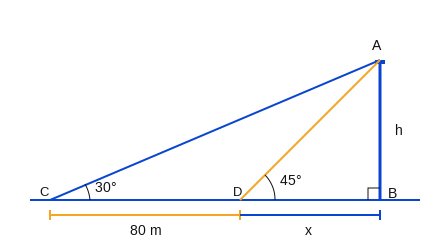
If the angle of elevation of the sun changes from 30° to 45°, the length of the shadow of a pillar decreases by 80 m. The height of the pillar is:
यदि सूर्य का उन्नयन कोण 30° से 45° हो जाता है, तो एक स्तंभ की छाया की लंबाई 80 m कम हो जाती है। स्तंभ की ऊँचाई है:
  1. A40(3+1)cm
  2. B30(3+1)cm
  3. C10(6+1)cm
  4. D20(3+1)cm
Show answer

Concept: Shadow length =htanθ; a higher sun gives a shorter shadow.

  1. At 30∘: shadow =hcot30∘=3h; at 45∘: shadow =hcot45∘=h.
  2. Difference: 3h−h=80 ⇒ h(3−1)=80.
  3. h=803−1=80(3+1)3−1=40(3+1) (units as given in the options).

Trick: For 30∘→45∘, h=decrease3−1=decrease(3+1)2 – rationalise directly.

Answer: (A) 40(3+1)

अवधारणा: छाया की लंबाई =htanθ; सूर्य ऊँचा होने पर छाया छोटी होती है।

  1. 30∘ पर: छाया =hcot30∘=3h; 45∘ पर: छाया =hcot45∘=h।
  2. अंतर: 3h−h=80 ⇒ h(3−1)=80।
  3. h=803−1=80(3+1)3−1=40(3+1) (इकाई विकल्पों के अनुसार)।

ट्रिक: 30∘→45∘ के लिए h=कमी3−1=कमी(3+1)2 – सीधे परिमेय करें।

उत्तर: (A) 40(3+1)

RRB Technician Grade I (Signal)MathematicsHeights and distancesRRB Technician Grade I (Signal) 2024 · 19 Dec Shift 3 →
Q17175.
The value of the discriminant of the quadratic equation 7x2 - 18x - 11 = 0 is:
द्विघात समीकरण 7x2 - 18x - 11 = 0 के विविक्तकर (discriminant) का मान है:
  1. A619
  2. B638
  3. C632
  4. D616
Show answer

Concept: For ax2+bx+c=0, discriminant D=b2−4ac.

  1. Here a=7, b=−18, c=−11.
  2. D=(−18)2−4(7)(−11)=324+308=632.

Trick: When c is negative, −4ac becomes positive – add, don't subtract. D>0 ⇒ two real distinct roots.

Answer: (C) 632

अवधारणा: ax2+bx+c=0 के लिए विविक्तकर (discriminant) D=b2−4ac।

  1. यहाँ a=7, b=−18, c=−11।
  2. D=(−18)2−4(7)(−11)=324+308=632।

ट्रिक: जब c ऋणात्मक हो, −4ac धनात्मक बन जाता है – जोड़ें, घटाएँ नहीं। D>0 ⇒ दो वास्तविक भिन्न मूल।

उत्तर: (C) 632

RRB Technician Grade I (Signal)MathematicsDiscriminant of a quadraticRRB Technician Grade I (Signal) 2024 · 19 Dec Shift 3 →
Q17176.
The distance between the points (0, 3) and (–3, 0) is :
बिंदुओं (0, 3) और (–3, 0) के बीच की दूरी है:
  1. A3 units3 इकाई
  2. B32 units32 इकाई
  3. C6 units6 इकाई
  4. D23 units23 इकाई
Show answer

Concept: Distance between (x1,y1) and (x2,y2) is (x2−x1)2+(y2−y1)2.

  1. d=(−3−0)2+(0−3)2=9+9.
  2. =18=32 units.

Trick: The points are the ends of the legs of a right isosceles triangle with legs 3 and 3, so the hypotenuse is 32.

Answer: (B) 32 units

अवधारणा: (x1,y1) और (x2,y2) के बीच दूरी =(x2−x1)2+(y2−y1)2।

  1. d=(−3−0)2+(0−3)2=9+9।
  2. =18=32 इकाई।

ट्रिक: ये बिंदु 3 और 3 भुजाओं वाले समकोण समद्विबाहु त्रिभुज के सिरे हैं, अतः कर्ण 32।

उत्तर: (B) 32 इकाई

RRB Technician Grade I (Signal)MathematicsDistance formulaRRB Technician Grade I (Signal) 2024 · 19 Dec Shift 3 →
Q17177.
The first and last terms of an A.P. are 36 and 46. If the sum of its terms is 574, then the number of terms will be?
एक समांतर श्रेढ़ी (A.P.) के प्रथम और अंतिम पद 36 और 46 हैं। यदि इसके पदों का योग 574 है, तो पदों की संख्या क्या होगी?
  1. A17
  2. B14
  3. C15
  4. D16
Show answer

Concept: When first term a and last term l are known, Sn=n2(a+l).

  1. 574=n2(36+46)=n2×82=41n.
  2. n=57441=14.

Trick: Number of terms = Sum ÷ (average of first and last term) = 574÷41=14.

Answer: (B) 14

अवधारणा: जब पहला पद a और अंतिम पद l ज्ञात हों, Sn=n2(a+l)।

  1. 574=n2(36+46)=n2×82=41n।
  2. n=57441=14।

ट्रिक: पदों की संख्या = योग ÷ (पहले और अंतिम पद का औसत) = 574÷41=14।

उत्तर: (B) 14

RRB Technician Grade I (Signal)MathematicsArithmetic progression – sumRRB Technician Grade I (Signal) 2024 · 19 Dec Shift 3 →
Q17178.
A coin is thrown eight times. The probability of getting exactly five tails is:
एक सिक्के को आठ बार उछाला जाता है। ठीक पाँच बार पट (tails) आने की प्रायिकता है:
  1. A0.22
  2. B0.11
  3. C0.78
  4. D0.28
Show answer

Concept: For n independent tosses, P(exactly r tails)=(nr)(12)n.

  1. n=8, r=5: (85)=(83)=8×7×66=56.
  2. Total outcomes =28=256.
  3. P=56256=0.21875≈0.22.

Trick: (85)=(83) – always use the smaller index to compute faster.

Answer: (A) 0.22

अवधारणा: n स्वतंत्र उछालों के लिए P(ठीक r टेल)=(nr)(12)n।

  1. n=8, r=5: (85)=(83)=8×7×66=56।
  2. कुल परिणाम =28=256।
  3. P=56256=0.21875≈0.22।

ट्रिक: (85)=(83) – तेज़ गणना के लिए हमेशा छोटा सूचकांक लें।

उत्तर: (A) 0.22

RRB Technician Grade I (Signal)MathematicsBinomial probabilityRRB Technician Grade I (Signal) 2024 · 19 Dec Shift 3 →
Q17179.
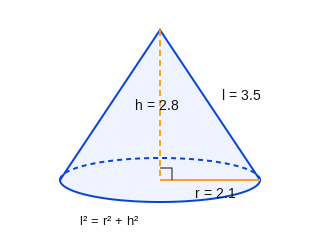
The radius of a right circular cone is 2.1 cm and its height is 2.8 cm. The total surface area of the cone is: (Take π = 22/7)
एक लंब वृत्तीय शंकु की त्रिज्या 2.1 cm और उसकी ऊँचाई 2.8 cm है। शंकु का कुल पृष्ठीय क्षेत्रफल है: (π = 22/7 लीजिए)
  1. A23.1 cm2
  2. B46.2 cm2
  3. C18.48 cm2
  4. D36.96 cm2
Show answer

Concept: Total surface area of a cone =πr(l+r), where slant height l=r2+h2.

  1. l=2.12+2.82=4.41+7.84=12.25=3.5cm.
  2. TSA=227×2.1×(3.5+2.1)=6.6×5.6=36.96cm2.

Trick: 2.1, 2.8, 3.5 is the 3-4-5 triplet × 0.7 – spot it to get l instantly. Only CSA would be πrl=23.1.

Answer: (D) 36.96 cm2

अवधारणा: शंकु का कुल पृष्ठीय क्षेत्रफल =πr(l+r), जहाँ तिर्यक ऊँचाई l=r2+h2।

  1. l=2.12+2.82=4.41+7.84=12.25=3.5cm।
  2. TSA=227×2.1×(3.5+2.1)=6.6×5.6=36.96cm2।

ट्रिक: 2.1, 2.8, 3.5 = 3-4-5 त्रिक × 0.7 – इसे पहचानकर l तुरंत मिल जाता है। केवल CSA होता πrl=23.1।

उत्तर: (D) 36.96 cm2

RRB Technician Grade I (Signal)MathematicsMensuration – coneRRB Technician Grade I (Signal) 2024 · 19 Dec Shift 3 →
Q17180.
If X= { a, b, c, d } and Y = { f, b, d, g}, find X ∩ Y.
यदि X= { a, b, c, d } और Y = { f, b, d, g} है, तो X ∩ Y ज्ञात कीजिए।
  1. A{ a, c}
  2. B{ g, f }
  3. C{ a, b, c, d, g, f }
  4. D{ b, d }
Show answer

Concept: X∩Y (intersection) contains only the elements common to both sets.

  1. X={a,b,c,d}, Y={f,b,d,g}.
  2. Elements present in both: b and d ⇒ X∩Y={b,d}.
  3. {a,b,c,d,g,f} would be the union X∪Y.

Trick: ∩ looks like a cap – "common" elements only; ∪ looks like a cup – "collect everything" (union).

Answer: (D) { b, d }

अवधारणा: X∩Y (सर्वनिष्ठ) में केवल वे अवयव होते हैं जो दोनों समुच्चयों में हों।

  1. X={a,b,c,d}, Y={f,b,d,g}।
  2. दोनों में उपस्थित अवयव: b और d ⇒ X∩Y={b,d}।
  3. {a,b,c,d,g,f} सम्मिलन X∪Y होगा।

ट्रिक: ∩ टोपी जैसा – केवल "common" अवयव; ∪ कप जैसा – "सब इकट्ठा" (सम्मिलन)।

उत्तर: (D) { b, d }

RRB Technician Grade I (Signal)MathematicsSets – intersectionRRB Technician Grade I (Signal) 2024 · 19 Dec Shift 3 →