Question bank

Q&A: practice questions with answers

Search questions on any topic. Filter by exam category, exam, subject and topic, try the question, then open the answer and explanation.

Courses – airGurukul

20,719 questions found.

Q17241.
​Read the given statements and conclusions carefully. You have to take the given statements to be true even if they seem to be at variance from commonly known facts. You have to decide which conclusion/s logically follow/s from the given statements. Statements:
All parks are grounds.
Some grounds are museums.
No museum is a theatre.
Conclusions:
(I) All museums are parks.
(II) No ground is a theatre.
​दिए गए कथनों और निष्कर्षों को ध्यानपूर्वक पढ़िए। आपको दिए गए कथनों को सत्य मानना है, भले ही वे सामान्यतः ज्ञात तथ्यों से भिन्न प्रतीत होते हों। आपको यह निर्णय लेना है कि दिए गए कथनों से कौन-सा/कौन-से निष्कर्ष तार्किक रूप से अनुसरण करता है/करते हैं। कथन:
सभी पार्क, मैदान हैं।
कुछ मैदान, संग्रहालय हैं।
कोई संग्रहालय, थिएटर नहीं है।
निष्कर्ष:
(I) सभी संग्रहालय, पार्क हैं।
(II) कोई मैदान, थिएटर नहीं है।
  1. AOnly conclusion I follows.केवल निष्कर्ष I अनुसरण करता है।
  2. BNeither conclusion I nor II follows.न तो निष्कर्ष I और न ही II अनुसरण करता है।
  3. COnly conclusion II follows.केवल निष्कर्ष II अनुसरण करता है।
  4. DBoth conclusions I and II follow.निष्कर्ष I और II दोनों अनुसरण करते हैं।
Show answer

Concept: Draw the Venn diagram of the statements and accept a conclusion only if it is true in every possible diagram.
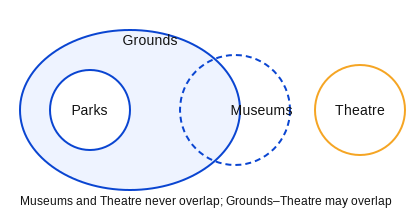
  1. "All parks are grounds" – parks circle lies inside grounds. "Some grounds are museums" – museums overlaps grounds. "No museum is a theatre" – museums and theatre are separate.
  2. Conclusion I "All museums are parks": museums only partly overlap grounds and need not touch parks at all → does not follow.
  3. Conclusion II "No ground is a theatre": only museums are separated from theatre; the part of grounds that is not museum can still overlap theatre → does not follow.

Trick: "Some A are B" + "No B is C" gives only "Some A are not C" – never "No A is C".

Answer: (B) Neither conclusion I nor II follows.

अवधारणा: कथनों का वेन आरेख बनाएँ और निष्कर्ष तभी स्वीकारें जब वह हर संभव आरेख में सत्य हो।

  1. "सभी पार्क ग्राउंड हैं" – पार्क वृत्त ग्राउंड के अंदर। "कुछ ग्राउंड म्यूज़ियम हैं" – म्यूज़ियम ग्राउंड से आंशिक रूप से मिलता है। "कोई म्यूज़ियम थिएटर नहीं" – म्यूज़ियम और थिएटर अलग।
  2. निष्कर्ष I "सभी म्यूज़ियम पार्क हैं": म्यूज़ियम ग्राउंड से केवल आंशिक मिलता है और पार्क को छूना भी ज़रूरी नहीं → अनुसरण नहीं करता।
  3. निष्कर्ष II "कोई ग्राउंड थिएटर नहीं": केवल म्यूज़ियम थिएटर से अलग है; ग्राउंड का गैर-म्यूज़ियम भाग थिएटर से मिल सकता है → अनुसरण नहीं करता।

ट्रिक: "कुछ A, B हैं" + "कोई B, C नहीं" से केवल "कुछ A, C नहीं हैं" निकलता है – कभी "कोई A, C नहीं" नहीं।

उत्तर: (B) न तो निष्कर्ष I न II अनुसरण करता है।
RRB Technician Grade I (Signal)General Intelligence and ReasoningSyllogismRRB Technician Grade I (Signal) 2024 · 19 Dec Shift 2 →
Q17242.
In this question, a question is followed by two statements numbered (I) and (II). You have to decide whether the data provided in the statements are sufficient to answer the question. Read both the statements and decide the appropriate answer.
Question: Five people V, W, X, Y and Z are sitting in a straight row, facing north. Who sits to the immediate left of Z?
Statement (I): Both V and X are immediate neighbours of Y. V sits at one of the extreme ends of the row.
Statement (II): Z sits to the immediate left of W. W sits at one of the extreme ends of the row.
इस प्रश्न में, एक प्रश्न के बाद (I) और (II) क्रमांकित दो कथन दिए गए हैं। आपको यह निर्णय लेना है कि कथनों में दिए गए आँकड़े प्रश्न का उत्तर देने के लिए पर्याप्त हैं या नहीं। दोनों कथनों को पढ़िए और उपयुक्त उत्तर का चयन कीजिए।
प्रश्न: पाँच व्यक्ति V, W, X, Y और Z एक सीधी पंक्ति में उत्तर की ओर मुख करके बैठे हैं। Z के ठीक बाईं ओर कौन बैठा है?
कथन (I): V और X दोनों Y के निकटतम पड़ोसी हैं। V पंक्ति के किसी एक अंतिम छोर पर बैठा है।
कथन (II): Z, W के ठीक बाईं ओर बैठा है। W पंक्ति के किसी एक अंतिम छोर पर बैठा है।
  1. AData in either statement I alone or statement II alone are sufficient to answer the question.या तो कथन I अकेले या कथन II अकेले के आँकड़े प्रश्न का उत्तर देने के लिए पर्याप्त हैं।
  2. BData in statement II alone is sufficient to answer the question while data in statement I is not.कथन II अकेले के आँकड़े प्रश्न का उत्तर देने के लिए पर्याप्त हैं, जबकि कथन I के आँकड़े पर्याप्त नहीं हैं।
  3. CData in statements I and II together are sufficient to answer the question.कथन I और II दोनों के आँकड़े मिलाकर प्रश्न का उत्तर देने के लिए पर्याप्त हैं।
  4. DData in statement I alone is sufficient to answer the question while data in statement II is not.कथन I अकेले के आँकड़े प्रश्न का उत्तर देने के लिए पर्याप्त हैं, जबकि कथन II के आँकड़े पर्याप्त नहीं हैं।
Show answer

Concept: Test each statement alone, then together; the question is "answerable" only when the arrangement fixes the required person uniquely.

  1. Statement I alone: V at an end with Y, X next → V Y X _ _ (or mirror). Positions of Z and W are not fixed → not sufficient.
  2. Statement II alone: W at an end and Z immediately left of W → W at the right end, Z at 4th place. The 3rd place could be V, X or Y → not sufficient.
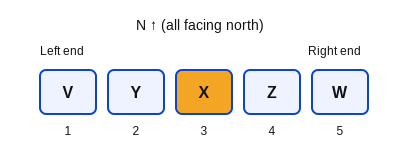
  3. Together: Places 4, 5 = Z, W, so V Y X occupy 1–3: V Y X Z W. Immediate left of Z is X → answer found.

Trick: "Immediate left" of someone facing north = the position with the smaller number from the left end.

Answer: (C) Data in statements I and II together are sufficient to answer the question.

अवधारणा: प्रत्येक कथन को अकेले, फिर दोनों को मिलाकर जाँचें; प्रश्न तभी "हल" माना जाएगा जब व्यवस्था पूछे गए व्यक्ति को अद्वितीय रूप से तय करे।

  1. कथन I अकेले: V एक छोर पर, Y और X उसके बाद → V Y X _ _ (या दर्पण)। Z और W के स्थान तय नहीं → पर्याप्त नहीं।
  2. कथन II अकेले: W एक छोर पर और Z उसके ठीक बाएँ → W दाएँ छोर पर, Z चौथे स्थान पर। तीसरा स्थान V, X या Y हो सकता है → पर्याप्त नहीं।
  3. दोनों मिलाकर: स्थान 4, 5 = Z, W, अतः V Y X स्थान 1–3 पर: V Y X Z W। Z के ठीक बाएँ X → उत्तर मिल गया।

ट्रिक: उत्तर की ओर मुख वाले व्यक्ति का "ठीक बायाँ" = बाएँ छोर से छोटी संख्या वाला स्थान।

उत्तर: (C) कथन I और II मिलकर प्रश्न का उत्तर देने के लिए पर्याप्त हैं।

RRB Technician Grade I (Signal)General Intelligence and ReasoningData Sufficiency – seating arrangementRRB Technician Grade I (Signal) 2024 · 19 Dec Shift 2 →
Q17243.
A statement is given followed by two arguments. Decide which of the arguments is/are strong with respect to the statement.
Statement:
The Government of country B has urged its citizens to invest in rain water harvesting and avail subsidies in doing so.
Arguments:
I. Ground water resources have been continuously depleting in country B.
II. Country B experiences heavy rainfall during the monsoon season leading to flooding in many low-lying areas.
एक कथन के बाद दो तर्क दिए गए हैं। निर्णय कीजिए कि कथन के संबंध में कौन-सा/कौन-से तर्क प्रबल है/हैं।
कथन:
देश B की सरकार ने अपने नागरिकों से वर्षा जल संचयन में निवेश करने और ऐसा करने में सब्सिडी का लाभ उठाने का आग्रह किया है।
तर्क:
I. देश B में भूजल संसाधन निरंतर घटते जा रहे हैं।
II. देश B में मानसून के मौसम में भारी वर्षा होती है, जिससे कई निचले क्षेत्रों में बाढ़ आ जाती है।
  1. ABoth I and II weaken the statement.I और II दोनों कथन को कमज़ोर करते हैं।
  2. BBoth I and II strengthen the statement.I और II दोनों कथन को मज़बूत करते हैं।
  3. CII weakens while I strengthens the statement.II कथन को कमज़ोर करता है जबकि I कथन को मज़बूत करता है।
  4. DI weakens while II strengthens the statement.I कथन को कमज़ोर करता है जबकि II कथन को मज़बूत करता है।
Show answer

Concept: An argument strengthens a statement if it gives a sound reason that supports the action recommended in it.

  1. Statement: the government urges citizens to invest in rainwater harvesting (with subsidies).
  2. Argument I: ground water is depleting → harvested rainwater recharges ground water and reduces dependence on it → strong reason to harvest → strengthens.
  3. Argument II: heavy monsoon rain causes flooding → plenty of rainwater is available to collect, and capturing it reduces run-off and flooding → also supports harvesting → strengthens.

Trick: Ask "does this fact make the recommended action more sensible?" Both facts (scarcity below, abundance above) say yes.

Answer: (B) Both I and II strengthen the statement.

अवधारणा: कोई तर्क कथन को मज़बूत करता है यदि वह कथन में सुझाए गए कार्य के पक्ष में ठोस कारण दे।

  1. कथन: सरकार नागरिकों से वर्षा जल संचयन में निवेश (सब्सिडी के साथ) का आग्रह करती है।
  2. तर्क I: भूजल घट रहा है → संचित वर्षा जल भूजल को पुनर्भरित करता है और उस पर निर्भरता घटाता है → संचयन का ठोस कारण → मज़बूत करता है।
  3. तर्क II: मानसून की भारी वर्षा से बाढ़ आती है → एकत्र करने के लिए प्रचुर वर्षा जल उपलब्ध है, और उसे रोकने से बहाव व बाढ़ घटती है → यह भी संचयन का समर्थन करता है → मज़बूत करता है।

ट्रिक: पूछें "क्या यह तथ्य सुझाए गए कार्य को अधिक उचित बनाता है?" दोनों तथ्य (नीचे कमी, ऊपर प्रचुरता) हाँ कहते हैं।

उत्तर: (B) I और II दोनों कथन को मज़बूत करते हैं।

RRB Technician Grade I (Signal)General Intelligence and ReasoningStatement and ArgumentsRRB Technician Grade I (Signal) 2024 · 19 Dec Shift 2 →
Q17244.
Refer to the following letter, number and symbol series and answer the question that follows.
(Left) + 2 $ Q = Y L A S S X L / % 9 T \ = X H 6 ? (Right)
How many such numbers are there that are immediately preceded by a symbol and immediately followed by a letter?
निम्नलिखित अक्षर, संख्या और प्रतीक श्रेणी को देखिए और उसके बाद दिए गए प्रश्न का उत्तर दीजिए।
(बाएँ) + 2 $ Q = Y L A S S X L / % 9 T \ = X H 6 ? (दाएँ)
ऐसी कितनी संख्याएँ हैं जिनके ठीक पहले एक प्रतीक है और ठीक बाद एक अक्षर है?
  1. AThreeतीन
  2. BOneएक
  3. CTwoदो
  4. DFourचार
Show answer

Concept: Locate every number in the series and check its left neighbour (must be a symbol) and right neighbour (must be a letter).

  1. Series: + 2 $ Q = Y L A S S X L / % 9 T \ = X H 6 ?
  2. 2: left "+", right "$" (symbol) → fails the "followed by a letter" condition.
  3. 9: left "%" (symbol), right "T" (letter) → ✓.
  4. 6: left "H" (letter) → fails. So only one such number.

Trick: Mark the numbers first (here 2, 9, 6), then check neighbours – it takes seconds.

Answer: (B) One

अवधारणा: श्रृंखला में हर अंक खोजें और उसका बायाँ पड़ोसी (प्रतीक होना चाहिए) व दायाँ पड़ोसी (अक्षर होना चाहिए) जाँचें।

  1. श्रृंखला: + 2 $ Q = Y L A S S X L / % 9 T \ = X H 6 ?
  2. 2: बाएँ "+", दाएँ "$" (प्रतीक) → "अक्षर के बाद" शर्त विफल।
  3. 9: बाएँ "%" (प्रतीक), दाएँ "T" (अक्षर) → ✓।
  4. 6: बाएँ "H" (अक्षर) → विफल। अतः ऐसा केवल एक अंक।

ट्रिक: पहले अंकों को चिह्नित करें (यहाँ 2, 9, 6), फिर पड़ोसी जाँचें – कुछ सेकंड का काम।

उत्तर: (B) एक (One)

RRB Technician Grade I (Signal)General Intelligence and ReasoningAlpha-numeric-symbol seriesRRB Technician Grade I (Signal) 2024 · 19 Dec Shift 2 →
Q17245.
D, E, F, G, H, I, and J, each has an exam on a different day of a week starting from Monday and ending on Sunday of the same week.
E has the exam on Friday. Only one person has the exam between E and D. J has the exam on the day immediately after E. H has the exam on the day immediately after D. Only two people have exams between H and G. F has the exam on the day immediately before D. I does not have the exam on Monday.
How many people have exams between J and F?
D, E, F, G, H, I और J में से प्रत्येक की परीक्षा एक ही सप्ताह के सोमवार से रविवार तक, सप्ताह के अलग-अलग दिन है।
E की परीक्षा शुक्रवार को है। E और D के बीच केवल एक व्यक्ति की परीक्षा है। J की परीक्षा E के ठीक अगले दिन है। H की परीक्षा D के ठीक अगले दिन है। H और G के बीच केवल दो व्यक्तियों की परीक्षा है। F की परीक्षा D के ठीक पहले वाले दिन है। I की परीक्षा सोमवार को नहीं है।
J और F के बीच कितने व्यक्तियों की परीक्षा है?
  1. AFiveपाँच
  2. BFourचार
  3. CThreeतीन
  4. DTwoदो
Show answer

Concept: Start from the fixed clue, place the people with "immediately before/after" clues, then use the counting clues.

  1. E = Friday; J immediately after E → J = Saturday.
  2. Exactly one person between E and D → D = Wednesday or Sunday. H is immediately after D, so D cannot be Sunday → D = Wednesday, H = Thursday.
  3. F immediately before D → F = Tuesday.
  4. Two people between H (Thu) and G → G = Monday or Sunday. I is not on Monday → I = Sunday, G = Monday.
  5. Order: G(Mon) F(Tue) D(Wed) H(Thu) E(Fri) J(Sat) I(Sun). Between J (Sat) and F (Tue): Wed, Thu, Fri → three people.

Trick: Draw the 7 boxes Mon–Sun and fill the definite clue (E = Fri) first; chains like F-D-H then drop in place.

Answer: (C) Three

अवधारणा: निश्चित सुराग से शुरू करें, "ठीक पहले/बाद" वाले लोगों को रखें, फिर गिनती वाले सुराग लगाएँ।

  1. E = शुक्रवार; J, E के ठीक बाद → J = शनिवार।
  2. E और D के बीच ठीक एक व्यक्ति → D = बुधवार या रविवार। H, D के ठीक बाद है, अतः D रविवार नहीं हो सकता → D = बुधवार, H = गुरुवार।
  3. F, D के ठीक पहले → F = मंगलवार।
  4. H (गुरु) और G के बीच दो व्यक्ति → G = सोमवार या रविवार। I सोमवार को नहीं → I = रविवार, G = सोमवार।

ट्रिक: सोम–रवि के 7 खाने बनाएँ और निश्चित सुराग (E = शुक्र) पहले भरें; F-D-H जैसी शृंखलाएँ अपने आप बैठ जाती हैं। क्रम: G F D H E J I → J (शनि) और F (मंगल) के बीच बुध, गुरु, शुक्र = तीन।

उत्तर: (C) तीन (Three)

RRB Technician Grade I (Signal)General Intelligence and ReasoningScheduling puzzle – days of the weekRRB Technician Grade I (Signal) 2024 · 19 Dec Shift 2 →
Q17246.
Which of the following terms will replace the question mark (?) in the given series to make it logically complete?
LQ13 MR20 NS27 OT34 ?
दी गई श्रेणी को तार्किक रूप से पूर्ण करने के लिए निम्नलिखित में से कौन-सा पद प्रश्नचिह्न (?) के स्थान पर आएगा?
LQ13 MR20 NS27 OT34 ?
  1. APV41
  2. BPV42
  3. CPU42
  4. DPU41
Show answer

Concept: Treat each part of the term separately – first letter, second letter and number.

  1. First letters: L, M, N, O → next P (+1 each).
  2. Second letters: Q, R, S, T → next U (+1 each).
  3. Numbers: 13, 20, 27, 34 → 34+7=41.
  4. Next term = PU41.

Trick: Options PV41/PV42 break the +1 letter pattern (T→U, not V) – eliminate them at once.

Answer: (D) PU41

अवधारणा: पद के हर भाग को अलग-अलग देखें – पहला अक्षर, दूसरा अक्षर और संख्या।

  1. पहले अक्षर: L, M, N, O → अगला P (हर बार +1)।
  2. दूसरे अक्षर: Q, R, S, T → अगला U (+1)।
  3. संख्याएँ: 13, 20, 27, 34 → 34+7=41।
  4. अगला पद = PU41।

ट्रिक: PV41/PV42 में +1 अक्षर पैटर्न टूटता है (T→U, V नहीं) – तुरंत हटाएँ।

उत्तर: (D) PU41

RRB Technician Grade I (Signal)General Intelligence and ReasoningAlphanumeric seriesRRB Technician Grade I (Signal) 2024 · 19 Dec Shift 2 →
Q17247.
கொடுக்கப்பட்டஅறிக்கைகள்மற்றும்முடிவுகளைகவனமாகபடித்து, கொடுக்கப்பட்டமுடிவுகளில்எதுஅறிக்கைகளைபின்பற்றுகிறது என்பதைமுடிவுசெய்யுங்கள்.
அறிக்கைகள்:
'இன்றுஒருபிரகாசமானசூரியஒளிமிகுந்தநாள், எனவேகடற்கரையில் காலைஉணவைசாப்பிட்டுவிட்டுபின்னர்நீங்கள்அனைவரும்பார்க்க விரும்பியஅருங்காட்சியகத்திற்குச்செல்வோம்' - ஒருதந்தைதனது குழந்தைகளிடம்கூறினார்.
முடிவுகள்:
(i) அனைத்துகுடும்பசுற்றுலாக்களும்பிரகாசமானசூரியஒளிமிகுந்த நாட்களில்மட்டுமேதிட்டமிடப்படவேண்டும்.
(ii) அறிவியல்அருங்காட்சியகங்கள்குழந்தைகளின்கல்விக்குமிகவும் பயனளிப்பவைஅதேசமயம்வேடிக்கையானவையும்ஆகும்.
दिए गए कथन और निष्कर्षों को ध्यानपूर्वक पढ़िए और निर्णय कीजिए कि दिए गए निष्कर्षों में से कौन-सा कथन का अनुसरण करता है।
कथन:
'आज एक उजला, धूप वाला दिन है, इसलिए समुद्र तट पर नाश्ता करने के बाद हम उस संग्रहालय को देखने चलेंगे जिसे तुम सब देखना चाहते थे' - एक पिता ने अपने बच्चों से कहा।
निष्कर्ष:
(i) सभी पारिवारिक भ्रमण केवल उजले, धूप वाले दिनों में ही नियोजित किए जाने चाहिए।
(ii) विज्ञान संग्रहालय बच्चों की शिक्षा के लिए बहुत उपयोगी होने के साथ-साथ मनोरंजक भी होते हैं।
  1. Aமுடிவு (I) அல்லது (II) ஆகியஎதுவும்பின்பற்றவில்லைन तो निष्कर्ष (I) और न ही (II) अनुसरण करता है
  2. Bமுடிவு (II) மட்டும்பின்பற்றுகிறதுकेवल निष्कर्ष (II) अनुसरण करता है
  3. Cமுடிவு (I) மட்டும்பின்பற்றுகிறதுकेवल निष्कर्ष (I) अनुसरण करता है
  4. Dமுடிவுகள் (I) மற்றும் (II) இரண்டும்பின்பற்றுகின்றனनिष्कर्ष (I) और (II) दोनों अनुसरण करते हैं
Show answer

Concept: A conclusion follows only if it is a definite, logical consequence of the statement. (Statement: a father tells his children, 'Today is a bright sunny day, so let us have breakfast on the beach and then visit the museum you all wanted to see.' Conclusions: (i) all family outings should be planned only on bright sunny days; (ii) science museums are very useful for children's education and also fun.)

  1. Conclusion (i) generalises one outing to all outings and adds 'only' – not implied.
  2. Conclusion (ii) talks about science museums being educational and fun; the statement says nothing about education or the type of museum.
  3. Hence neither conclusion follows.

Trick: Words like 'all', 'only', 'always' in a conclusion are usually a sign that it does NOT follow.

Answer: (A) Neither conclusion (I) nor (II) follows

अवधारणा: निष्कर्ष तभी अनुसरण करता है जब वह कथन का निश्चित, तार्किक परिणाम हो। (कथन: एक पिता बच्चों से कहते हैं, 'आज धूप वाला सुंदर दिन है, इसलिए समुद्र तट पर नाश्ता करके फिर उस संग्रहालय चलेंगे जिसे तुम सब देखना चाहते थे।' निष्कर्ष: (i) सभी पारिवारिक सैर केवल धूप वाले दिनों में ही होनी चाहिए; (ii) विज्ञान संग्रहालय बच्चों की शिक्षा के लिए बहुत उपयोगी और मनोरंजक भी हैं।)

  1. निष्कर्ष (i) एक सैर को सभी सैरों पर लागू करता है और 'केवल' जोड़ता है – कथन से नहीं निकलता।
  2. निष्कर्ष (ii) विज्ञान संग्रहालय की शिक्षा और मनोरंजन की बात करता है; कथन में शिक्षा या संग्रहालय के प्रकार का कोई ज़िक्र नहीं।
  3. अतः कोई भी निष्कर्ष अनुसरण नहीं करता।

ट्रिक: निष्कर्ष में 'सभी', 'केवल', 'हमेशा' जैसे शब्द प्रायः संकेत हैं कि वह अनुसरण नहीं करता।

उत्तर: (A) न निष्कर्ष (I) न (II) अनुसरण करता है

RRB Technician Grade I (Signal)General Intelligence and ReasoningStatement and conclusionsRRB Technician Grade I (Signal) 2024 · 19 Dec Shift 2 →
Q17248.
Based on the English alphabetical order, three of the following four letter-cluster pairs are alike in a certain way and thus form a group. Which pair DOES NOT belong to that group?
(Note: The odd one out is not based on the number of consonants/vowels or their position in the letter-cluster pair.)
अंग्रेज़ी वर्णमाला क्रम के आधार पर, निम्नलिखित चार अक्षर-समूह युग्मों में से तीन एक निश्चित प्रकार से समान हैं और इस प्रकार एक समूह बनाते हैं। कौन-सा युग्म उस समूह से संबंधित नहीं है?
(नोट: असंगत युग्म व्यंजनों/स्वरों की संख्या या अक्षर-समूह युग्म में उनकी स्थिति पर आधारित नहीं है।)
  1. AOH-MT
  2. BSL-RX
  3. CRK-QW
  4. DLE-KQ
Show answer

Concept: Compare the position shift of each letter in the pair.

  1. SL-RX: S→R (−1), L→X (+12).
  2. RK-QW: R→Q (−1), K→W (+12).
  3. LE-KQ: L→K (−1), E→Q (+12).
  4. OH-MT: O→M (−2), H→T (+12) – the first shift is −2 instead of −1, so it is the odd one.

Trick: Check the first letters only: S→R, R→Q, L→K are all previous letters; O→M skips one.

Answer: (A) OH-MT

अवधारणा: जोड़े के हर अक्षर के स्थान-परिवर्तन की तुलना करें।

  1. SL-RX: S→R (−1), L→X (+12)।
  2. RK-QW: R→Q (−1), K→W (+12)।
  3. LE-KQ: L→K (−1), E→Q (+12)।
  4. OH-MT: O→M (−2), H→T (+12) – पहला परिवर्तन −1 की जगह −2 है, अतः यह विषम है।

ट्रिक: केवल पहले अक्षर देखें: S→R, R→Q, L→K सब ठीक पिछला अक्षर; O→M एक छोड़ता है।

उत्तर: (A) OH-MT

RRB Technician Grade I (Signal)General Intelligence and ReasoningLetter-cluster odd one outRRB Technician Grade I (Signal) 2024 · 19 Dec Shift 2 →
Q17249.
In the following triad, each group of letters is related to the subsequent one following a certain logic. Select from the given options, the one that follows the same logic. LIVE - IVLE - EVIL
REST - ESRT - TSER
निम्नलिखित त्रिक में, अक्षरों का प्रत्येक समूह एक निश्चित तर्क के अनुसार अपने अगले समूह से संबंधित है। दिए गए विकल्पों में से उस विकल्प का चयन कीजिए जो उसी तर्क का अनुसरण करता है। LIVE - IVLE - EVIL
REST - ESRT - TSER
  1. AWIND - INWD - INDW
  2. BWEST - WSET - TSEW
  3. CMUTE - UTME - ETUM
  4. DYORK - OYRK - KORY
Show answer

Concept: Find how the positions 1-2-3-4 of the first word are rearranged in the second and third words.

  1. LIVE → IVLE: positions 2,3,1,4 (first letter moves to third place). REST → ESRT: same, 2,3,1,4.
  2. LIVE → EVIL and REST → TSER: the third word is the first word reversed (4,3,2,1).
  3. MUTE → UTME (2,3,1,4 ✓) → ETUM (MUTE reversed ✓). Others fail: WIND→INWD ✓ but INDW is not DNIW; WEST→WSET ✗; YORK→OYRK ✗.

Trick: Check the third word first – it must be the exact reverse of the first; only C satisfies it.

Answer: (C) MUTE - UTME - ETUM

अवधारणा: देखें कि पहले शब्द के स्थान 1-2-3-4 दूसरे और तीसरे शब्द में कैसे बदलते हैं।

  1. LIVE → IVLE: स्थान 2,3,1,4 (पहला अक्षर तीसरे स्थान पर)। REST → ESRT: वही, 2,3,1,4।
  2. LIVE → EVIL और REST → TSER: तीसरा शब्द पहले शब्द का उल्टा है (4,3,2,1)।
  3. MUTE → UTME (2,3,1,4 ✓) → ETUM (MUTE का उल्टा ✓)। बाकी असफल: WIND→INWD ✓ पर INDW, DNIW नहीं; WEST→WSET ✗; YORK→OYRK ✗।

ट्रिक: पहले तीसरा शब्द जाँचें – वह पहले शब्द का ठीक उल्टा होना चाहिए; केवल C में ऐसा है।

उत्तर: (C) MUTE - UTME - ETUM

RRB Technician Grade I (Signal)General Intelligence and ReasoningLetter rearrangement analogyRRB Technician Grade I (Signal) 2024 · 19 Dec Shift 2 →
Q17250.
The full form of DDR SDRAM is ______________.
DDR SDRAM का पूर्ण रूप ______________ है।
  1. ADouble Data Rate Systematic Dynamic Random Access Memory
  2. BDynamic Data Rate Systematic Dynamic Random Access Memory
  3. CDouble Data Rate Synchronous Dynamic Random Access Memory
  4. DData Dynamic Rate Synchronous Dynamic Random Access Memory
Show answer

Concept: Full forms of memory technologies.

  1. DDR SDRAM = Double Data Rate Synchronous Dynamic Random Access Memory.
  2. "Synchronous" means the memory works in step with the system clock; "Double Data Rate" means data is transferred on both the rising and falling edges of the clock, doubling the bandwidth of ordinary SDRAM.
  3. Options with "Systematic" or "Dynamic Data Rate" are not real terms.

Yaad rakhein: SDRAM = Synchronous DRAM; DDR = Double Data Rate (data on both clock edges). Versions: DDR, DDR2, DDR3, DDR4, DDR5.

Answer: (C) Double Data Rate Synchronous Dynamic Random Access Memory

अवधारणा: मेमोरी तकनीकों के पूर्ण रूप।

  1. DDR SDRAM = Double Data Rate Synchronous Dynamic Random Access Memory।
  2. "Synchronous" का अर्थ है मेमोरी सिस्टम क्लॉक के साथ तालमेल में काम करती है; "Double Data Rate" का अर्थ है क्लॉक के उठते और गिरते दोनों किनारों पर डेटा स्थानांतरण, जिससे सामान्य SDRAM से दुगुनी बैंडविड्थ मिलती है।
  3. "Systematic" या "Dynamic Data Rate" वाले विकल्प वास्तविक शब्द नहीं हैं।

याद रखें: SDRAM = Synchronous DRAM; DDR = Double Data Rate (दोनों क्लॉक किनारों पर डेटा)। संस्करण: DDR, DDR2, DDR3, DDR4, DDR5।

उत्तर: (C) Double Data Rate Synchronous Dynamic Random Access Memory

RRB Technician Grade I (Signal)Basics of Computers and ApplicationComputer Memory – RAM typesRRB Technician Grade I (Signal) 2024 · 19 Dec Shift 2 →
Q17251.
Which of the following represents the applications used primarily for messaging and communication?
निम्नलिखित में से कौन-सा मुख्य रूप से संदेश भेजने और संचार के लिए उपयोग किए जाने वाले एप्लिकेशनों को दर्शाता है?
  1. AGmail and FirefoxGmail और Firefox
  2. BWhatsApp and TelegramWhatsApp और Telegram
  3. CSafari and MS WordSafari और MS Word
  4. DTelegram and SafariTelegram और Safari
Show answer

Concept: Classifying common applications by their purpose.

  1. WhatsApp and Telegram are instant-messaging apps used mainly for chat, voice/video calls and file sharing.
  2. Firefox, Chrome and Safari are web browsers; MS Word is a word processor; Gmail is e-mail (communication, but it is paired with a browser in option A).
  3. Only option B has two messaging apps together.

Yaad rakhein: Browsers – Chrome, Firefox, Safari, Edge; Messaging – WhatsApp, Telegram, Signal, Messenger.

Answer: (B) WhatsApp and Telegram

अवधारणा: सामान्य एप्लीकेशनों का उनके उपयोग के अनुसार वर्गीकरण।

  1. WhatsApp और Telegram इंस्टेंट मैसेजिंग ऐप हैं – चैट, वॉइस/वीडियो कॉल और फ़ाइल साझा करने के लिए।
  2. Firefox, Chrome, Safari वेब ब्राउज़र हैं; MS Word वर्ड प्रोसेसर है; Gmail ई-मेल है (संचार, पर विकल्प A में ब्राउज़र के साथ जोड़ा गया है)।
  3. केवल विकल्प B में दोनों मैसेजिंग ऐप हैं।

याद रखें: ब्राउज़र – Chrome, Firefox, Safari, Edge; मैसेजिंग – WhatsApp, Telegram, Signal, Messenger।

उत्तर: (B) WhatsApp और Telegram

RRB Technician Grade I (Signal)Basics of Computers and ApplicationSoftware – messaging applicationsRRB Technician Grade I (Signal) 2024 · 19 Dec Shift 2 →
Q17252.
Which type of virus is designed to attach itself to documents and spread through macros in programs like Microsoft Word or Excel?
किस प्रकार का वायरस दस्तावेज़ों से स्वयं को जोड़ने और Microsoft Word या Excel जैसे प्रोग्रामों में मैक्रो (macros) के माध्यम से फैलने के लिए बनाया गया है?
  1. APolymorphic Virusपॉलीमॉर्फिक वायरस (Polymorphic Virus)
  2. BNetwork Virusनेटवर्क वायरस (Network Virus)
  3. CResident Virusरेज़िडेंट वायरस (Resident Virus)
  4. DMacro Virusमैक्रो वायरस (Macro Virus)
Show answer

Concept: Viruses are classified by how they infect and spread.

  1. A macro virus is written in the macro language of applications such as MS Word or Excel; it hides inside documents/spreadsheets and runs when the file is opened (e.g. Melissa virus).
  2. Polymorphic virus – changes its code to avoid detection; Resident virus – stays in RAM; Network virus – spreads through network connections.

Yaad rakhein: "Macro" = document automation in Office → Macro virus = spreads through Word/Excel documents.

Answer: (D) Macro Virus

अवधारणा: वायरसों का वर्गीकरण उनके संक्रमण और फैलने के तरीके से होता है।

  1. मैक्रो वायरस MS Word या Excel जैसे एप्लीकेशनों की मैक्रो भाषा में लिखा जाता है; यह दस्तावेज़/स्प्रेडशीट में छिपा रहता है और फ़ाइल खोलते ही चलता है (जैसे Melissa वायरस)।
  2. Polymorphic वायरस – पहचान से बचने के लिए कोड बदलता है; Resident वायरस – RAM में रहता है; Network वायरस – नेटवर्क कनेक्शन से फैलता है।

याद रखें: "Macro" = Office में दस्तावेज़ ऑटोमेशन → Macro वायरस = Word/Excel दस्तावेज़ों से फैलता है।

उत्तर: (D) Macro Virus

RRB Technician Grade I (Signal)Basics of Computers and ApplicationComputer Security – types of virusesRRB Technician Grade I (Signal) 2024 · 19 Dec Shift 2 →
Q17253.
Which of the following is NOT an example of application software?
निम्नलिखित में से कौन-सा एप्लिकेशन सॉफ़्टवेयर का उदाहरण नहीं है?
  1. AWindows Vista
  2. BGoogle Chrome
  3. CAdobe Photoshop
  4. DWhatsApp
Show answer

Concept: System software (operating systems, drivers, utilities) manages the hardware; application software performs user tasks.

  1. Windows Vista is an operating system released by Microsoft in 2007 → system software.
  2. Google Chrome (browser), Adobe Photoshop (image editing) and WhatsApp (messaging) are all application software.

Yaad rakhein: Anything named Windows/Linux/macOS/Android = OS = system software, not an application.

Answer: (A) Windows Vista

अवधारणा: सिस्टम सॉफ्टवेयर (ऑपरेटिंग सिस्टम, ड्राइवर, यूटिलिटी) हार्डवेयर का प्रबंधन करता है; एप्लीकेशन सॉफ्टवेयर उपयोगकर्ता के काम करता है।

  1. Windows Vista Microsoft का 2007 में जारी ऑपरेटिंग सिस्टम है → सिस्टम सॉफ्टवेयर।
  2. Google Chrome (ब्राउज़र), Adobe Photoshop (इमेज एडिटिंग) और WhatsApp (मैसेजिंग) सभी एप्लीकेशन सॉफ्टवेयर हैं।

याद रखें: Windows/Linux/macOS/Android नाम वाला कुछ भी = OS = सिस्टम सॉफ्टवेयर, एप्लीकेशन नहीं।

उत्तर: (A) Windows Vista

RRB Technician Grade I (Signal)Basics of Computers and ApplicationSystem software vs application softwareRRB Technician Grade I (Signal) 2024 · 19 Dec Shift 2 →
Q17254.
Which element is typically found at the bottom left of the desktop in the Windows OS?
Windows OS में डेस्कटॉप के निचले बाएँ भाग में सामान्यतः कौन-सा तत्व पाया जाता है?
  1. ANotification Centerनोटिफिकेशन सेंटर (Notification Center)
  2. BStart Menuस्टार्ट मेनू (Start Menu)
  3. CRecycle Binरीसायकल बिन (Recycle Bin)
  4. DQuick Access Toolbarक्विक एक्सेस टूलबार (Quick Access Toolbar)
Show answer

Concept: Layout of the Windows desktop.

  1. The Start Menu button sits at the bottom-left corner of the taskbar (Windows XP, 7, 8, 10); it opens the list of programs, settings and power options.
  2. Notification Center (Action Center) is at the bottom-right; Recycle Bin is usually at the top-left of the desktop; Quick Access Toolbar belongs to MS Office/File Explorer windows, not the desktop.
  3. In Windows 11 the Start button is centred by default, but can be moved back to the left.

Yaad rakhein: Bottom-left = Start, bottom-right = clock + notifications, top-left = Recycle Bin.

Answer: (B) Start Menu

अवधारणा: Windows डेस्कटॉप का लेआउट।

  1. Start Menu बटन टास्कबार के निचले-बाएँ कोने में होता है (Windows XP, 7, 8, 10); यह प्रोग्राम, सेटिंग्स और पावर विकल्पों की सूची खोलता है।
  2. Notification Center (Action Center) निचले-दाएँ में; Recycle Bin सामान्यतः डेस्कटॉप के ऊपरी-बाएँ में; Quick Access Toolbar MS Office/File Explorer विंडो का हिस्सा है, डेस्कटॉप का नहीं।
  3. Windows 11 में Start बटन डिफ़ॉल्ट रूप से बीच में है, पर इसे बाएँ किया जा सकता है।

याद रखें: निचला-बायाँ = Start, निचला-दायाँ = घड़ी + नोटिफिकेशन, ऊपरी-बायाँ = Recycle Bin।

उत्तर: (B) Start Menu

RRB Technician Grade I (Signal)Basics of Computers and ApplicationWindows OS – desktop elementsRRB Technician Grade I (Signal) 2024 · 19 Dec Shift 2 →
Q17255.
What does the 'This PC' icon on a Windows desktop represent?
Windows डेस्कटॉप पर 'This PC' आइकन क्या दर्शाता है?
  1. AAn application launcherएक एप्लिकेशन लॉन्चर
  2. BA file that stores system updatesएक फ़ाइल जो सिस्टम अपडेट संग्रहीत करती है
  3. CAccess to drives, files and system propertiesड्राइव, फ़ाइलों और सिस्टम प्रॉपर्टीज़ तक पहुँच
  4. DA shortcut to the Control Panelकंट्रोल पैनल (Control Panel) का एक शॉर्टकट
Show answer

Concept: Standard desktop icons in Windows and their functions.

  1. This PC (formerly "My Computer") opens File Explorer showing all storage drives (C:, D:, USB, DVD), network locations and folders such as Documents, Downloads, Pictures.
  2. Right-clicking This PC → Properties shows system information (Windows edition, processor, RAM, device name).
  3. It is not an application launcher (that is the Start menu), not an update store, and not a Control Panel shortcut.

Yaad rakhein: This PC = My Computer = window to drives, files and system properties.

Answer: (C) Access to drives, files and system properties

अवधारणा: Windows के मानक डेस्कटॉप आइकन और उनके कार्य।

  1. This PC (पहले "My Computer") File Explorer खोलता है जिसमें सभी स्टोरेज ड्राइव (C:, D:, USB, DVD), नेटवर्क स्थान और Documents, Downloads, Pictures जैसे फ़ोल्डर दिखते हैं।
  2. This PC पर राइट-क्लिक → Properties से सिस्टम जानकारी (Windows संस्करण, प्रोसेसर, RAM, डिवाइस नाम) दिखती है।
  3. यह एप्लीकेशन लॉन्चर नहीं (वह Start मेनू है), अपडेट फ़ाइल नहीं, और Control Panel का शॉर्टकट भी नहीं।

याद रखें: This PC = My Computer = ड्राइव, फ़ाइलों और सिस्टम प्रॉपर्टीज़ की खिड़की।

उत्तर: (C) ड्राइव, फ़ाइलों और सिस्टम प्रॉपर्टीज़ तक पहुँच

RRB Technician Grade I (Signal)Basics of Computers and ApplicationWindows – This PC iconRRB Technician Grade I (Signal) 2024 · 19 Dec Shift 2 →
Q17256.
Which view is primarily used to run a slide show in MS-PowerPoint?
MS-PowerPoint में स्लाइड शो चलाने के लिए मुख्य रूप से किस व्यू (view) का उपयोग किया जाता है?
  1. ANotes Page Viewनोट्स पेज व्यू (Notes Page View)
  2. BNormal Viewनॉर्मल व्यू (Normal View)
  3. CSlide Show Viewस्लाइड शो व्यू (Slide Show View)
  4. DSlide Sorter Viewस्लाइड सॉर्टर व्यू (Slide Sorter View)
Show answer

Concept: PowerPoint offers different views for different tasks.

  1. Slide Show view (F5 from the start, Shift+F5 from the current slide) displays slides full-screen one after another – this is the view used to present/run the show.
  2. Normal view – for editing slides; Slide Sorter view – thumbnails for reordering; Notes Page view – slide with speaker notes for printing.

Yaad rakhein: Edit → Normal; Arrange → Slide Sorter; Present → Slide Show (F5).

Answer: (C) Slide Show View

अवधारणा: PowerPoint में अलग-अलग कार्यों के लिए अलग-अलग व्यू होते हैं।

  1. Slide Show view (शुरू से F5, वर्तमान स्लाइड से Shift+F5) स्लाइडों को एक के बाद एक पूरी स्क्रीन पर दिखाता है – प्रस्तुति चलाने का यही व्यू है।
  2. Normal view – स्लाइड संपादन; Slide Sorter view – क्रम बदलने के लिए थंबनेल; Notes Page view – स्लाइड के साथ वक्ता नोट्स प्रिंट के लिए।

याद रखें: संपादन → Normal; क्रम → Slide Sorter; प्रस्तुति → Slide Show (F5)।

उत्तर: (C) Slide Show View

RRB Technician Grade I (Signal)Basics of Computers and ApplicationMS PowerPoint – viewsRRB Technician Grade I (Signal) 2024 · 19 Dec Shift 2 →
Q17257.
How do you sort data in Microsoft (MS) Excel in ascending or descending order?
Microsoft (MS) Excel में आप डेटा को आरोही या अवरोही क्रम में कैसे क्रमबद्ध (sort) करते हैं?
  1. ABy selecting 'Sort' from the Format menuFormat मेनू से 'Sort' चुनकर
  2. BBy selecting the data range, then choosing 'Sort' from the Data menu and specifying the sorting criteria and orderडेटा रेंज का चयन करके, फिर Data मेनू से 'Sort' चुनकर और क्रमबद्ध करने का मानदंड तथा क्रम निर्दिष्ट करके
  3. CBy right-clicking on the data and selecting 'Sort' from the context menuडेटा पर राइट-क्लिक करके कॉन्टेक्स्ट मेनू से 'Sort' चुनकर
  4. DBy clicking on the 'Sort' button in the toolbarटूलबार में 'Sort' बटन पर क्लिक करके
Show answer

Concept: Sorting in Excel is done through the Data tab.

  1. Select the data range → Data tab → Sort → choose the column (Sort by), Sort On (values) and Order (A to Z / Z to A, Smallest to Largest etc.) → OK. This is the complete, standard method and allows multi-level sorting.
  2. Quick buttons "Sort A→Z" / "Sort Z→A" also exist on the Data tab and in the Home → Editing → Sort & Filter menu, but the Format menu has no Sort command, and the right-click menu sorts only by a single column.
  3. Option B is the full procedure with criteria and order specified.

Yaad rakhein: Sort and Filter live on the Data tab (Data → Sort & Filter group).

Answer: (B) By selecting the data range, then choosing 'Sort' from the Data menu and specifying the sorting criteria and order

अवधारणा: Excel में सॉर्टिंग Data टैब से की जाती है।

  1. डेटा रेंज चुनें → Data टैब → Sort → कॉलम (Sort by), Sort On (values) और Order (A to Z / Z to A, Smallest to Largest आदि) चुनें → OK। यह पूर्ण, मानक विधि है और बहु-स्तरीय सॉर्टिंग भी देती है।
  2. "Sort A→Z" / "Sort Z→A" के त्वरित बटन भी Data टैब और Home → Editing → Sort & Filter में हैं, पर Format मेनू में Sort नहीं होता, और राइट-क्लिक मेनू केवल एक कॉलम से सॉर्ट करता है।
  3. विकल्प B मानदंड और क्रम सहित पूरी प्रक्रिया है।

याद रखें: Sort और Filter Data टैब में हैं (Data → Sort & Filter समूह)।

उत्तर: (B) डेटा रेंज चुनकर, Data मेनू से 'Sort' चुनकर और सॉर्टिंग मानदंड व क्रम निर्दिष्ट करके

RRB Technician Grade I (Signal)Basics of Computers and ApplicationMS Excel – sorting dataRRB Technician Grade I (Signal) 2024 · 19 Dec Shift 2 →
Q17258.
You can save your MS-PowerPoint presentation in the newest format _____, or as an MS-PowerPoint 97-2003 Presentation _____.
आप अपनी MS-PowerPoint प्रस्तुति को नवीनतम फ़ॉर्मेट _____ में, या MS-PowerPoint 97-2003 Presentation _____ के रूप में सहेज सकते हैं।
  1. A(.docx), (.doc)
  2. B(.pptx), (.ppt)
  3. C(.odp), (.ppt)
  4. D(.ppt), (.pptx)
Show answer

Concept: Every Office application has a modern XML-based format (extension ending in x) and an older 97-2003 binary format.

  1. PowerPoint 2007 onwards saves presentations as .pptx.
  2. The 'PowerPoint 97-2003 Presentation' option saves as .ppt.
  3. .docx/.doc belong to Word and .odp is the OpenDocument presentation format, not a PowerPoint native format.

Trick: Word → doc/docx, Excel → xls/xlsx, PowerPoint → ppt/pptx; the 'x' means the newer XML format.

Answer: (B) (.pptx), (.ppt)

अवधारणा: हर Office एप्लिकेशन का एक नया XML-आधारित फ़ॉर्मेट (x पर समाप्त) और एक पुराना 97-2003 फ़ॉर्मेट होता है।

  1. PowerPoint 2007 और बाद के संस्करण प्रेज़ेंटेशन को .pptx में सेव करते हैं।
  2. 'PowerPoint 97-2003 Presentation' विकल्प .ppt में सेव करता है।
  3. .docx/.doc Word के हैं और .odp OpenDocument प्रेज़ेंटेशन फ़ॉर्मेट है, PowerPoint का मूल फ़ॉर्मेट नहीं।

ट्रिक: Word → doc/docx, Excel → xls/xlsx, PowerPoint → ppt/pptx; 'x' का मतलब नया XML फ़ॉर्मेट।

उत्तर: (B) (.pptx), (.ppt)

RRB Technician Grade I (Signal)Basics of Computers and ApplicationMS PowerPoint file formatsRRB Technician Grade I (Signal) 2024 · 19 Dec Shift 2 →
Q17259.
How can you quickly change the case of selected text in MS Word?
MS Word में चयनित टेक्स्ट का केस (case) आप शीघ्रता से कैसे बदल सकते हैं?
  1. AUse the keyboard shortcut ‘Shift + F3’कीबोर्ड शॉर्टकट 'Shift + F3' का उपयोग करके
  2. BRight-click the selected text and choose ‘Font’चयनित टेक्स्ट पर राइट-क्लिक करके 'Font' चुनकर
  3. CChange it manually by typing the text againटेक्स्ट को दोबारा टाइप करके मैन्युअल रूप से बदलकर
  4. DGo to the ‘Home’ tab and click on ‘Change Case’'Home' टैब पर जाकर 'Change Case' पर क्लिक करके
Show answer

Concept: Shift + F3 cycles the selected text through lowercase → UPPERCASE → Capitalize Each Word.

  1. Pressing Shift + F3 repeatedly is the quickest way to change case.
  2. Home tab → Change Case (Aa) also works but needs more clicks; the question asks for the quick way.
  3. Right-click → Font opens formatting, not a direct case switch; retyping is the slowest.

Yaad rakhein: F3 with Shift = 'flip the case'.

Answer: (A) Use the keyboard shortcut 'Shift + F3'

अवधारणा: Shift + F3 चयनित टेक्स्ट को lowercase → UPPERCASE → Capitalize Each Word के बीच बदलता है।

  1. Shift + F3 बार-बार दबाना केस बदलने का सबसे तेज़ तरीका है।
  2. Home टैब → Change Case (Aa) भी काम करता है पर ज़्यादा क्लिक लगते हैं; प्रश्न quick तरीका पूछ रहा है।
  3. Right-click → Font से फ़ॉर्मेटिंग खुलती है, सीधा केस नहीं बदलता; दोबारा टाइप करना सबसे धीमा है।

याद रखें: Shift के साथ F3 = 'केस पलटो'।

उत्तर: (A) Use the keyboard shortcut 'Shift + F3'

RRB Technician Grade I (Signal)Basics of Computers and ApplicationMS Word shortcutsRRB Technician Grade I (Signal) 2024 · 19 Dec Shift 2 →
Q17260.
Which of the following is the standard method to print a web page using most modern web browsers?
अधिकांश आधुनिक वेब ब्राउज़रों का उपयोग करके वेब पेज प्रिंट करने की मानक विधि निम्नलिखित में से कौन-सी है?
  1. APressing Ctrl + P (Windows) or Cmd + P (Mac)Ctrl + P (Windows) या Cmd + P (Mac) दबाना
  2. BRight-clicking and selecting 'Save As'राइट-क्लिक करके 'Save As' चुनना
  3. CPressing F12F12 दबाना
  4. DPressing Ctrl + S (Windows) or Cmd + S (Mac)Ctrl + S (Windows) या Cmd + S (Mac) दबाना
Show answer

Concept: Ctrl + P (Windows) / Cmd + P (Mac) opens the Print dialog in almost every application, including Chrome, Edge and Firefox.

  1. Ctrl + P = Print; Ctrl + S = Save page; F12 = Developer tools.
  2. Right-click → 'Save As' stores the page as a file, it does not print.

Yaad rakhein: P for Print, S for Save.

Answer: (A) Pressing Ctrl + P (Windows) or Cmd + P (Mac)

अवधारणा: Ctrl + P (Windows) / Cmd + P (Mac) लगभग हर एप्लिकेशन में, Chrome, Edge, Firefox सहित, Print डायलॉग खोलता है।

  1. Ctrl + P = Print; Ctrl + S = पेज सेव; F12 = Developer tools।
  2. Right-click → 'Save As' पेज को फ़ाइल में सेव करता है, प्रिंट नहीं।

याद रखें: P = Print, S = Save।

उत्तर: (A) Pressing Ctrl + P (Windows) or Cmd + P (Mac)

RRB Technician Grade I (Signal)Basics of Computers and ApplicationBrowser shortcutsRRB Technician Grade I (Signal) 2024 · 19 Dec Shift 2 →