Question bank

Q&A: practice questions with answers

Search questions on any topic. Filter by exam category, exam, subject and topic, try the question, then open the answer and explanation.

Courses – airGurukul

20,719 questions found.

Q17261.
What does the 'IF' function do in MS-Excel?
MS-Excel में 'IF' फ़ंक्शन क्या करता है?
  1. AIt sorts the data.यह डेटा को क्रमबद्ध (sort) करता है।
  2. BIt sums up the data.यह डेटा का योग करता है।
  3. CIt checks a condition and returns one value if true and another if false.यह एक शर्त की जाँच करता है और शर्त सत्य होने पर एक मान तथा असत्य होने पर दूसरा मान लौटाता है।
  4. DIt filters the data.यह डेटा को फ़िल्टर करता है।
Show answer

Concept: IF is a logical function: =IF(condition, value_if_true, value_if_false).

  1. Example: =IF(A1>=40,"Pass","Fail") returns Pass when the condition is true, otherwise Fail.
  2. Sorting and filtering are Data-tab commands, and adding is done by SUM, not IF.

Yaad rakhein: IF = test → true result / false result.

Answer: (C) It checks a condition and returns one value if true and another if false.

अवधारणा: IF एक तार्किक (logical) फ़ंक्शन है: =IF(शर्त, सत्य होने पर मान, असत्य होने पर मान)।

  1. उदाहरण: =IF(A1>=40,"Pass","Fail") शर्त सत्य होने पर Pass, अन्यथा Fail देता है।
  2. Sort और Filter Data टैब के कमांड हैं, और जोड़ SUM से होता है, IF से नहीं।

याद रखें: IF = जाँच → सत्य परिणाम / असत्य परिणाम।

उत्तर: (C) It checks a condition and returns one value if true and another if false.
RRB Technician Grade I (Signal)Basics of Computers and ApplicationMS Excel functionsRRB Technician Grade I (Signal) 2024 · 19 Dec Shift 2 →
Q17262.
When printing a web page, what is the 'Margins' setting control?
वेब पेज प्रिंट करते समय 'Margins' सेटिंग क्या नियंत्रित करती है?
  1. AThe space between the content and the edges of the printed pageसामग्री और प्रिंट किए गए पृष्ठ के किनारों के बीच की जगह
  2. BThe number of pages the content will spanपृष्ठों की संख्या जिन पर सामग्री फैलेगी
  3. CThe color scheme of the web pageवेब पेज की रंग योजना
  4. DThe font size of the contentसामग्री का फ़ॉन्ट आकार
Show answer

Concept: In the browser's print dialog, 'Margins' sets the blank space between the printed content and the paper edges (Default, None, Minimum, Custom).

  1. Number of pages is shown separately as 'Pages/Sheets'; font size and colours are controlled by 'Scale' and 'Background graphics', not by Margins.

Yaad rakhein: Margin = border gap of the page.

Answer: (A) The space between the content and the edges of the printed page

अवधारणा: ब्राउज़र के प्रिंट डायलॉग में 'Margins' प्रिंट सामग्री और कागज़ के किनारों के बीच खाली जगह तय करता है (Default, None, Minimum, Custom)।

  1. पृष्ठों की संख्या अलग से 'Pages/Sheets' में दिखती है; फ़ॉन्ट आकार और रंग 'Scale' व 'Background graphics' से नियंत्रित होते हैं, Margins से नहीं।

याद रखें: Margin = पेज के किनारे की खाली पट्टी।

उत्तर: (A) The space between the content and the edges of the printed page

RRB Technician Grade I (Signal)Basics of Computers and ApplicationPrinting a web pageRRB Technician Grade I (Signal) 2024 · 19 Dec Shift 2 →
Q17263.
There are two types of links supported in the NTFS file system, ________________.
NTFS फ़ाइल सिस्टम में दो प्रकार के लिंक समर्थित हैं, ________________।
  1. Asoft links and direct linkingसॉफ्ट लिंक (soft links) और डायरेक्ट लिंकिंग (direct linking)
  2. Bhard links and direct linkingहार्ड लिंक (hard links) और डायरेक्ट लिंकिंग (direct linking)
  3. Chard links and junctionsहार्ड लिंक (hard links) और जंक्शन (junctions)
  4. Dsoft links and junctionsसॉफ्ट लिंक (soft links) और जंक्शन (junctions)
Show answer

Concept: NTFS (Windows) supports two kinds of links: hard links (several file names pointing to the same file data on one volume) and junctions (directory links that redirect a folder path to another local folder).

  1. Hard links are made with mklink /H, junctions with mklink /J.
  2. 'Direct linking' is not an NTFS term; 'soft link' is the Unix name for a symbolic link.

Yaad rakhein: NTFS → Hard links + Junctions (H and J).

Answer: (C) hard links and junctions

अवधारणा: NTFS (Windows) दो प्रकार के लिंक देता है: hard links (एक ही वॉल्यूम पर एक फ़ाइल डेटा के कई नाम) और junctions (फ़ोल्डर पथ को किसी दूसरे स्थानीय फ़ोल्डर पर मोड़ने वाले डायरेक्टरी लिंक)।

  1. Hard link mklink /H से और junction mklink /J से बनता है।
  2. 'Direct linking' NTFS का शब्द नहीं है; 'soft link' Unix में symbolic link का नाम है।

याद रखें: NTFS → Hard links + Junctions (H और J)।

उत्तर: (C) hard links and junctions

RRB Technician Grade I (Signal)Basics of Computers and ApplicationNTFS file systemRRB Technician Grade I (Signal) 2024 · 19 Dec Shift 2 →
Q17264.
Which of the following keyboard shortcuts is NOT used in MS Word 2019 to manipulate the formatting of selected text?
निम्नलिखित में से कौन-सा कीबोर्ड शॉर्टकट MS Word 2019 में चयनित टेक्स्ट की फ़ॉर्मेटिंग बदलने के लिए उपयोग नहीं किया जाता है?
  1. ACtrl + U
  2. BCtrl + S
  3. CCtrl + I
  4. DCtrl + B
Show answer

Concept: Ctrl + B (bold), Ctrl + I (italic) and Ctrl + U (underline) change the formatting of selected text.

  1. Ctrl + S saves the document – a file operation, not text formatting.

Yaad rakhein: B-I-U = Bold-Italic-Underline; S = Save.

Answer: (B) Ctrl + S

अवधारणा: Ctrl + B (bold), Ctrl + I (italic) और Ctrl + U (underline) चयनित टेक्स्ट की फ़ॉर्मेटिंग बदलते हैं।

  1. Ctrl + S दस्तावेज़ सेव करता है – यह फ़ाइल ऑपरेशन है, टेक्स्ट फ़ॉर्मेटिंग नहीं।

याद रखें: B-I-U = Bold-Italic-Underline; S = Save।

उत्तर: (B) Ctrl + S

RRB Technician Grade I (Signal)Basics of Computers and ApplicationMS Word shortcutsRRB Technician Grade I (Signal) 2024 · 19 Dec Shift 2 →
Q17265.
What happens when you click the 'Font Color' button in the Home tab of MS-Word?
MS-Word के Home टैब में 'Font Color' बटन पर क्लिक करने पर क्या होता है?
  1. AIt changes the font color of the selected text to the default color.यह चयनित टेक्स्ट के फ़ॉन्ट रंग को डिफ़ॉल्ट रंग में बदल देता है।
  2. BIt changes the background color of the selected text.यह चयनित टेक्स्ट का पृष्ठभूमि रंग बदल देता है।
  3. CIt opens the Font dialog box.यह Font डायलॉग बॉक्स खोलता है।
  4. DIt opens a drop-down list of colors to choose from.यह चुनने के लिए रंगों की एक ड्रॉप-डाउन सूची खोलता है।
Show answer

Concept: The Font Color button (the 'A' with a coloured bar) has a small arrow; clicking it opens a drop-down palette of Theme Colors, Standard Colors and More Colors.

  1. Clicking the main 'A' part applies the last-used colour; the arrow shows the list – the question refers to the colour chooser.
  2. Background colour is 'Text Highlight Color' / Shading; the Font dialog box opens with Ctrl + D.

Yaad rakhein: Font Color → palette drop-down; Highlight → background.

Answer: (D) It opens a drop-down list of colors to choose from.

अवधारणा: Font Color बटन (रंगीन पट्टी वाला 'A') के साथ छोटा तीर होता है; उसे क्लिक करने पर Theme Colors, Standard Colors और More Colors की ड्रॉप-डाउन सूची खुलती है।

  1. मुख्य 'A' पर क्लिक अंतिम प्रयुक्त रंग लगाता है; तीर सूची दिखाता है – प्रश्न रंग चुनने की सूची की बात कर रहा है।
  2. पृष्ठभूमि रंग 'Text Highlight Color' / Shading से बदलता है; Font डायलॉग Ctrl + D से खुलता है।

याद रखें: Font Color → रंगों की ड्रॉप-डाउन; Highlight → पृष्ठभूमि।

उत्तर: (D) It opens a drop-down list of colors to choose from.

RRB Technician Grade I (Signal)Basics of Computers and ApplicationMS Word – Font groupRRB Technician Grade I (Signal) 2024 · 19 Dec Shift 2 →
Q17266.
Which of the following methods is used to create a custom series in MS-Excel?
MS-Excel में कस्टम श्रेणी (custom series) बनाने के लिए निम्नलिखित में से किस विधि का उपयोग किया जाता है?
  1. AUsing Data ValidationData Validation का उपयोग करके
  2. BUsing Conditional FormattingConditional Formatting का उपयोग करके
  3. CUsing Sort & FilterSort & Filter का उपयोग करके
  4. DUsing the Fill Handle and draggingFill Handle का उपयोग करके और ड्रैग करके
Show answer

Concept: A series (1, 2, 3… or Jan, Feb… or a custom list) is created by typing the first value(s), selecting them and dragging the Fill Handle (small square at the cell's bottom-right corner).

  1. Custom lists are defined in File → Options → Advanced → Edit Custom Lists, then filled by dragging the Fill Handle.
  2. Data Validation restricts entries, Conditional Formatting colours cells, Sort & Filter arranges data – none generate a series.

Yaad rakhein: Fill Handle = AutoFill = series.

Answer: (D) Using the Fill Handle and dragging

अवधारणा: श्रृंखला (1, 2, 3… या Jan, Feb… या कस्टम सूची) पहले मान टाइप करके, उन्हें चुनकर Fill Handle (सेल के निचले-दाएँ कोने का छोटा वर्ग) खींचने से बनती है।

  1. कस्टम सूची File → Options → Advanced → Edit Custom Lists में बनती है, फिर Fill Handle खींचकर भरी जाती है।
  2. Data Validation प्रविष्टि सीमित करता है, Conditional Formatting सेल रंगता है, Sort & Filter डेटा जमाता है – कोई श्रृंखला नहीं बनाता।

याद रखें: Fill Handle = AutoFill = श्रृंखला।

उत्तर: (D) Using the Fill Handle and dragging

RRB Technician Grade I (Signal)Basics of Computers and ApplicationMS Excel – Fill HandleRRB Technician Grade I (Signal) 2024 · 19 Dec Shift 2 →
Q17267.
Which of the following statements is FALSE with respect to Style Set in Outlook for writing an email?
ईमेल लिखने के लिए Outlook में Style Set के संबंध में निम्नलिखित में से कौन-सा कथन असत्य है?
  1. AYou can change the colors or fonts that are used in a Style Set by clicking Change Styles in the Styles group, and then clicking Colors or Fonts.आप Styles समूह में Change Styles पर क्लिक करके और फिर Colors या Fonts पर क्लिक करके किसी Style Set में उपयोग किए गए रंग या फ़ॉन्ट बदल सकते हैं।
  2. BIf you changed the styles in a message and the styles are not updating the way you expected, click the Styles Dialog Box Launcher, and then click the Style Inspector button (located at the bottom of the pane) to find out whether text was manually formatted instead of formatted by using styles.यदि आपने किसी संदेश में स्टाइल बदले हैं और स्टाइल आपकी अपेक्षा के अनुसार अपडेट नहीं हो रहे हैं, तो Styles Dialog Box Launcher पर क्लिक करें और फिर Style Inspector बटन (पेन के नीचे स्थित) पर क्लिक करके पता लगाएँ कि टेक्स्ट को स्टाइल के द्वारा फ़ॉर्मेट करने के बजाय मैन्युअल रूप से फ़ॉर्मेट किया गया था या नहीं।
  3. CYou can see how a Quick Style set will look in a message by pointing to a Style Set without clicking it.आप किसी Style Set पर क्लिक किए बिना उस पर पॉइंट करके देख सकते हैं कि Quick Style set किसी संदेश में कैसा दिखेगा।
  4. DAfter you select a Style, you can see a list of the style sets available within the styles. In the Styles group, click the Styles Dialog Box Launcher .किसी Style का चयन करने के बाद, आप स्टाइल के भीतर उपलब्ध स्टाइल सेटों की सूची देख सकते हैं। Styles समूह में, Styles Dialog Box Launcher पर क्लिक करें।
Show answer

Concept: In Outlook's message window, Style Sets are listed under Change Styles → Style Set in the Styles group, not under the Styles Dialog Box Launcher.

  1. Statements A (Change Styles → Colors/Fonts), B (Style Inspector at the bottom of the Styles pane) and C (live preview on hovering) are correct Microsoft procedures.
  2. Statement D is false: the Dialog Box Launcher opens the Styles pane for individual styles; the list of style sets is under Change Styles.

Yaad rakhein: Style Set → Change Styles button; Styles pane → individual styles.

Answer: (D) After you select a Style, you can see a list of the style sets available within the styles…

अवधारणा: Outlook की मैसेज विंडो में Style Sets, Styles समूह के Change Styles → Style Set में मिलते हैं, Styles Dialog Box Launcher में नहीं।

  1. कथन A (Change Styles → Colors/Fonts), B (Styles पेन के नीचे Style Inspector) और C (माउस ले जाने पर live preview) सही Microsoft प्रक्रियाएँ हैं।
  2. कथन D असत्य है: Dialog Box Launcher व्यक्तिगत styles का पेन खोलता है; style sets की सूची Change Styles में होती है।

याद रखें: Style Set → Change Styles बटन; Styles पेन → अलग-अलग styles।

उत्तर: (D) After you select a Style, you can see a list of the style sets available within the styles…

RRB Technician Grade I (Signal)Basics of Computers and ApplicationMS Outlook – StylesRRB Technician Grade I (Signal) 2024 · 19 Dec Shift 2 →
Q17268.
Which type of virus attaches itself to executable files and spreads when the file is run?
किस प्रकार का वायरस स्वयं को एक्ज़ीक्यूटेबल (executable) फ़ाइलों से जोड़ लेता है और फ़ाइल चलाए जाने पर फैलता है?
  1. AMacro Virusमैक्रो वायरस (Macro Virus)
  2. BPolymorphic Virusपॉलीमॉर्फिक वायरस (Polymorphic Virus)
  3. CBoot Sector Virusबूट सेक्टर वायरस (Boot Sector Virus)
  4. DFile Infector Virusफ़ाइल इन्फेक्टर वायरस (File Infector Virus)
Show answer

Concept: A file infector virus attaches its code to executable files (.exe, .com) and runs – and spreads – whenever the infected program is executed.

  1. Macro virus: hides in Office document macros. Boot sector virus: infects the disk's boot record and loads at start-up.
  2. Polymorphic virus: changes its code each time to evade antivirus – a disguise technique, not a target type.

Yaad rakhein: 'File infector' – the name says what it infects.

Answer: (D) File Infector Virus

अवधारणा: File infector वायरस अपना कोड executable फ़ाइलों (.exe, .com) से जोड़ देता है और संक्रमित प्रोग्राम चलते ही सक्रिय होकर फैलता है।

  1. Macro वायरस: Office दस्तावेज़ों के macro में छिपता है। Boot sector वायरस: डिस्क के boot record को संक्रमित करता है और स्टार्ट-अप पर लोड होता है।
  2. Polymorphic वायरस: antivirus से बचने के लिए हर बार कोड बदलता है – यह छिपने की तकनीक है, लक्ष्य का प्रकार नहीं।

याद रखें: 'File infector' – नाम ही बताता है कि वह क्या संक्रमित करता है।

उत्तर: (D) File Infector Virus

RRB Technician Grade I (Signal)Basics of Computers and ApplicationComputer virusesRRB Technician Grade I (Signal) 2024 · 19 Dec Shift 2 →
Q17269.
Which of the following is NOT a disadvantage of LAN?
निम्नलिखित में से कौन-सा LAN का नुकसान नहीं है?
  1. AIt can face security issues if the central server is not properly secured.यदि केंद्रीय सर्वर उचित रूप से सुरक्षित न हो तो इसमें सुरक्षा संबंधी समस्याएँ आ सकती हैं।
  2. BIt has high data transmission rates.इसमें डेटा संचरण दर उच्च होती है।
  3. CIt has a high initial setup cost.इसकी प्रारंभिक स्थापना लागत अधिक होती है।
  4. DIt restricts the size of the network.यह नेटवर्क के आकार को सीमित करता है।
Show answer

Concept: A LAN covers a small area (office, campus) and offers high speed (100 Mbps–10 Gbps) – that is an advantage.

  1. Disadvantages: high initial cost of cabling, switches and servers; limited geographical size; security risk if the central server is compromised.
  2. High data transmission rate is a benefit, so B is NOT a disadvantage.

Yaad rakhein: LAN = fast + cheap to run, but costly to set up and small in reach.

Answer: (B) It has high data transmission rates.

अवधारणा: LAN छोटे क्षेत्र (ऑफ़िस, कैंपस) को जोड़ता है और उच्च गति (100 Mbps–10 Gbps) देता है – यह एक लाभ है।

  1. हानियाँ: केबल, स्विच और सर्वर की ऊँची प्रारंभिक लागत; सीमित भौगोलिक आकार; केंद्रीय सर्वर असुरक्षित हो तो सुरक्षा जोखिम।
  2. उच्च डेटा संचरण दर लाभ है, अतः B हानि नहीं है।

याद रखें: LAN = तेज़ + चलाने में सस्ता, पर लगाने में महँगा और पहुँच में छोटा।

उत्तर: (B) It has high data transmission rates.

RRB Technician Grade I (Signal)Basics of Computers and ApplicationLAN – advantages and disadvantagesRRB Technician Grade I (Signal) 2024 · 19 Dec Shift 2 →
Q17270.
If 15th and 28th terms of an A.P. be 208 and 416 respectively, then its 49th term is:
यदि किसी समांतर श्रेढ़ी (A.P.) के 15वें और 28वें पद क्रमशः 208 और 416 हैं, तो उसका 49वाँ पद है:
  1. A755
  2. B749
  3. C752
  4. D751
Show answer

Concept: nth term of an A.P.: an=a+(n−1)d. The difference of two terms gives d directly: am−an=(m−n)d.

  1. a28−a15=416−208=208=13d → d=16.
  2. a49=a28+(49−28)d=416+21×16=416+336=752.
  3. Check via a: a=208−14×16=−16; a49=−16+48×16=752 ✓.

Trick: Jump directly from a known term: a49=a28+21d – no need to find a.

Answer: (C) 752

अवधारणा: A.P. का nवाँ पद: an=a+(n−1)d। दो पदों का अंतर सीधे d देता है: am−an=(m−n)d।

  1. a28−a15=416−208=208=13d → d=16।
  2. a49=a28+(49−28)d=416+21×16=416+336=752।
  3. जाँच: a=208−14×16=−16; a49=−16+48×16=752 ✓।

ट्रिक: ज्ञात पद से सीधे छलाँग लगाएँ: a49=a28+21d – a निकालने की ज़रूरत नहीं।

उत्तर: (C) 752

RRB Technician Grade I (Signal)MathematicsArithmetic Progression – nth termRRB Technician Grade I (Signal) 2024 · 19 Dec Shift 2 →
Q17271.
The first and last terms of an A.P. are 20 and 55. If the sum of its terms is 600, then the number of terms will be?
किसी समांतर श्रेढ़ी (A.P.) के प्रथम और अंतिम पद 20 और 55 हैं। यदि उसके पदों का योग 600 है, तो पदों की संख्या क्या होगी?
  1. A15
  2. B16
  3. C17
  4. D14
Show answer

Concept: When the first term a and last term l are known, Sn=n2(a+l).

  1. a=20, l=55, Sn=600.
  2. 600=n2(20+55)=75n2.
  3. n=120075=16.

Trick: Sum = (number of terms) × (average of first and last term). Average =37.5, so n=600÷37.5=16.

Answer: (B) 16

अवधारणा: जब प्रथम पद a और अंतिम पद l ज्ञात हों, Sn=n2(a+l)।

  1. a=20, l=55, Sn=600।
  2. 600=n2(20+55)=75n2।
  3. n=120075=16।

ट्रिक: योग = (पदों की संख्या) × (प्रथम और अंतिम पद का औसत)। औसत =37.5, अतः n=600÷37.5=16।

उत्तर: (B) 16

RRB Technician Grade I (Signal)MathematicsArithmetic Progression – sum of termsRRB Technician Grade I (Signal) 2024 · 19 Dec Shift 2 →
Q17272.
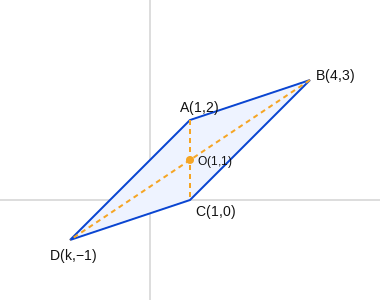
If the points A(1, 2), B(4, 3), C(1, 0) and D(k, -1) are the vertices of a parallelogram then, the value of k is :
यदि बिंदु A(1, 2), B(4, 3), C(1, 0) और D(k, -1) एक समांतर चतुर्भुज के शीर्ष हैं, तो k का मान है :
  1. A2
  2. B1
  3. C-1
  4. D-2
Show answer

Concept: Diagonals of a parallelogram bisect each other, so the midpoint of AC equals the midpoint of BD.

  1. Midpoint of AC =(1+12,2+02)=(1,1).
  2. Midpoint of BD =(4+k2,3+(−1)2)=(4+k2,1).
  3. Equate x-coordinates: 4+k2=1 → 4+k=2 → k=−2.

Trick: For parallelogram ABCD (in order): xA+xC=xB+xD → 1+1=4+k → k=−2.

Answer: (D) −2

अवधारणा: समांतर चतुर्भुज के विकर्ण एक-दूसरे को समद्विभाजित करते हैं, अतः AC का मध्य-बिंदु = BD का मध्य-बिंदु।

  1. AC का मध्य-बिंदु =(1+12,2+02)=(1,1)।
  2. BD का मध्य-बिंदु =(4+k2,3+(−1)2)=(4+k2,1)।
  3. x-निर्देशांक बराबर करें: 4+k2=1 → 4+k=2 → k=−2।

ट्रिक: क्रम में ABCD समांतर चतुर्भुज के लिए: xA+xC=xB+xD → 1+1=4+k → k=−2।

उत्तर: (D) −2

RRB Technician Grade I (Signal)MathematicsCoordinate Geometry – parallelogramRRB Technician Grade I (Signal) 2024 · 19 Dec Shift 2 →
Q17273.
The mode and median of a data is 87.5 and 86, respectively. What is the mean of the data? (Use empirical formula.)
किसी डेटा का बहुलक और माध्यिका क्रमशः 87.5 और 86 हैं। डेटा का माध्य क्या है? (आनुभविक सूत्र का उपयोग कीजिए।)
  1. A85.2
  2. B85.4
  3. C84.2
  4. D87.1
Show answer

Concept: Empirical relation between the three averages: Mode=3Median−2Mean.

  1. 87.5=3×86−2Mean=258−2Mean.
  2. 2Mean=258−87.5=170.5.
  3. Mean=85.25≈85.2 (closest option).

Trick: Mean=3Median−Mode2. Remember "Mode = 3 Med − 2 Mean" as 3M − 2M.

Answer: (A) 85.2

अवधारणा: तीनों माध्यों में आनुभविक संबंध: बहुलक=3माध्यिका−2माध्य।

  1. 87.5=3×86−2Mean=258−2Mean।
  2. 2Mean=258−87.5=170.5।
  3. Mean=85.25≈85.2 (निकटतम विकल्प)।

ट्रिक: Mean=3Median−Mode2। "Mode = 3 Med − 2 Mean" को 3M − 2M की तरह याद रखें।

उत्तर: (A) 85.2

RRB Technician Grade I (Signal)MathematicsStatistics – empirical relationRRB Technician Grade I (Signal) 2024 · 19 Dec Shift 2 →
Q17274.
If the quadratic equation x2 − 4ax + (b + 1) = 0, where a and b are real constants, has no real roots, then:
यदि द्विघात समीकरण x2 − 4ax + (b + 1) = 0, जहाँ a और b वास्तविक अचर हैं, के कोई वास्तविक मूल नहीं हैं, तो:
  1. Ab < (a + 1)(a − 1)
  2. Bb < (2a + 1)(2a − 1)
  3. Cb > (2a + 1)(2a − 1)
  4. Db > (a + 1)(a − 1)
Show answer

Concept: ax2+bx+c=0 has no real roots when the discriminant D=b2−4ac<0.

  1. Here coefficients: 1, −4a, (b+1). D=(−4a)2−4(1)(b+1)=16a2−4b−4.
  2. No real roots: 16a2−4b−4<0 → 4a2−1<b.
  3. b>4a2−1=(2a+1)(2a−1).

Trick: 4a2−1 is a difference of squares: (2a)2−12=(2a+1)(2a−1).

Answer: (C) b>(2a+1)(2a−1)

अवधारणा: ax2+bx+c=0 के वास्तविक मूल नहीं होते जब विविक्तकर D=b2−4ac<0।

  1. यहाँ गुणांक: 1, −4a, (b+1)। D=(−4a)2−4(1)(b+1)=16a2−4b−4।
  2. वास्तविक मूल नहीं: 16a2−4b−4<0 → 4a2−1<b।
  3. b>4a2−1=(2a+1)(2a−1)।

ट्रिक: 4a2−1 वर्गों का अंतर है: (2a)2−12=(2a+1)(2a−1)।

उत्तर: (C) b>(2a+1)(2a−1)

RRB Technician Grade I (Signal)MathematicsQuadratic Equations – nature of rootsRRB Technician Grade I (Signal) 2024 · 19 Dec Shift 2 →
Q17275.
A car manufacturing company is sponsoring a basketball match by painting its logo on the basketball at the rate of ₹3/ cm2 . There are two identical basketballs of diameter 14 cm which are to be painted. What will be the total cost (in ₹) of painting the balls for the company?
एक कार निर्माता कंपनी बास्केटबॉल पर ₹3/ cm2 की दर से अपना लोगो पेंट करके एक बास्केटबॉल मैच को प्रायोजित कर रही है। 14 cm व्यास की दो समरूप बास्केटबॉल हैं जिन्हें पेंट किया जाना है। कंपनी के लिए गेंदों को पेंट करने की कुल लागत (₹ में) क्या होगी?
  1. A1848
  2. B3586
  3. C4928
  4. D3696
Show answer

Concept: Painting covers the curved surface; surface area of a sphere =4πr2.

  1. Diameter =14 cm → r=7 cm.
  2. Surface area of one ball =4×227×7×7=616cm2.
  3. Two balls: 2×616=1232cm2; cost =1232×3=₹3696.

Trick: With r=7, 4πr2=4×22×7=616 instantly (the 7s cancel).

Answer: (D) 3696

अवधारणा: रंगाई वक्र पृष्ठ पर होती है; गोले का पृष्ठीय क्षेत्रफल =4πr2।

  1. व्यास =14 cm → r=7 cm।
  2. एक गेंद का पृष्ठीय क्षेत्रफल =4×227×7×7=616cm2।
  3. दो गेंदें: 2×616=1232cm2; लागत =1232×3=₹3696।

ट्रिक: r=7 होने पर 4πr2=4×22×7=616 तुरंत (7 कट जाते हैं)।

उत्तर: (D) 3696

RRB Technician Grade I (Signal)MathematicsMensuration – surface area of sphereRRB Technician Grade I (Signal) 2024 · 19 Dec Shift 2 →
Q17276.
64 identical small spheres are cast from a sphere of radius 12 cm, with the total volume of the small spheres being equal to the volume of the larger sphere. The diameter (in cm) of each of the small spheres is:
12 cm त्रिज्या के एक गोले से 64 समरूप छोटे गोले बनाए जाते हैं, जिनमें छोटे गोलों का कुल आयतन बड़े गोले के आयतन के बराबर है। प्रत्येक छोटे गोले का व्यास (cm में) है:
  1. A6
  2. B11
  3. C5
  4. D3
Show answer

Concept: Volume is conserved on recasting; volume of a sphere =43πr3, so volume ∝r3.

  1. 64×43πr3=43π(12)3 → r3=172864=27.
  2. r=3 cm.
  3. Diameter =2r=6 cm.

Trick: 64=43, so each small radius =124=3 – divide the radius by the cube root of the number of pieces.

Answer: (A) 6

अवधारणा: पुनः ढालने पर आयतन संरक्षित रहता है; गोले का आयतन =43πr3, अतः आयतन ∝r3।

  1. 64×43πr3=43π(12)3 → r3=172864=27।
  2. r=3 cm।
  3. व्यास =2r=6 cm।

ट्रिक: 64=43, अतः छोटी त्रिज्या =124=3 – त्रिज्या को टुकड़ों की संख्या के घनमूल से भाग दें।

उत्तर: (A) 6

RRB Technician Grade I (Signal)MathematicsMensuration – volume of sphereRRB Technician Grade I (Signal) 2024 · 19 Dec Shift 2 →
Q17277.
In △PQR, 3∠P=4∠Q=6∠R, then find the value of (2∠P−∠Q+3∠R5).
△PQR में, 3∠P=4∠Q=6∠R, तो (2∠P−∠Q+3∠R5) का मान ज्ञात कीजिए।
  1. A44∘
  2. B30∘
  3. C72∘
  4. D65∘
Show answer

Concept: Angle-sum property: ∠P+∠Q+∠R=180∘. When 3∠P=4∠Q=6∠R, write each angle in terms of a common constant.

  1. Let 3∠P=4∠Q=6∠R=k → ∠P=k3, ∠Q=k4, ∠R=k6.
  2. Sum: k3+k4+k6=4k+3k+2k12=3k4=180∘ → k=240.
  3. ∠P=80∘, ∠Q=60∘, ∠R=40∘.
  4. 2∠P−∠Q+3∠R5=160−60+1205=2205=44∘.

Trick: 3P=4Q=6R → P:Q:R=13:14:16=4:3:2 → angles 80∘,60∘,40∘.

Answer: (A) 44∘

अवधारणा: कोण-योग गुण: ∠P+∠Q+∠R=180∘। जब 3∠P=4∠Q=6∠R, प्रत्येक कोण को एक उभयनिष्ठ अचर में लिखें।

  1. मान लें 3∠P=4∠Q=6∠R=k → ∠P=k3, ∠Q=k4, ∠R=k6।
  2. योग: k3+k4+k6=4k+3k+2k12=3k4=180∘ → k=240।
  3. ∠P=80∘, ∠Q=60∘, ∠R=40∘।
  4. 2∠P−∠Q+3∠R5=160−60+1205=2205=44∘।

ट्रिक: 3P=4Q=6R → P:Q:R=13:14:16=4:3:2 → कोण 80∘,60∘,40∘।

उत्तर: (A) 44∘

RRB Technician Grade I (Signal)MathematicsGeometry – angles of a triangleRRB Technician Grade I (Signal) 2024 · 19 Dec Shift 2 →
Q17278.
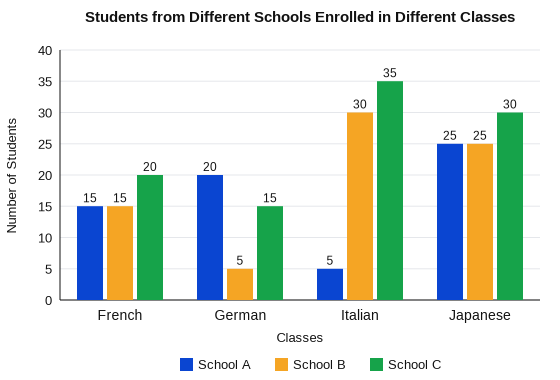
Study the given bar graph and answer the question that follows.

The given bar graph shows the number of students from different schools enrolled in different classes. Which class has the maximum students from school C?
दिए गए दंड आरेख (bar graph) का अध्ययन कीजिए और उसके बाद दिए गए प्रश्न का उत्तर दीजिए।

दिया गया दंड आरेख विभिन्न विद्यालयों के विभिन्न कक्षाओं में नामांकित विद्यार्थियों की संख्या दर्शाता है। किस कक्षा में विद्यालय C के सबसे अधिक विद्यार्थी हैं?
  1. AGermanजर्मन (German)
  2. BItalianइटैलियन (Italian)
  3. CJapaneseजापानी (Japanese)
  4. DFrenchफ़्रेंच (French)
Show answer

Concept: Read only the bars of School C (grey, third bar in each group) and compare their heights.

  1. School C: French =20, German =15, Italian =35, Japanese =30.
  2. The tallest School C bar is in the Italian class (35 students).
  3. Japanese (30) is the tempting second; French and German are much smaller.

Trick: Match the legend colour first, then scan only those bars – ignore the other schools entirely.

Answer: (B) Italian

अवधारणा: केवल School C (ग्रे, हर समूह का तीसरा दंड) के दंड पढ़ें और उनकी ऊँचाई की तुलना करें।

  1. School C: French =20, German =15, Italian =35, Japanese =30।
  2. School C का सबसे ऊँचा दंड Italian कक्षा में है (35 विद्यार्थी)।
  3. Japanese (30) दूसरे स्थान पर; French और German बहुत कम।

ट्रिक: पहले लेजेंड का रंग मिलाएँ, फिर केवल उन्हीं दंडों को देखें – बाकी स्कूलों को पूरी तरह छोड़ दें।

उत्तर: (B) Italian

RRB Technician Grade I (Signal)MathematicsData Interpretation – bar graphRRB Technician Grade I (Signal) 2024 · 19 Dec Shift 2 →
Q17279.
The product of (x - 9) and (x + 8) is:
(x - 9) और (x + 8) का गुणनफल है:
  1. Ax2 + x + 72
  2. Bx2 - x - 72
  3. Cx2 + 72
  4. Dx2 + 2x - 72
Show answer

Concept: (x+a)(x+b)=x2+(a+b)x+ab.

  1. Here a=−9, b=8: a+b=−1, ab=−72.
  2. (x−9)(x+8)=x2−x−72.
  3. Check by expanding: x2+8x−9x−72=x2−x−72 ✓.

Trick: Middle coefficient = sum of the two numbers, constant = their product; sign of the product is negative when the numbers have opposite signs.

Answer: (B) x2−x−72

अवधारणा: (x+a)(x+b)=x2+(a+b)x+ab।

  1. यहाँ a=−9, b=8: a+b=−1, ab=−72।
  2. (x−9)(x+8)=x2−x−72।
  3. विस्तार से जाँच: x2+8x−9x−72=x2−x−72 ✓।

ट्रिक: मध्य गुणांक = दोनों संख्याओं का योग, अचर = उनका गुणनफल; विपरीत चिह्न वाली संख्याओं का गुणनफल ऋणात्मक।

उत्तर: (B) x2−x−72

RRB Technician Grade I (Signal)MathematicsAlgebra – product of binomialsRRB Technician Grade I (Signal) 2024 · 19 Dec Shift 2 →
Q17280.
The coordinates of the centroid of the triangle ABC whose vertices are A(-5, 7), B(-4, -5) and C(4, 5), is
त्रिभुज ABC, जिसके शीर्ष A(-5, 7), B(-4, -5) और C(4, 5) हैं, के केंद्रक (centroid) के निर्देशांक हैं
  1. A(−53,73)
  2. B(−73,53)
  3. C(−43,73)
  4. D(−53,−73)
Show answer

Concept: Centroid of a triangle with vertices (x1,y1), (x2,y2), (x3,y3) is G=(x1+x2+x33,y1+y2+y33).

  1. x-coordinate: −5+(−4)+43=−53.
  2. y-coordinate: 7+(−5)+53=73.
  3. G=(−53,73).

Trick: Centroid = average of the vertices; the −4 and +4 cancel in x, the −5 and +5 cancel in y.

Answer: (A) (−53,73)

अवधारणा: शीर्षों (x1,y1), (x2,y2), (x3,y3) वाले त्रिभुज का केन्द्रक G=(x1+x2+x33,y1+y2+y33)।

  1. x-निर्देशांक: −5+(−4)+43=−53।
  2. y-निर्देशांक: 7+(−5)+53=73।
  3. G=(−53,73)।

ट्रिक: केन्द्रक = शीर्षों का औसत; x में −4 और +4 कट जाते हैं, y में −5 और +5।

उत्तर: (A) (−53,73)

RRB Technician Grade I (Signal)MathematicsCoordinate Geometry – centroidRRB Technician Grade I (Signal) 2024 · 19 Dec Shift 2 →