Question bank

Q&A: practice questions with answers

Search questions on any topic. Filter by exam category, exam, subject and topic, try the question, then open the answer and explanation.

Courses – airGurukul

20,719 questions found.

Q17341.
Select the set in which the numbers are related in the same way as are the numbers of the following sets.
(NOTE: Operations should be performed on the whole numbers, without breaking down the numbers into its constituent digits. E.g., 13 – Operations on 13 such as
adding/deleting/multiplying etc. to 13 can be performed. Breaking down 13 into 1 and 3 and then performing mathematical operations on 1 and 3 is not allowed)
(5, 9, 52)
(11, 7, 90)
उस समुच्चय का चयन कीजिए जिसमें संख्याएँ उसी प्रकार संबंधित हैं जिस प्रकार निम्नलिखित समुच्चयों की संख्याएँ संबंधित हैं।
(नोट: संक्रियाएँ पूर्ण संख्याओं पर की जानी चाहिए, संख्याओं को उनके घटक अंकों में तोड़े बिना। उदाहरण के लिए, 13 – 13 पर संक्रियाएँ जैसे
13 में जोड़ना/घटाना/गुणा करना आदि किया जा सकता है। 13 को 1 और 3 में तोड़कर फिर 1 और 3 पर गणितीय संक्रियाएँ करने की अनुमति नहीं है)
(5, 9, 52)
(11, 7, 90)
  1. A(7, 13, 98)
  2. B(14, 4, 63)
  3. C(8, 11, 95)
  4. D(9, 6, 65)
Show answer

Concept: Find one rule relating the three numbers (a,b,c) of each given set and apply it to the options.

  1. (5,9,52): 5×(9+1)+2=50+2=52
  2. (11,7,90): 11×(7+1)+2=88+2=90 → rule: c=a×(b+1)+2
  3. (9,6,65): 9×7+2=65 ✓; A: 7×14+2=100, B: 14×5+2=72, C: 8×12+2=98 ✗

Trick: When c is close to a×b, check a×b± something or a×(b±1)± something.

Answer: (D) (9, 6, 65)

अवधारणा: दिए गए दोनों समूहों (a,b,c) में एक समान नियम खोजें और विकल्पों पर लागू करें।

  1. (5,9,52): 5×(9+1)+2=50+2=52
  2. (11,7,90): 11×(7+1)+2=88+2=90 → नियम: c=a×(b+1)+2
  3. (9,6,65): 9×7+2=65 ✓; A: 7×14+2=100, B: 14×5+2=72, C: 8×12+2=98 ✗

ट्रिक: जब c, a×b के पास हो तो a×b± कुछ या a×(b±1)± कुछ जाँचें।

उत्तर: (D) (9, 6, 65)

RRB Technician Grade I (Signal)General Intelligence and ReasoningNumber-set analogyRRB Technician Grade I (Signal) 2024 · 19 Dec Shift 1 →
Q17342.
If ‘A’ stands for ‘÷’, ‘B’ stands for ‘×’, ‘C’ stands for ‘+’ and ‘D’ stands for ‘−’, then what will come in place of the question mark (?) in the following equation?
18 A 6 B 11 C 8 D 6 = ?
यदि ‘A’ का अर्थ ‘÷’, ‘B’ का अर्थ ‘×’, ‘C’ का अर्थ ‘+’ और ‘D’ का अर्थ ‘−’ है, तो निम्नलिखित समीकरण में प्रश्नचिह्न (?) के स्थान पर क्या आएगा?
18 A 6 B 11 C 8 D 6 = ?
  1. A35
  2. B33
  3. C36
  4. D34
Show answer

Concept: Replace the letters by the given operators and apply BODMAS.

  1. 18 A 6 B 11 C 8 D 6=18÷6×11+8−6
  2. 18÷6=3; 3×11=33
  3. 33+8−6=35

Trick: Do ÷ and × left to right first, then + and −.

Answer: (A) 35

अवधारणा: अक्षरों की जगह दिए गए चिह्न रखें और BODMAS लागू करें।

  1. 18 A 6 B 11 C 8 D 6=18÷6×11+8−6
  2. 18÷6=3; 3×11=33
  3. 33+8−6=35

ट्रिक: पहले ÷ और × बाएँ से दाएँ, फिर + और −।

उत्तर: (A) 35

RRB Technician Grade I (Signal)General Intelligence and ReasoningMathematical operations – symbol substitutionRRB Technician Grade I (Signal) 2024 · 19 Dec Shift 1 →
Q17343.
Which of the following terms will replace the question mark (?) in the given series to make it logically complete?
PU16 QV18 RW22 SX28 ?
दी गई श्रेणी को तार्किक रूप से पूर्ण करने के लिए निम्नलिखित में से कौन-सा पद प्रश्नचिह्न (?) के स्थान पर आएगा?
PU16 QV18 RW22 SX28 ?
  1. ATZ36
  2. BTZ37
  3. CTY36
  4. DTY37
Show answer

Concept: Treat the letters and the numbers as separate series.

  1. First letters: P, Q, R, S → T; second letters: U, V, W, X → Y.
  2. Numbers: 16, 18, 22, 28: differences +2,+4,+6 → next +8: 28+8=36.
  3. Next term: TY36.

Trick: Check the letter part first — it eliminates two options (TZ) instantly.

Answer: (C) TY36

अवधारणा: अक्षरों और संख्याओं को अलग-अलग श्रृंखला मानें।

  1. पहले अक्षर: P, Q, R, S → T; दूसरे अक्षर: U, V, W, X → Y।
  2. संख्याएँ: 16, 18, 22, 28: अंतर +2,+4,+6 → अगला +8: 28+8=36।
  3. अगला पद: TY36।

ट्रिक: पहले अक्षर भाग देखें — दो विकल्प (TZ) तुरंत कट जाते हैं।

उत्तर: (C) TY36

RRB Technician Grade I (Signal)General Intelligence and ReasoningAlphanumeric seriesRRB Technician Grade I (Signal) 2024 · 19 Dec Shift 1 →
Q17344.
Refer to the following letter, number and symbol series and answer the question that follows.
(Left) 6 2 8 # 7 \ 2 L % 9 3 3 \ / + H 2 $ S P # H (Right)
How many such symbols are there that are immediately preceded by a letter and immediately followed by a number?
निम्नलिखित अक्षर, संख्या और प्रतीक श्रेणी को देखिए और उसके बाद दिए गए प्रश्न का उत्तर दीजिए।
(बाएँ) 6 2 8 # 7 \ 2 L % 9 3 3 \ / + H 2 $ S P # H (दाएँ)
ऐसे कितने प्रतीक हैं जिनके ठीक पहले एक अक्षर और ठीक बाद एक संख्या है?
  1. AOneएक
  2. BTwoदो
  3. CFourचार
  4. DThreeतीन
Show answer

Concept: Scan each symbol and check its immediate left (must be a letter) and immediate right (must be a number).

  1. Symbols with neighbours: 8 # 7 (number–number), 7 \ 2 (number–number), L % 9 (letter–number ✓), 3 \ / , \ / +, / + H, 2 $ S (number–letter), P # H (letter–letter).
  2. Only L % 9 satisfies the condition.

Trick: Mark the symbols first, then look only at the two neighbours of each — do not re-read the whole series.

Answer: (A) One

अवधारणा: प्रत्येक प्रतीक के ठीक बाएँ (अक्षर होना चाहिए) और ठीक दाएँ (संख्या होनी चाहिए) को जाँचें।

  1. प्रतीक और पड़ोसी: 8 # 7 (संख्या–संख्या), 7 \ 2 (संख्या–संख्या), L % 9 (अक्षर–संख्या ✓), 3 \ /, \ / +, / + H, 2 $ S (संख्या–अक्षर), P # H (अक्षर–अक्षर)।
  2. केवल L % 9 शर्त पूरी करता है।

ट्रिक: पहले प्रतीक चिह्नित करें, फिर हर प्रतीक के केवल दो पड़ोसी देखें — पूरी श्रृंखला दोबारा न पढ़ें।

उत्तर: (A) एक

RRB Technician Grade I (Signal)General Intelligence and ReasoningLetter-number-symbol seriesRRB Technician Grade I (Signal) 2024 · 19 Dec Shift 1 →
Q17345.
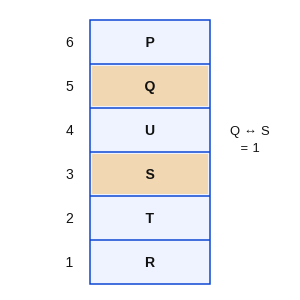
Six people P, Q, R, S, T and U live on six different floors of the same building. The bottom-most floor of the building is numbered as 1; the floor above it is numbered as 2 and so on. The topmost floor is numbered as 6.
P lives on an even-numbered floor but not on floor number 4. Only two people live between S and P. R lives immediately below T. U lives on an even-numbered floor. Q does not live on the bottom-most floor. How many people live between Q and S?
छह व्यक्ति P, Q, R, S, T और U एक ही भवन की छह अलग-अलग मंज़िलों पर रहते हैं। भवन की सबसे निचली मंज़िल की संख्या 1 है; उसके ऊपर की मंज़िल की संख्या 2 है और इसी प्रकार आगे। सबसे ऊपरी मंज़िल की संख्या 6 है।
P एक सम संख्या वाली मंज़िल पर रहता है, लेकिन मंज़िल संख्या 4 पर नहीं। S और P के बीच केवल दो व्यक्ति रहते हैं। R, T के ठीक नीचे रहता है। U एक सम संख्या वाली मंज़िल पर रहता है। Q सबसे निचली मंज़िल पर नहीं रहता है। Q और S के बीच कितने व्यक्ति रहते हैं?
  1. AThreeतीन
  2. BOneएक
  3. CFourचार
  4. DTwoदो
Show answer

Concept: Fix the most restricted person first (P: floor 2 or 6), then test each case against the remaining clues.

  1. Case P = 2 → S = 5 (two between). R–T must be consecutive from {1,3,4,6} → (3,4). Then Q and U take {1,6}; Q ≠ 1 so U = 1, but U must be even. ✗
  2. Case P = 6 → S = 3. R–T consecutive from {1,2,4,5}: (4,5) forces Q = 1 ✗; so R = 1, T = 2, U = 4, Q = 5. ✓
  3. Floors: 1-R, 2-T, 3-S, 4-U, 5-Q, 6-P. Between Q (5) and S (3): only U → one person.

Trick: 'Only two people between X and Y' in 6 floors means they are at (1,4), (2,5) or (3,6).

Answer: (B) One

अवधारणा: सबसे अधिक बंधन वाले व्यक्ति (P: मंज़िल 2 या 6) को पहले रखें, फिर बाकी शर्तों से हर case जाँचें।

  1. Case P = 2 → S = 5 (बीच में दो)। R–T लगातार {1,3,4,6} से → (3,4)। तब Q, U को {1,6}; Q ≠ 1 अतः U = 1, पर U सम मंज़िल पर है। ✗
  2. Case P = 6 → S = 3। R–T लगातार {1,2,4,5} से: (4,5) लेने पर Q = 1 ✗; अतः R = 1, T = 2, U = 4, Q = 5। ✓
  3. मंज़िलें: 1-R, 2-T, 3-S, 4-U, 5-Q, 6-P। Q (5) और S (3) के बीच केवल U → एक व्यक्ति।

ट्रिक: 6 मंज़िलों में 'X और Y के बीच केवल दो' का अर्थ है जोड़ा (1,4), (2,5) या (3,6)।

उत्तर: (B) एक

RRB Technician Grade I (Signal)General Intelligence and ReasoningFloor-based puzzleRRB Technician Grade I (Signal) 2024 · 19 Dec Shift 1 →
Q17346.
A statement is given followed by two arguments. Decide which of the arguments is/are strong with respect to the statement.
Statement:
The Government of State A is planning to shut down all markets by 7 pm.
Arguments:
I. Incidents of shoplifting and attempted robberies have increased especially during night time.
II. Many people get time to shop only after office hours.
एक कथन के बाद दो तर्क दिए गए हैं। निर्णय लीजिए कि कथन के संदर्भ में कौन-सा/कौन-से तर्क प्रबल है/हैं।
कथन:
राज्य A की सरकार सभी बाज़ारों को शाम 7 बजे तक बंद करने की योजना बना रही है।
तर्क:
I. दुकानों में चोरी और डकैती के प्रयासों की घटनाएँ विशेष रूप से रात के समय बढ़ गई हैं।
II. बहुत से लोगों को खरीदारी के लिए समय केवल कार्यालय समय के बाद ही मिलता है।
  1. ABoth I and II strengthen the statement.I और II दोनों कथन को प्रबल करते हैं।
  2. BI weakens while II strengthens the statement.I कथन को कमज़ोर करता है जबकि II उसे प्रबल करता है।
  3. CBoth I and II weaken the statement.I और II दोनों कथन को कमज़ोर करते हैं।
  4. DII weakens while I strengthens the statement.II कथन को कमज़ोर करता है जबकि I उसे प्रबल करता है।
Show answer

Concept: A strong argument is directly related to the statement, realistic, and gives a solid reason for or against it.

  1. Argument I: rising night-time thefts/robberies is a direct public-safety reason to close markets early → strengthens (supports) the plan.
  2. Argument II: many people can shop only after office hours → closing at 7 pm would hurt them → weakens (opposes) the plan.
  3. Both are relevant; one supports, the other opposes.

Trick: Ask of each argument: 'Does this give a reason to do it, or a reason not to?'

Answer: (D) II weakens while I strengthens the statement.

अवधारणा: प्रबल तर्क वह है जो कथन से सीधे जुड़ा, यथार्थवादी और उसके पक्ष या विपक्ष में ठोस कारण देता हो।

  1. तर्क I: रात में चोरी/डकैती की घटनाएँ बढ़ना बाज़ार जल्दी बंद करने का सीधा सुरक्षा-कारण है → कथन को मज़बूत (समर्थन) करता है।
  2. तर्क II: कई लोग ऑफिस के बाद ही खरीदारी कर पाते हैं → 7 बजे बंद करना उन्हें नुकसान देगा → कथन को कमज़ोर (विरोध) करता है।
  3. दोनों प्रासंगिक हैं; एक समर्थन, दूसरा विरोध।

ट्रिक: हर तर्क से पूछें: 'यह करने का कारण देता है या न करने का?'

उत्तर: (D) II कमज़ोर करता है जबकि I कथन को मज़बूत करता है।

RRB Technician Grade I (Signal)General Intelligence and ReasoningStatement and argumentsRRB Technician Grade I (Signal) 2024 · 19 Dec Shift 1 →
Q17347.
Tamper Protection is a feature that prevents unauthorised apps from changing your security settings. Which of the following Operating Systems supports the same?
टैम्पर प्रोटेक्शन (Tamper Protection) एक ऐसी विशेषता है जो अनधिकृत ऐप्स को आपकी सुरक्षा सेटिंग्स बदलने से रोकती है। निम्नलिखित में से कौन-सा ऑपरेटिंग सिस्टम इसका समर्थन करता है?
  1. AWindows 10
  2. BWindows XP
  3. CLinux
  4. DWindows Vista
Show answer

Concept: Tamper Protection is a setting inside Windows Security (Microsoft Defender) that blocks apps or malware from switching off real-time protection or changing security settings.

  1. It was introduced in Windows 10 (version 1903, 2019) and continues in Windows 11.
  2. Windows XP and Windows Vista are much older OSes without Microsoft Defender Antivirus in this form.
  3. Linux has no built-in "Tamper Protection" feature by this name.

Yaad rakhein: Tamper Protection = Windows Security = Windows 10 and 11.

Answer: (A) Windows 10

अवधारणा: Tamper Protection, Windows Security (Microsoft Defender) की सेटिंग है जो किसी app या malware को real-time protection बंद करने या सुरक्षा सेटिंग बदलने से रोकती है।

  1. यह Windows 10 (version 1903, 2019) में आई और Windows 11 में भी है।
  2. Windows XP और Vista बहुत पुराने OS हैं, उनमें Microsoft Defender Antivirus इस रूप में नहीं था।
  3. Linux में इस नाम का कोई built-in फीचर नहीं है।

याद रखें: Tamper Protection = Windows Security = Windows 10 and 11।

उत्तर: (A) Windows 10

RRB Technician Grade I (Signal)Basics of Computers and ApplicationWindows Security – Tamper ProtectionRRB Technician Grade I (Signal) 2024 · 19 Dec Shift 1 →
Q17348.
Identify the correct order of steps to configure your web browser.
I. Enable cookies in your web browser
II. Enable scripts to disable or replace context menus (Mozilla Firefox only)
III. Enable file download on IE 11 running on Windows 2012
IV. Enable JavaScript for your web browser
अपने वेब ब्राउज़र को कॉन्फ़िगर करने के चरणों का सही क्रम पहचानिए।
I. अपने वेब ब्राउज़र में कुकीज़ (cookies) सक्षम करें
II. कॉन्टेक्स्ट मेनू को अक्षम या प्रतिस्थापित करने के लिए स्क्रिप्ट सक्षम करें (केवल Mozilla Firefox)
III. Windows 2012 पर चल रहे IE 11 में फ़ाइल डाउनलोड सक्षम करें
IV. अपने वेब ब्राउज़र के लिए JavaScript सक्षम करें
  1. AIV, III, II, I '
  2. BIII, II, IV, I
  3. CIV, I, III, II
  4. DI, II, III, IV
Show answer

Concept: Many government e-portals list the browser settings needed before use, in a fixed order: first the engine-level setting (JavaScript), then cookies, then download permission, and lastly the browser-specific tweak.

  1. Step 1 – Enable JavaScript (IV): the site cannot even run without it.
  2. Step 2 – Enable cookies (I) so login sessions are stored.
  3. Step 3 – Enable file download on IE 11/Windows 2012 (III); Step 4 – Firefox-only script setting for context menus (II).

Yaad rakhein: JavaScript → Cookies → Download → Firefox tweak = IV, I, III, II.

Answer: (C) IV, I, III, II

अवधारणा: कई सरकारी e-portal उपयोग से पहले ब्राउज़र सेटिंग एक निश्चित क्रम में बताते हैं: पहले मूल सेटिंग (JavaScript), फिर cookies, फिर download अनुमति, और अंत में ब्राउज़र-विशेष बदलाव।

  1. चरण 1 – JavaScript enable करें (IV): इसके बिना साइट चलती ही नहीं।
  2. चरण 2 – cookies enable करें (I) ताकि login session सुरक्षित रहे।
  3. चरण 3 – IE 11/Windows 2012 पर file download enable करें (III); चरण 4 – Firefox-only context menu script सेटिंग (II)।

याद रखें: JavaScript → Cookies → Download → Firefox बदलाव = IV, I, III, II।

उत्तर: (C) IV, I, III, II

RRB Technician Grade I (Signal)Basics of Computers and ApplicationWeb browser configurationRRB Technician Grade I (Signal) 2024 · 19 Dec Shift 1 →
Q17349.
The most common topologies used in LAN networks are _____________.
LAN नेटवर्क में सबसे अधिक प्रयोग की जाने वाली टोपोलॉजी (topology) _____________ हैं।
  1. Abus, ring, and starबस, रिंग और स्टार
  2. Bmesh and ring onlyकेवल मेश और रिंग
  3. Cwired, wireless, and virtualवायर्ड, वायरलेस और वर्चुअल
  4. Dinsider threats, LAN sockets, viruses and malwareइनसाइडर थ्रेट, LAN सॉकेट, वायरस और मैलवेयर
Show answer

Concept: Network topology is the physical/logical layout of how nodes are connected in a LAN.

  1. The classic LAN topologies are bus (single backbone cable), ring (closed loop, e.g. Token Ring) and star (all nodes to a central hub/switch – today's Ethernet standard).
  2. Mesh is used mainly in WANs/backbones, not "most common" in LANs; option B also wrongly says "only".
  3. "Wired/wireless" are transmission media and option D lists security threats, not topologies.

Yaad rakhein: LAN topologies → Bus, Ring, Star (B-R-S).

Answer: (A) bus, ring, and star

अवधारणा: Network topology LAN में nodes को जोड़ने का भौतिक/तार्किक ढाँचा है।

  1. LAN की क्लासिक टोपोलॉजी हैं bus (एक backbone केबल), ring (बंद लूप, जैसे Token Ring) और star (सब nodes केंद्रीय hub/switch से – आज का Ethernet मानक)।
  2. Mesh मुख्यतः WAN/backbone में प्रयोग होता है, LAN में "सबसे आम" नहीं; विकल्प B में "only" भी गलत है।
  3. "Wired/wireless" संचार माध्यम हैं और विकल्प D में सुरक्षा खतरे हैं, टोपोलॉजी नहीं।

याद रखें: LAN topologies → Bus, Ring, Star (B-R-S)।

उत्तर: (A) bus, ring, and star

RRB Technician Grade I (Signal)Basics of Computers and ApplicationLAN topologiesRRB Technician Grade I (Signal) 2024 · 19 Dec Shift 1 →
Q17350.
What is the purpose of the 'grep' command in the Linux operating system?
Linux ऑपरेटिंग सिस्टम में ‘grep’ कमांड का उद्देश्य क्या है?
  1. ATo rename filesफ़ाइलों का नाम बदलना
  2. BTo display the calendarकैलेंडर प्रदर्शित करना
  3. CTo display system processesसिस्टम प्रोसेस प्रदर्शित करना
  4. DTo search for a specific pattern in a fileकिसी फ़ाइल में एक विशिष्ट पैटर्न खोजना
Show answer

Concept: grep ("global regular expression print") searches text for lines matching a pattern and prints them, e.g. grep error log.txt.

  1. Rename files → mv; display calendar → cal; system processes → ps/top.
  2. grep is often used with pipes: ps -e | grep ssh.

Yaad rakhein: grep = "find the pattern" (think of a search torch for text files).

Answer: (D) To search for a specific pattern in a file

अवधारणा: grep ("global regular expression print") टेक्स्ट में pattern से मेल खाने वाली लाइनें खोजकर दिखाता है, जैसे grep error log.txt।

  1. फ़ाइल rename → mv; कैलेंडर → cal; system processes → ps/top।
  2. grep अक्सर pipe के साथ प्रयोग होता है: ps -e | grep ssh।

याद रखें: grep = "pattern ढूँढो" (टेक्स्ट फ़ाइल की search टॉर्च)।

उत्तर: (D) To search for a specific pattern in a file

RRB Technician Grade I (Signal)Basics of Computers and ApplicationLinux commands – grepRRB Technician Grade I (Signal) 2024 · 19 Dec Shift 1 →
Q17351.
Match the word templates from group A with their types in group B.
Group A Group B
I. Planners and trackers A. Questionnaire
II. Marketing assets B. Flyers
III. Surveys C. Planning sheets
समूह A के Word टेम्पलेट्स को समूह B में दिए गए उनके प्रकारों से सुमेलित कीजिए।
समूह A समूह B
I. Planners and trackers (प्लानर और ट्रैकर) A. Questionnaire (प्रश्नावली)
II. Marketing assets (मार्केटिंग सामग्री) B. Flyers (फ़्लायर)
III. Surveys (सर्वेक्षण) C. Planning sheets (प्लानिंग शीट)
  1. AI-A, II-C, III-B
  2. BI-A, II-B, III-C
  3. CI-B, II-C, III-A
  4. DI-C, II-B, III-A
Show answer

Concept: Word's template gallery groups templates by purpose; match each category with the document type it contains.

  1. Planners and trackers → Planning sheets (calendars, to-do lists, budgets) : I-C.
  2. Marketing assets → Flyers, brochures, posters : II-B.
  3. Surveys → Questionnaire forms : III-A.

Yaad rakhein: Planner-sheet, Marketing-flyer, Survey-questionnaire → I-C, II-B, III-A.

Answer: (D) I-C, II-B, III-A

अवधारणा: Word की template gallery टेम्पलेट को उद्देश्य के अनुसार बाँटती है; हर श्रेणी को उसके दस्तावेज़ प्रकार से मिलाएँ।

  1. Planners and trackers → Planning sheets (कैलेंडर, to-do list, बजट) : I-C।
  2. Marketing assets → Flyers, brochure, poster : II-B।
  3. Surveys → Questionnaire फ़ॉर्म : III-A।

याद रखें: Planner-sheet, Marketing-flyer, Survey-questionnaire → I-C, II-B, III-A।

उत्तर: (D) I-C, II-B, III-A

RRB Technician Grade I (Signal)Basics of Computers and ApplicationMS Word templatesRRB Technician Grade I (Signal) 2024 · 19 Dec Shift 1 →
Q17352.
What is the purpose of the 'Subject line' in an email?
ई-मेल में ‘Subject line’ (विषय पंक्ति) का उद्देश्य क्या है?
  1. ATo include attachments with the emailई-मेल के साथ अटैचमेंट शामिल करना
  2. BTo provide a detailed explanation of the email contentई-मेल की सामग्री की विस्तृत व्याख्या देना
  3. CTo give a brief summary of the email's topicई-मेल के विषय का संक्षिप्त सार देना
  4. DTo list the recipients of the emailई-मेल के प्राप्तकर्ताओं की सूची देना
Show answer

Concept: The Subject line is the short title of an email that appears in the recipient's inbox list before the mail is opened.

  1. It gives a brief summary of the topic so the reader can prioritise and search mails.
  2. Attachments go in the attachment area, recipients in To/Cc/Bcc, and the detailed explanation in the body – not in the subject.

Yaad rakhein: Subject = headline of the email (one line, not the story).

Answer: (C) To give a brief summary of the email's topic

अवधारणा: Subject line ईमेल का छोटा शीर्षक है जो मेल खोलने से पहले ही प्राप्तकर्ता की inbox सूची में दिखता है।

  1. यह विषय का संक्षिप्त सार देता है ताकि पाठक मेल को प्राथमिकता दे सके और खोज सके।
  2. Attachment अलग जगह, प्राप्तकर्ता To/Cc/Bcc में और विस्तृत व्याख्या body में होती है – subject में नहीं।

याद रखें: Subject = ईमेल की headline (एक लाइन, पूरी कहानी नहीं)।

उत्तर: (C) To give a brief summary of the email's topic

RRB Technician Grade I (Signal)Basics of Computers and ApplicationEmail – subject lineRRB Technician Grade I (Signal) 2024 · 19 Dec Shift 1 →
Q17353.
What does the clock speed of a CPU measure?
CPU की क्लॉक स्पीड (clock speed) क्या मापती है?
  1. AThe temperature of the CPUCPU का तापमान
  2. BThe amount of cache memoryकैश मेमोरी की मात्रा
  3. CThe number of instructions executed per secondप्रति सेकंड निष्पादित निर्देशों की संख्या
  4. DThe amount of data processed per secondप्रति सेकंड संसाधित डेटा की मात्रा
Show answer

Concept: Clock speed (in GHz) is the number of clock cycles the CPU completes per second; each cycle lets the processor execute instruction steps, so it indicates how many instructions the CPU can process per second.

  1. A 3 GHz CPU runs 3×10⁹ cycles every second – a direct measure of processing pace.
  2. Temperature is measured by sensors, cache size in MB, and data throughput depends on bus width/bandwidth, not the clock alone.

Yaad rakhein: Clock speed = "ticks per second" = how fast instructions are executed.

Answer: (C) The number of instructions executed per second

अवधारणा: Clock speed (GHz में) वह संख्या है जितने clock cycle CPU प्रति सेकंड पूरे करता है; हर cycle में निर्देश के चरण चलते हैं, अतः यह बताता है CPU प्रति सेकंड कितने निर्देश संसाधित कर सकता है।

  1. 3 GHz CPU हर सेकंड 3×10⁹ cycle चलाता है – प्रसंस्करण गति का सीधा माप।
  2. ताप sensor से, cache MB में मापा जाता है, और data throughput bus width/bandwidth पर निर्भर है, केवल clock पर नहीं।

याद रखें: Clock speed = "प्रति सेकंड tick" = निर्देश कितनी तेज़ी से चलते हैं।

उत्तर: (C) The number of instructions executed per second

RRB Technician Grade I (Signal)Basics of Computers and ApplicationCPU clock speedRRB Technician Grade I (Signal) 2024 · 19 Dec Shift 1 →
Q17354.
If you need to attach a large file that exceeds the email provider's limit, what is a common solution?
यदि आपको एक बड़ी फ़ाइल अटैच करनी है जो ई-मेल प्रदाता की सीमा से अधिक है, तो इसका एक सामान्य समाधान क्या है?
  1. AReduce the file's resolution.फ़ाइल का रेज़ोल्यूशन कम करना।
  2. BBreak the file into smaller parts and send multiple emails.फ़ाइल को छोटे भागों में विभाजित करके कई ई-मेल भेजना।
  3. CUse a cloud storage service and share the link.क्लाउड स्टोरेज सेवा का उपयोग करना और लिंक साझा करना।
  4. DCompress the file into a .zip format.फ़ाइल को .zip फ़ॉर्मेट में संपीड़ित (compress) करना।
Show answer

Concept: Email providers cap attachment size (e.g. Gmail 25 MB). The standard solution for a bigger file is to upload it to cloud storage (Google Drive, OneDrive, Dropbox) and send a share link.

  1. Gmail itself offers "Insert from Drive" when an attachment is too large.
  2. Zipping or reducing resolution may still exceed the limit and can lose quality; splitting into many emails is clumsy and not the common practice.

Yaad rakhein: Too big to attach → upload to cloud, share the link.

Answer: (C) Use a cloud storage service and share the link.

अवधारणा: ईमेल सेवाएँ attachment का आकार सीमित रखती हैं (जैसे Gmail 25 MB)। बड़ी फ़ाइल के लिए मानक उपाय है उसे cloud storage (Google Drive, OneDrive, Dropbox) पर upload कर share link भेजना।

  1. Gmail स्वयं बड़े attachment पर "Insert from Drive" सुझाता है।
  2. Zip करना या resolution घटाना फिर भी सीमा पार कर सकता है और गुणवत्ता घटाता है; कई ईमेल में तोड़ना असुविधाजनक है, सामान्य व्यवहार नहीं।

याद रखें: Attach न हो → cloud पर upload, link share।

उत्तर: (C) Use a cloud storage service and share the link.

RRB Technician Grade I (Signal)Basics of Computers and ApplicationEmail – large attachmentsRRB Technician Grade I (Signal) 2024 · 19 Dec Shift 1 →
Q17355.
Which feature is commonly found in modern anti-virus software to help with real-time threat detection?
रियल-टाइम खतरे की पहचान में सहायता के लिए आधुनिक एंटी-वायरस सॉफ़्टवेयर में सामान्यतः कौन-सी विशेषता पाई जाती है?
  1. AManual updatesमैनुअल अपडेट
  2. BCloud-based detectionक्लाउड-आधारित डिटेक्शन
  3. COffline scanningऑफ़लाइन स्कैनिंग
  4. DPassive scanningपैसिव स्कैनिंग
Show answer

Concept: Modern anti-virus software uses cloud-based detection: file signatures/behaviour are checked against a constantly updated online threat database, allowing real-time detection of new malware.

  1. Cloud lookup gives instant updates without waiting for a local definition download.
  2. Manual updates, offline scanning and passive scanning are slower, older approaches – not real-time.

Yaad rakhein: Real-time = cloud-connected (Windows Defender "Cloud-delivered protection").

Answer: (B) Cloud-based detection

अवधारणा: आधुनिक anti-virus cloud-based detection उपयोग करता है: फ़ाइल signature/व्यवहार को लगातार अपडेट होते online threat database से मिलाया जाता है, जिससे नए malware की real-time पहचान होती है।

  1. Cloud lookup से स्थानीय definition download की प्रतीक्षा किए बिना तुरंत अपडेट मिलता है।
  2. Manual update, offline scanning और passive scanning धीमे, पुराने तरीके हैं – real-time नहीं।

याद रखें: Real-time = cloud से जुड़ा (Windows Defender "Cloud-delivered protection")।

उत्तर: (B) Cloud-based detection

RRB Technician Grade I (Signal)Basics of Computers and ApplicationAnti-virus – real-time detectionRRB Technician Grade I (Signal) 2024 · 19 Dec Shift 1 →
Q17356.
Which of the following options is used to search for help topics in MS-Word 2021?
MS-Word 2021 में सहायता विषयों (help topics) को खोजने के लिए निम्नलिखित में से किस विकल्प का उपयोग किया जाता है?
  1. AAccess 'Help' from the 'View' tab.‘View’ टैब से ‘Help’ तक पहुँचें।
  2. BGo to the 'File' tab and select 'Help'.‘File’ टैब में जाकर ‘Help’ चुनें।
  3. CClick the 'Help' button in the Ribbon.रिबन में ‘Help’ बटन पर क्लिक करें।
  4. DUse the 'Tell me what you want to do' search box.‘Tell me what you want to do’ सर्च बॉक्स का उपयोग करें।
Show answer

Concept: MS Word 2016, 2019 and 2021 has a search box on the Ribbon titled "Tell me what you want to do" (shown as a "Search" box with a bulb/magnifier icon). Typing a task there finds the command and related help topics instantly.

  1. Keyboard shortcut: Alt + Q jumps to this box.
  2. There is also a Help tab, but the question asks for the option used to search help topics – that is the Tell-me box; "File → Help" and "View tab" are not the search route.

Yaad rakhein: "Tell me…" box = Alt + Q = instant help/command search.

Answer: (D) Use the 'Tell me what you want to do' search box.

अवधारणा: MS Word 2016, 2019 and 2021 के Ribbon पर "Tell me what you want to do" नामक search box होता है (bulb/magnifier आइकन वाला "Search" box)। उसमें कार्य लिखते ही command और संबंधित help topics तुरंत मिल जाते हैं।

  1. Keyboard shortcut: Alt + Q इस box पर ले जाता है।
  2. Help tab भी है, पर प्रश्न help topics खोजने का विकल्प पूछता है – वह Tell-me box है; "File → Help" और "View tab" खोज का रास्ता नहीं हैं।

याद रखें: "Tell me…" box = Alt + Q = तुरंत help/command खोज।

उत्तर: (D) Use the 'Tell me what you want to do' search box.

RRB Technician Grade I (Signal)Basics of Computers and ApplicationMS Word 2021 – Help searchRRB Technician Grade I (Signal) 2024 · 19 Dec Shift 1 →
Q17357.
Which of the following options is NOT used to perform the next animation or advance to the next slide in MS PowerPoint?
MS PowerPoint में अगला एनीमेशन करने या अगली स्लाइड पर जाने के लिए निम्नलिखित में से किस विकल्प का उपयोग नहीं किया जाता है?
  1. AEnter
  2. BShift+F5
  3. CN
  4. DPage Down
Show answer

Concept: During a slide show, several keys advance to the next animation or slide: Enter, Spacebar, N (Next), Right/Down arrow and Page Down. Shift+F5 is a different kind of key — it starts the slide show from the current slide.

  1. Enter, Page Down and N all move the presentation forward.
  2. Shift+F5 launches the show (from the current slide); F5 launches it from the first slide. Neither advances a slide once the show is running.

Trick: F5 = show from start, Shift+F5 = show from current slide; N = Next, P = Previous.

Answer: (B) Shift+F5

अवधारणा: स्लाइड शो के दौरान कई कीज़ अगली एनिमेशन/स्लाइड पर ले जाती हैं: Enter, Spacebar, N (Next), Right/Down arrow और Page Down। Shift+F5 अलग प्रकार की की है — यह वर्तमान स्लाइड से स्लाइड शो शुरू करती है।

  1. Enter, Page Down और N तीनों प्रस्तुति को आगे बढ़ाते हैं।
  2. Shift+F5 शो को (वर्तमान स्लाइड से) चालू करती है; F5 पहली स्लाइड से। शो चलते समय ये स्लाइड आगे नहीं बढ़ातीं।

याद रखें: F5 = शुरू से show, Shift+F5 = वर्तमान स्लाइड से show; N = Next, P = Previous।

उत्तर: (B) Shift+F5

RRB Technician Grade I (Signal)Basics of Computers and ApplicationPowerPoint slideshow keysRRB Technician Grade I (Signal) 2024 · 19 Dec Shift 1 →
Q17358.
Convert binary number 1101.1101 into decimal equivalent.
द्विआधारी (binary) संख्या 1101.1101 को उसके दशमलव (decimal) तुल्यांक में परिवर्तित कीजिए।
  1. A12.8125
  2. B13.8125
  3. C12.625
  4. D13.625
Show answer

Concept: Each binary digit is multiplied by a power of 2: integer part uses 23,22,21,20 and fractional part uses 2−1,2−2,…

  1. 11012=8+4+0+1=13
  2. 0.11012=12+14+0+116=0.5+0.25+0.0625=0.8125
  3. Total =13.8125

Trick: After the point the weights are 0.5, 0.25, 0.125, 0.0625 — just add the ones under a 1.

Answer: (B) 13.8125

अवधारणा: प्रत्येक बाइनरी अंक को 2 की घात से गुणा करते हैं: पूर्णांक भाग में 23,22,21,20 और भिन्नात्मक भाग में 2−1,2−2,…

  1. 11012=8+4+0+1=13
  2. 0.11012=12+14+0+116=0.5+0.25+0.0625=0.8125
  3. कुल =13.8125

ट्रिक: बिंदु के बाद भार 0.5, 0.25, 0.125, 0.0625 हैं — जहाँ 1 है बस वही जोड़ें।

उत्तर: (B) 13.8125

RRB Technician Grade I (Signal)Basics of Computers and ApplicationBinary to decimal conversionRRB Technician Grade I (Signal) 2024 · 19 Dec Shift 1 →
Q17359.
The Mozilla Firefox/Google Chrome/Microsoft Edge requires support for the __________ protocol.
Mozilla Firefox/Google Chrome/Microsoft Edge के लिए __________ प्रोटोकॉल का समर्थन आवश्यक है।
  1. AHTTP 2.1
  2. BHTTP 3.1
  3. CHTTP 1.1
  4. DHTTP 1.2
Show answer

Concept: Web browsers communicate with web servers using HTTP. HTTP/1.1 (1997–99) is the base version every browser must support; newer HTTP/2 and HTTP/3 are optional upgrades.

  1. Firefox, Chrome and Edge all require HTTP/1.1 support — persistent connections, host header, chunked transfer.
  2. 'HTTP 2.1', 'HTTP 3.1' and 'HTTP 1.2' are not real HTTP versions.

Trick: Real HTTP versions: 0.9, 1.0, 1.1, 2, 3 — anything else is a distractor.

Answer: (C) HTTP 1.1

अवधारणा: वेब ब्राउज़र वेब सर्वर से HTTP द्वारा संवाद करते हैं। HTTP/1.1 (1997–99) वह आधार संस्करण है जिसे हर ब्राउज़र को support करना ही होता है; HTTP/2 और HTTP/3 वैकल्पिक upgrade हैं।

  1. Firefox, Chrome और Edge सभी को HTTP/1.1 support चाहिए — persistent connection, host header, chunked transfer।
  2. 'HTTP 2.1', 'HTTP 3.1' और 'HTTP 1.2' वास्तविक संस्करण नहीं हैं।

याद रखें: असली HTTP संस्करण: 0.9, 1.0, 1.1, 2, 3 — बाकी सब भ्रामक हैं।

उत्तर: (C) HTTP 1.1

RRB Technician Grade I (Signal)Basics of Computers and ApplicationHTTP protocol and browsersRRB Technician Grade I (Signal) 2024 · 19 Dec Shift 1 →
Q17360.
How do you view hidden files and folders in File Explorer in the Windows OS?
Windows OS में File Explorer में छिपी हुई (hidden) फ़ाइलों और फ़ोल्डरों को कैसे देखा जाता है?
  1. AGo to 'View' -> Select 'Show hidden items'‘View’ में जाएँ -> ‘Show hidden items’ चुनें
  2. BRight-click -> Select 'View hidden files'राइट-क्लिक करें -> ‘View hidden files’ चुनें
  3. CGo to 'Settings' -> Select 'Hidden files'‘Settings’ में जाएँ -> ‘Hidden files’ चुनें
  4. DGo to 'Edit' -> Select 'Show hidden items'‘Edit’ में जाएँ -> ‘Show hidden items’ चुनें
Show answer

Concept: In Windows File Explorer, visibility of hidden files is controlled from the View tab (ribbon) or View → Show menu.

  1. Windows 10: View tab → tick 'Hidden items'. Windows 11: View → Show → Hidden items.
  2. There is no 'Edit' menu in modern Explorer and no right-click 'View hidden files' option.

Trick: Anything about how things look (hidden items, file extensions, layout) lives under View.

Answer: (A) Go to 'View' → Select 'Show hidden items'

अवधारणा: Windows File Explorer में छिपी फाइलें दिखाना View टैब (ribbon) या View → Show मेनू से नियंत्रित होता है।

  1. Windows 10: View टैब → 'Hidden items' टिक करें। Windows 11: View → Show → Hidden items।
  2. आधुनिक Explorer में 'Edit' मेनू नहीं है और right-click में 'View hidden files' विकल्प नहीं होता।

याद रखें: दिखावट से जुड़ी हर चीज़ (hidden items, file extensions, layout) View के अंदर होती है।

उत्तर: (A) 'View' → 'Show hidden items'

RRB Technician Grade I (Signal)Basics of Computers and ApplicationWindows File Explorer settingsRRB Technician Grade I (Signal) 2024 · 19 Dec Shift 1 →