Question bank

Q&A: practice questions with answers

Search questions on any topic. Filter by exam category, exam, subject and topic, try the question, then open the answer and explanation.

Courses – airGurukul

494 questions found.

Q121.
In the following number-pairs, the second number is obtained by applying certain mathematical operations to the first number. Which numbers should replace X and Y so that the pattern followed by the two numbers on the left side of :: is same as that on the right side of ::?
(NOTE: Operations should be performed on the whole numbers, without breaking down the numbers into their constituent digits. E.g. 13 – Operations on 13 such as
adding/subtracting/multiplying to 13 can be performed. Breaking down 13 into 1 and 3 and then performing mathematical operations on 1 and 3 is not allowed.)
X : 32 :: 18 : Y
निम्नलिखित संख्या-युग्मों में, दूसरी संख्या पहली संख्या पर कुछ निश्चित गणितीय संक्रियाएँ करके प्राप्त की गई है। X और Y के स्थान पर कौन-सी संख्याएँ आनी चाहिए ताकि :: के बाईं ओर की दो संख्याओं द्वारा अनुसरण किया गया पैटर्न :: के दाईं ओर के पैटर्न के समान हो?
(नोट: संक्रियाएँ पूर्ण संख्याओं पर की जानी चाहिए, संख्याओं को उनके घटक अंकों में तोड़े बिना। उदाहरण के लिए 13 – 13 पर संक्रियाएँ जैसे
13 में जोड़ना/घटाना/गुणा करना किया जा सकता है। 13 को 1 और 3 में तोड़कर फिर 1 और 3 पर गणितीय संक्रियाएँ करने की अनुमति नहीं है।)
X : 32 :: 18 : Y
  1. AX=15, Y=37
  2. BX=13, Y=37
  3. CX=14, Y=35
  4. DX=13, Y=30
Show answer

Concept: Find one operation that converts the first number into the second and apply the same to the other pair.

  1. Try option B: 13→32: 13+19=32 ✓.
  2. Same rule on the right: 18+19=37=Y ✓.
  3. Other options fail: A gives 15+17=32 but 18+19=37 (different additions); C and D cannot use one common operation.

Trick: Test the options – the pair with the same difference (32−13=37−18=19) is the answer.

Answer: (B) X=13, Y=37

अवधारणा: एक ऐसी संक्रिया खोजें जो पहली संख्या को दूसरी में बदले और वही दूसरे युग्म पर लागू करें।

  1. विकल्प B जाँचें: 13→32: 13+19=32 ✓।
  2. वही नियम दाईं ओर: 18+19=37=Y ✓।
  3. बाकी विकल्प विफल: A में 15+17=32 पर 18+19=37 (अलग-अलग योग); C और D में एक समान संक्रिया नहीं बनती।

ट्रिक: विकल्पों को जाँचें – जिस युग्म में अंतर समान हो (32−13=37−18=19) वही उत्तर है।

उत्तर: (B) X=13, Y=37

RRB Technician Grade I (Signal)General Intelligence and ReasoningNumber analogyRRB Technician Grade I (Signal) 2024 · 19 Dec Shift 3 →
Q122.
In this question, a question is followed by two statements numbered (I) and (II). You have to decide whether the data provided in the statements are sufficient to answer the question. Read both the statements and decide the appropriate answer.
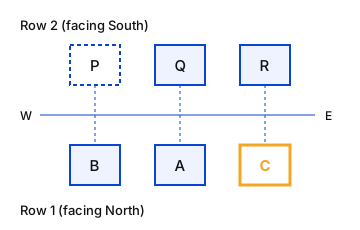
Question: Six people sit in two parallel rows. In Row 1- A, B and C sit facing towards north and in Row 2 - P, Q and R sit facing the south. Each person in a row faces a person in the other row. Who sits at the right extreme end of Row 1?
Statement (I): R sits to the immediate left of Q. Q faces A. B sits to the immediate left of A.
Statement (II): Only one person sits between B and C. B faces an immediate neighbour of Q.
इस प्रश्न में, एक प्रश्न के बाद (I) और (II) क्रमांकित दो कथन दिए गए हैं। आपको यह निर्णय करना है कि कथनों में दिए गए आँकड़े प्रश्न का उत्तर देने के लिए पर्याप्त हैं या नहीं। दोनों कथनों को पढ़िए और उचित उत्तर का चयन कीजिए।
प्रश्न: छह व्यक्ति दो समानांतर पंक्तियों में बैठे हैं। पंक्ति 1 में A, B और C उत्तर की ओर मुख करके बैठे हैं और पंक्ति 2 में P, Q और R दक्षिण की ओर मुख करके बैठे हैं। एक पंक्ति का प्रत्येक व्यक्ति दूसरी पंक्ति के किसी व्यक्ति के सामने बैठा है। पंक्ति 1 के दाएँ छोर पर कौन बैठा है?
कथन (I): R, Q के ठीक बाएँ बैठा है। Q का मुख A की ओर है। B, A के ठीक बाएँ बैठा है।
कथन (II): B और C के बीच केवल एक व्यक्ति बैठा है। B का मुख Q के एक निकटतम पड़ोसी की ओर है।
  1. AData in statements I and II together are NOT sufficient to answer the question.कथन I और II के आँकड़े मिलकर भी प्रश्न का उत्तर देने के लिए पर्याप्त नहीं हैं।
  2. BData in Statement I alone is sufficient to answer the question while data in statement II is not.कथन I के आँकड़े अकेले प्रश्न का उत्तर देने के लिए पर्याप्त हैं, जबकि कथन II के आँकड़े पर्याप्त नहीं हैं।
  3. CData in Statement II alone is sufficient to answer the question while data in statement I is not.कथन II के आँकड़े अकेले प्रश्न का उत्तर देने के लिए पर्याप्त हैं, जबकि कथन I के आँकड़े पर्याप्त नहीं हैं।
  4. DData in statements I and II together are sufficient to answer the question.कथन I और II के आँकड़े मिलकर प्रश्न का उत्तर देने के लिए पर्याप्त हैं।
Show answer

Concept: Row 1 faces north (its right = east); Row 2 faces south (its left = east). Test each statement separately.

  1. Statement I: R is to the immediate left of Q → R is east of Q, so Q is west or middle. Q faces A, and B is to A's immediate left (west). If Q were at the west end, A would be at the west end and B could not be west of it. Hence Q and A are in the middle, R and C at the east ends, B and P at the west ends.
  2. Right extreme of Row 1 (east) = C. Statement I alone is sufficient.
  3. Statement II: one person between B and C → B and C occupy the two ends, A in the middle; B faces a neighbour of Q – true for either end. B or C can be at the east end → not sufficient.

Trick: For south-facing people, "left" is east. Fix one certain position first, then try to place the others.

Answer: (B) Data in Statement I alone is sufficient to answer the question while data in statement II is not.

अवधारणा: Row 1 उत्तर की ओर मुख (इसका दायाँ = पूर्व); Row 2 दक्षिण की ओर मुख (इसका बायाँ = पूर्व)। हर कथन अलग-अलग जाँचें।

  1. कथन I: R, Q के ठीक बाएँ → R, Q के पूर्व में है, अतः Q पश्चिम छोर या मध्य में। Q का मुख A की ओर, और B, A के ठीक बाएँ (पश्चिम)। यदि Q पश्चिम छोर पर होता तो A भी पश्चिम छोर पर होता और B उसके पश्चिम में नहीं आ सकता। अतः Q और A मध्य में, R और C पूर्वी छोर पर, B और P पश्चिमी छोर पर।
  2. Row 1 का दायाँ छोर (पूर्व) = C। कथन I अकेला पर्याप्त है।
  3. कथन II: B और C के बीच एक व्यक्ति → B और C दोनों छोरों पर, A मध्य में; B, Q के पड़ोसी के सामने – दोनों छोरों पर सत्य। पूर्वी छोर पर B या C कोई भी हो सकता है → पर्याप्त नहीं।

ट्रिक: दक्षिणमुखी व्यक्तियों के लिए "बायाँ" = पूर्व। पहले एक निश्चित स्थान तय करें, फिर बाकी को बिठाएँ।

उत्तर: (B) Data in Statement I alone is sufficient to answer the question while data in statement II is not.

RRB Technician Grade I (Signal)General Intelligence and ReasoningData sufficiency – seating arrangementRRB Technician Grade I (Signal) 2024 · 19 Dec Shift 3 →
Q123.
Six people A, B, C, D, E and F live on six different floors of the same building. The bottom-most floor of the building is numbered as 1; the floor above it is numbered as 2 and so on. The topmost floor is numbered as 6.
A lives on an even-numbered floor. Only three people live between A and B. F lives immediately above E. B does not live on floor number 2. Only two people live between F and D. F lives on an even-numbered floor. Who lives on floor number 3?
छह व्यक्ति A, B, C, D, E और F एक ही भवन की छह अलग-अलग मंज़िलों पर रहते हैं। भवन की सबसे निचली मंज़िल की संख्या 1 है; उसके ऊपर की मंज़िल की संख्या 2 है और इसी प्रकार आगे। सबसे ऊपरी मंज़िल की संख्या 6 है।
A एक सम-संख्या वाली मंज़िल पर रहता है। A और B के बीच केवल तीन व्यक्ति रहते हैं। F, E के ठीक ऊपर रहता है। B मंज़िल संख्या 2 पर नहीं रहता है। F और D के बीच केवल दो व्यक्ति रहते हैं। F एक सम-संख्या वाली मंज़िल पर रहता है। मंज़िल संख्या 3 पर कौन रहता है?
  1. AE
  2. BC
  3. CB
  4. DD
Show answer

Concept: Use the strongest clues first ("only three between", parity conditions), then fit the rest.

  1. Three people between A and B → (A, B) on floors (1, 5) or (2, 6). A is even → A = 2, B = 6 (B ≠ 2 rules out A = 6, B = 2).
  2. F even and F immediately above E: F = 4 (6 is taken by B) → E = 3.
  3. Two people between F and D → D = 1. The remaining floor 5 → C.
  4. Final: 6-B, 5-C, 4-F, 3-E, 2-A, 1-D. Floor 3 = E.

Trick: "Exactly n between" means a gap of n+1 floors – list the only possible pairs and apply the even/odd condition.

Answer: (A) E

अवधारणा: पहले सबसे मज़बूत सुराग ("केवल तीन के बीच", सम/विषम शर्तें) लगाएँ, फिर बाकी बिठाएँ।

  1. A और B के बीच तीन लोग → (A, B) मंज़िल (1, 5) या (2, 6) पर। A सम → A = 2, B = 6 (B ≠ 2 से A = 6, B = 2 खारिज)।
  2. F सम और F, E के ठीक ऊपर: F = 4 (6 पर B है) → E = 3।
  3. F और D के बीच दो लोग → D = 1। बची मंज़िल 5 → C।
  4. अंतिम: 6-B, 5-C, 4-F, 3-E, 2-A, 1-D। मंज़िल 3 = E।

ट्रिक: "ठीक n लोग बीच में" = n+1 मंज़िल का अंतर – संभावित युग्म लिखें और सम/विषम शर्त लगाएँ।

उत्तर: (A) E

RRB Technician Grade I (Signal)General Intelligence and ReasoningFloor puzzleRRB Technician Grade I (Signal) 2024 · 19 Dec Shift 3 →
Q124.
In the following number-pairs, the second number is obtained by applying certain mathematical operations to the first number. Which numbers should replace X and Y so that the pattern followed by the two numbers on the left side of :: is same as that on the right side of ::?
(NOTE: Operations should be performed on the whole numbers, without breaking down the numbers into its constituent digits. E.g. 13 – Operations on 13 such as adding /subtracting /multiplying etc. to 13 can be performed. Breaking down 13 into 1 and 3 and then performing mathematical operations on 1 and 3 is not allowed.)
X : 49 :: 17 : Y
निम्नलिखित संख्या-युग्मों में, दूसरी संख्या पहली संख्या पर कुछ निश्चित गणितीय संक्रियाएँ करके प्राप्त की गई है। X और Y के स्थान पर कौन-सी संख्याएँ आनी चाहिए ताकि :: के बाईं ओर की दो संख्याओं द्वारा अनुसरण किया गया पैटर्न :: के दाईं ओर के पैटर्न के समान हो?
(नोट: संक्रियाएँ पूर्ण संख्याओं पर की जानी चाहिए, संख्याओं को उनके घटक अंकों में तोड़े बिना। उदाहरण के लिए 13 – 13 पर संक्रियाएँ जैसे 13 में जोड़ना/घटाना/गुणा करना आदि किया जा सकता है। 13 को 1 और 3 में तोड़कर फिर 1 और 3 पर गणितीय संक्रियाएँ करने की अनुमति नहीं है।)
X : 49 :: 17 : Y
  1. AX = 23, Y = 37
  2. BX = 25, Y = 39
  3. CX = 21, Y = 37
  4. DX = 31, Y = 34
Show answer

Concept: Find a single operation (on the whole number) linking the first number to the second and apply it to both pairs.

  1. Rule: second =2× first +3.
  2. Option A: 23×2+3=49 ✓ and 17×2+3=37=Y ✓.
  3. Other options: B 25×2−1=49 but 17×2−1=33≠39; C 21×2+7=49 but 17×2+7=41; D fails similarly.

Trick: Compute 17→Y for the common rules (×2±k) and match with the options.

Answer: (A) X = 23, Y = 37

अवधारणा: पूरी संख्या पर एक ही संक्रिया खोजें जो पहली संख्या को दूसरी से जोड़े और दोनों युग्मों पर लागू करें।

  1. नियम: दूसरी =2× पहली +3।
  2. विकल्प A: 23×2+3=49 ✓ और 17×2+3=37=Y ✓।
  3. अन्य विकल्प: B 25×2−1=49 पर 17×2−1=33≠39; C 21×2+7=49 पर 17×2+7=41; D भी विफल।

ट्रिक: सामान्य नियमों (×2±k) से 17→Y निकालें और विकल्पों से मिलाएँ।

उत्तर: (A) X = 23, Y = 37

RRB Technician Grade I (Signal)General Intelligence and ReasoningNumber analogyRRB Technician Grade I (Signal) 2024 · 19 Dec Shift 3 →
Q125.
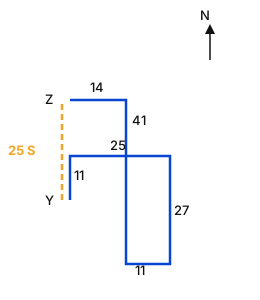
Anurag starts from Point Y and drives 11 km towards North. He then takes a right turn, drives 25 km, turns right and drives 27 km. He then takes a right turn and drives 11 km. He takes a right turn, drives 41 km. He then turns left, drives 14 km and stops at Point Z. How far (shortest distance) and towards which direction should he drive in order to reach Point Y again? (All turns are 90 degrees turns only unless specified)
अनुराग बिंदु Y से चलना शुरू करता है और उत्तर की ओर 11 km गाड़ी चलाता है। फिर वह दाएँ मुड़ता है, 25 km चलता है, दाएँ मुड़ता है और 27 km चलता है। फिर वह दाएँ मुड़ता है और 11 km चलता है। वह दाएँ मुड़कर 41 km चलता है। फिर वह बाएँ मुड़ता है, 14 km चलता है और बिंदु Z पर रुक जाता है। बिंदु Y पर पुनः पहुँचने के लिए उसे कितनी दूर (न्यूनतम दूरी) और किस दिशा में गाड़ी चलानी चाहिए? (जब तक अन्यथा निर्दिष्ट न हो, सभी मोड़ केवल 90 डिग्री के मोड़ हैं)
  1. A36 km towards North36 km उत्तर की ओर
  2. B14 km towards North14 km उत्तर की ओर
  3. C30 km towards South30 km दक्षिण की ओर
  4. D25 km towards South25 km दक्षिण की ओर
Show answer

Concept: Plot the path on a grid with Y at the origin; the final position relative to Y gives the shortest return distance and direction.

  1. Y(0, 0) → 11 km N → (0, 11) → right (E) 25 km → (25, 11) → right (S) 27 km → (25, −16).
  2. Right (W) 11 km → (14, −16) → right (N) 41 km → (14, 25) → left (W) 14 km → Z(0, 25).
  3. Z is directly 25 km north of Y, so he must drive 25 km towards South.

Trick: Net E–W: +25−11−14=0; net N–S: +11−27+41=+25 (north). Return = 25 km south.

Answer: (D) 25 km towards South

अवधारणा: Y को मूलबिंदु मानकर पथ ग्रिड पर बनाएँ; Y के सापेक्ष अंतिम स्थिति से लौटने की न्यूनतम दूरी और दिशा मिलती है।

  1. Y(0, 0) → 11 km उत्तर → (0, 11) → दाएँ (पूर्व) 25 km → (25, 11) → दाएँ (दक्षिण) 27 km → (25, −16)।
  2. दाएँ (पश्चिम) 11 km → (14, −16) → दाएँ (उत्तर) 41 km → (14, 25) → बाएँ (पश्चिम) 14 km → Z(0, 25)।
  3. Z, Y के ठीक 25 km उत्तर में है, अतः उसे 25 km दक्षिण की ओर चलना होगा।

ट्रिक: शुद्ध पूर्व–पश्चिम: +25−11−14=0; शुद्ध उत्तर–दक्षिण: +11−27+41=+25 (उत्तर)। वापसी = 25 km दक्षिण।

उत्तर: (D) 25 km towards South

RRB Technician Grade I (Signal)General Intelligence and ReasoningDirection senseRRB Technician Grade I (Signal) 2024 · 19 Dec Shift 3 →
Q126.
Which of the following statements are true about GPU?
i. The full form of GPU is Graphical User Interface.
ii. GPUs are made for the acceleration and enhancement of computer graphics and processed images.
iii. The GPU exists as an electronic circuit that can be found on graphics card. iv. The GPU exists as a special electronic circuit that can be used in PCs and game consoles.
GPU के बारे में निम्नलिखित में से कौन-से कथन सत्य हैं?
i. GPU का पूर्ण रूप Graphical User Interface है।
ii. GPU कंप्यूटर ग्राफ़िक्स और प्रोसेस की गई छवियों के त्वरण (acceleration) और संवर्धन के लिए बनाए जाते हैं।
iii. GPU एक इलेक्ट्रॉनिक परिपथ (circuit) के रूप में होता है जो ग्राफ़िक्स कार्ड पर पाया जा सकता है। iv. GPU एक विशेष इलेक्ट्रॉनिक परिपथ के रूप में होता है जिसका उपयोग PC और गेम कंसोल में किया जा सकता है।
  1. AOnly i, ii, and ivकेवल i, ii और iv
  2. Bi, ii, iii and ivi, ii, iii और iv
  3. COnly ii and iiiकेवल ii और iii
  4. DOnly i, ii, and iiiकेवल i, ii और iii
Show answer

Concept: GPU = Graphics Processing Unit – a special electronic circuit on the graphics card that accelerates graphics and image processing.

  1. Statement i is false: GPU is not "Graphical User Interface" (that is GUI).
  2. Statement ii is true – GPUs are built to accelerate and enhance computer graphics and image processing.
  3. Statement iii is true – the GPU is an electronic circuit found on the graphics card.
  4. Only the option containing ii and iii without i fits.

Trick: GPU ≠ GUI. GPU = hardware (Processing Unit), GUI = software (User Interface).

Answer: (C) Only ii and iii

अवधारणा: GPU = Graphics Processing Unit – ग्राफिक्स कार्ड पर लगा एक विशेष इलेक्ट्रॉनिक सर्किट जो ग्राफिक्स और इमेज प्रोसेसिंग को तेज़ करता है।

  1. कथन i गलत है: GPU का अर्थ "Graphical User Interface" नहीं है (वह GUI है)।
  2. कथन ii सही है – GPU कंप्यूटर ग्राफिक्स और इमेज प्रोसेसिंग को तेज़ और बेहतर बनाने के लिए बनाए जाते हैं।
  3. कथन iii सही है – GPU ग्राफिक्स कार्ड पर पाया जाने वाला इलेक्ट्रॉनिक सर्किट है।
  4. केवल वही विकल्प सही है जिसमें ii और iii हों पर i न हो।

याद रखें: GPU ≠ GUI। GPU = हार्डवेयर (Processing Unit), GUI = सॉफ्टवेयर (User Interface)।

उत्तर: (C) केवल ii और iii

RRB Technician Grade I (Signal)Basics of Computers and ApplicationGPU basicsRRB Technician Grade I (Signal) 2024 · 19 Dec Shift 3 →
Q127.
In MS Word, what does the term 'font weight' refer to?
MS Word में 'font weight' शब्द का क्या अर्थ है?
  1. AThe style of the fontफ़ॉन्ट की शैली
  2. BThe colour of the fontफ़ॉन्ट का रंग
  3. CThe spacing between charactersवर्णों के बीच का अंतराल
  4. DThe thickness of the fontफ़ॉन्ट की मोटाई
Show answer

Concept: Font weight describes how thick or heavy the strokes of a typeface are (Light, Regular, Bold, Extra-Bold).

  1. In MS Word, applying Bold (Ctrl + B) increases the font weight – the letters become thicker.
  2. Style (italic/underline), colour and character spacing are separate font properties, not weight.

Yaad rakhein: Weight = "bhaari-pan" = thickness of the letters.

Answer: (D) The thickness of the font

अवधारणा: फ़ॉन्ट वेट (font weight) बताता है कि अक्षरों की रेखाएँ कितनी मोटी/भारी हैं (Light, Regular, Bold, Extra-Bold)।

  1. MS Word में Bold (Ctrl + B) लगाने से फ़ॉन्ट वेट बढ़ता है – अक्षर मोटे हो जाते हैं।
  2. स्टाइल (italic/underline), रंग और अक्षरों के बीच की दूरी अलग गुण हैं, वेट नहीं।

याद रखें: Weight = भारीपन = अक्षरों की मोटाई।

उत्तर: (D) फ़ॉन्ट की मोटाई

RRB Technician Grade I (Signal)Basics of Computers and ApplicationMS Word – font formattingRRB Technician Grade I (Signal) 2024 · 19 Dec Shift 3 →
Q128.
How can a computer virus affect a system's functionality?
कंप्यूटर वायरस किसी सिस्टम की कार्यक्षमता को कैसे प्रभावित कर सकता है?
  1. ABy accelerating system boot timeसिस्टम बूट समय को तीव्र करके
  2. BBy optimizing system updatesसिस्टम अपडेट को अनुकूलित करके
  3. CBy causing software to malfunction or crashसॉफ़्टवेयर में खराबी या क्रैश उत्पन्न करके
  4. DBy improving hardware performanceहार्डवेयर के प्रदर्शन में सुधार करके
Show answer

Concept: A computer virus is malicious code that attaches itself to programs/files and spreads, damaging data and disrupting normal operation.

  1. Typical effects: programs crash or malfunction, files get corrupted or deleted, the system slows down or shows unwanted pop-ups.
  2. A virus never improves boot time, updates or hardware performance – those options describe the opposite of what malware does.

Yaad rakhein: Virus = harm. Any option that says "improve/optimise/accelerate" is wrong.

Answer: (C) By causing software to malfunction or crash

अवधारणा: कंप्यूटर वायरस एक दुर्भावनापूर्ण कोड है जो प्रोग्राम/फ़ाइलों से जुड़कर फैलता है, डेटा को नुकसान पहुँचाता है और सामान्य कार्य में बाधा डालता है।

  1. सामान्य प्रभाव: प्रोग्राम क्रैश या खराब होना, फ़ाइलें करप्ट/डिलीट होना, सिस्टम धीमा होना या अनचाहे पॉप-अप आना।
  2. वायरस कभी बूट समय, अपडेट या हार्डवेयर प्रदर्शन को बेहतर नहीं बनाता – वे विकल्प मैलवेयर के उल्टे काम बताते हैं।

याद रखें: वायरस = नुकसान। जिस विकल्प में "बेहतर/तेज़/अनुकूलित" लिखा हो, वह गलत है।

उत्तर: (C) सॉफ्टवेयर को खराब करके या क्रैश कराकर

RRB Technician Grade I (Signal)Basics of Computers and ApplicationComputer virusRRB Technician Grade I (Signal) 2024 · 19 Dec Shift 3 →
Q129.
Which part of the Linux OS controls a computer's boot up process?
Linux OS का कौन-सा भाग कंप्यूटर की बूट-अप प्रक्रिया को नियंत्रित करता है?
  1. AKernelकर्नेल (Kernel)
  2. BDaemonsडीमन (Daemons)
  3. CInit systemइनिट सिस्टम (Init system)
  4. DBootloaderबूटलोडर (Bootloader)
Show answer

Concept: The bootloader (e.g. GRUB) is the first program that runs after BIOS/UEFI; it loads the Linux kernel into memory and starts it.

  1. Boot sequence: BIOS/UEFI → Bootloader (GRUB) → Kernel → Init system (systemd) → Daemons/services → Login.
  2. The kernel manages hardware after it is loaded; init starts services; daemons are background processes – none of them controls the boot-up itself.

Yaad rakhein: "Boot" is in the name – the Boot-loader controls the boot-up.

Answer: (D) Bootloader

अवधारणा: बूटलोडर (जैसे GRUB) BIOS/UEFI के बाद चलने वाला पहला प्रोग्राम है; यह Linux कर्नेल को मेमोरी में लोड कर चालू करता है।

  1. बूट क्रम: BIOS/UEFI → Bootloader (GRUB) → Kernel → Init system (systemd) → Daemons/सेवाएँ → Login।
  2. कर्नेल लोड होने के बाद हार्डवेयर संभालता है; init सेवाएँ शुरू करता है; daemon पृष्ठभूमि प्रक्रियाएँ हैं – इनमें से कोई बूट-अप को नियंत्रित नहीं करता।

याद रखें: नाम में ही "Boot" है – Boot-loader बूट-अप नियंत्रित करता है।

उत्तर: (D) Bootloader

RRB Technician Grade I (Signal)Basics of Computers and ApplicationLinux boot processRRB Technician Grade I (Signal) 2024 · 19 Dec Shift 3 →
Q130.
When you first open a spreadsheet software, what is usually displayed?
जब आप पहली बार कोई स्प्रेडशीट सॉफ़्टवेयर खोलते हैं, तो सामान्यतः क्या प्रदर्शित होता है?
  1. AA blank spreadsheet with grids and cellsग्रिड और सेल वाली एक रिक्त स्प्रेडशीट
  2. BA presentation slideएक प्रेज़ेंटेशन स्लाइड
  3. CA blank documentएक रिक्त दस्तावेज़
  4. DA blank page without any gridsबिना किसी ग्रिड वाला एक रिक्त पृष्ठ
Show answer

Concept: A spreadsheet program (Excel, Calc, Google Sheets) organises data in a grid of rows and columns called cells.

  1. On opening, it shows a blank workbook: columns A, B, C… and rows 1, 2, 3… forming a grid of cells, with A1 selected.
  2. A blank document is a word-processor view and a slide belongs to presentation software.

Yaad rakhein: Word → page, PowerPoint → slide, Excel → grid of cells.

Answer: (A) A blank spreadsheet with grids and cells

अवधारणा: स्प्रेडशीट प्रोग्राम (Excel, Calc, Google Sheets) डेटा को पंक्तियों और स्तंभों के ग्रिड में रखता है जिसके खाने सेल कहलाते हैं।

  1. खोलने पर एक खाली वर्कबुक दिखती है: कॉलम A, B, C… और पंक्तियाँ 1, 2, 3… से बना सेलों का ग्रिड, जिसमें A1 चुना होता है।
  2. खाली दस्तावेज़ वर्ड-प्रोसेसर का दृश्य है और स्लाइड प्रेज़ेंटेशन सॉफ्टवेयर की।

याद रखें: Word → पेज, PowerPoint → स्लाइड, Excel → सेलों का ग्रिड।

उत्तर: (A) ग्रिड और सेल वाली खाली स्प्रेडशीट

RRB Technician Grade I (Signal)Basics of Computers and ApplicationSpreadsheet basicsRRB Technician Grade I (Signal) 2024 · 19 Dec Shift 3 →
Q131.
Which power-saving mode is most suitable for short breaks when you want to resume work quickly?
छोटे अंतराल (breaks) के लिए, जब आप शीघ्र कार्य पुनः आरंभ करना चाहते हों, कौन-सा पावर-सेविंग मोड सबसे उपयुक्त है?
  1. ARestart
  2. BHibernate
  3. CShutdown
  4. DSleep
Show answer

Concept: Sleep keeps the current session in RAM at very low power, so the PC wakes up in seconds.

  1. Sleep: open programs stay in RAM; wake-up is almost instant – ideal for short breaks.
  2. Hibernate: saves RAM contents to the hard disk and powers off; resuming is slower – better for long breaks.
  3. Shutdown/Restart close everything, so work has to be reopened.

Yaad rakhein: Sleep = short nap (RAM); Hibernate = long winter sleep (disk).

Answer: (D) Sleep

अवधारणा: Sleep मोड वर्तमान सत्र को RAM में बहुत कम पावर पर रखता है, इसलिए PC सेकंडों में जाग जाता है।

  1. Sleep: खुले प्रोग्राम RAM में रहते हैं; जागना लगभग तुरंत – छोटे ब्रेक के लिए आदर्श।
  2. Hibernate: RAM की सामग्री हार्ड डिस्क में सहेजकर बंद कर देता है; दोबारा चालू होना धीमा – लंबे ब्रेक के लिए बेहतर।
  3. Shutdown/Restart सब बंद कर देते हैं, काम दोबारा खोलना पड़ता है।

याद रखें: Sleep = छोटी झपकी (RAM); Hibernate = लंबी शीतनिद्रा (डिस्क)।

उत्तर: (D) Sleep

RRB Technician Grade I (Signal)Basics of Computers and ApplicationPower options – Sleep vs HibernateRRB Technician Grade I (Signal) 2024 · 19 Dec Shift 3 →
Q132.
Which of the following methods can be used to delete multiple columns simultaneously in Excel?
Excel में एक साथ कई कॉलम हटाने (delete) के लिए निम्नलिखित में से किस विधि का उपयोग किया जा सकता है?
  1. AUse the "Find and Replace" feature"Find and Replace" सुविधा का उपयोग करें
  2. BSelect the columns, then right-click and press "Delete"कॉलम चुनें, फिर राइट-क्लिक करके "Delete" दबाएँ
  3. CSelect the columns, then press the Delete keyकॉलम चुनें, फिर Delete कुंजी दबाएँ
  4. DUse the "Clear" option from the Home tabHome टैब से "Clear" विकल्प का उपयोग करें
Show answer

Concept: In Excel, removing whole columns is done with the Delete command (right-click → Delete or Home → Cells → Delete), not with the Delete key.

  1. Select several column headers (click–drag or Ctrl + click), right-click and choose Delete – all selected columns are removed and the remaining ones shift left.
  2. Pressing the Delete key or using Clear only erases the contents; the empty columns stay in place.
  3. Find and Replace changes text, it cannot remove columns.

Yaad rakhein: Delete key = clears data; Delete command = removes the cells/columns themselves.

Answer: (B) Select the columns, then right-click and press "Delete"

अवधारणा: Excel में पूरे कॉलम हटाने के लिए Delete कमांड (right-click → Delete या Home → Cells → Delete) का उपयोग होता है, Delete कुंजी का नहीं।

  1. कई कॉलम हेडर चुनें (click–drag या Ctrl + click), right-click करके Delete चुनें – सभी चुने कॉलम हट जाते हैं और बाकी बाईं ओर खिसक जाते हैं।
  2. Delete कुंजी दबाने या Clear से केवल सामग्री मिटती है; खाली कॉलम वहीं रहते हैं।
  3. Find and Replace टेक्स्ट बदलता है, कॉलम नहीं हटा सकता।

याद रखें: Delete कुंजी = डेटा मिटाती है; Delete कमांड = सेल/कॉलम ही हटा देती है।

उत्तर: (B) कॉलम चुनें, फिर right-click करके "Delete" दबाएँ

RRB Technician Grade I (Signal)Basics of Computers and ApplicationExcel – deleting columnsRRB Technician Grade I (Signal) 2024 · 19 Dec Shift 3 →
Q133.
Which of the following is the correct shortcut key to bring up the task manager directly using keyboard only?
केवल कीबोर्ड का उपयोग करके सीधे टास्क मैनेजर खोलने के लिए निम्नलिखित में से कौन-सी शॉर्टकट कुंजी सही है?
  1. ACtrl + Windows + Enter
  2. BWindows + R
  3. CCtrl + Shift + Escape
  4. DCtrl + Alt + Delete
Show answer

Concept: Ctrl + Shift + Esc opens Windows Task Manager directly in one step.

  1. Ctrl + Alt + Delete opens a security screen from which Task Manager must be chosen – not direct.
  2. Windows + R opens the Run box (you would still have to type taskmgr).
  3. Ctrl + Windows + Enter is not a Task Manager shortcut.

Yaad rakhein: "Esc" from a hung program → Ctrl + Shift + Esc = Task Manager.

Answer: (C) Ctrl + Shift + Escape

अवधारणा: Ctrl + Shift + Esc एक ही चरण में सीधे Windows Task Manager खोलता है।

  1. Ctrl + Alt + Delete एक सुरक्षा स्क्रीन खोलता है जिसमें से Task Manager चुनना पड़ता है – सीधा नहीं।
  2. Windows + R से Run बॉक्स खुलता है (फिर taskmgr टाइप करना पड़ेगा)।
  3. Ctrl + Windows + Enter Task Manager का शॉर्टकट नहीं है।

याद रखें: अटके प्रोग्राम से "Esc" → Ctrl + Shift + Esc = Task Manager।

उत्तर: (C) Ctrl + Shift + Escape

RRB Technician Grade I (Signal)Basics of Computers and ApplicationWindows shortcuts – Task ManagerRRB Technician Grade I (Signal) 2024 · 19 Dec Shift 3 →
Q134.
What is the purpose of setting a print area in a spreadsheet?
स्प्रेडशीट में प्रिंट एरिया (print area) सेट करने का उद्देश्य क्या है?
  1. ATo highlight the area with coloursक्षेत्र को रंगों से हाइलाइट करना
  2. BTo define the range of cells to be printedप्रिंट किए जाने वाले सेल की रेंज को परिभाषित करना
  3. CTo freeze rows and columnsपंक्तियों और कॉलमों को फ़्रीज़ करना
  4. DTo adjust the font sizeफ़ॉन्ट का आकार समायोजित करना
Show answer

Concept: A print area is a selected range of cells that will be printed instead of the whole worksheet.

  1. In Excel: select the range → Page Layout → Print Area → Set Print Area; only that range goes to the printer.
  2. Highlighting uses Fill Colour, freezing uses Freeze Panes and font size is a formatting option – none relates to printing a range.

Yaad rakhein: Print Area = "print only this part".

Answer: (B) To define the range of cells to be printed

अवधारणा: प्रिंट एरिया सेलों की वह चुनी हुई रेंज है जो पूरी वर्कशीट की जगह प्रिंट होती है।

  1. Excel में: रेंज चुनें → Page Layout → Print Area → Set Print Area; केवल वही रेंज प्रिंटर पर जाती है।
  2. हाइलाइट के लिए Fill Colour, फ्रीज़ के लिए Freeze Panes और फ़ॉन्ट साइज़ एक फ़ॉर्मेटिंग विकल्प है – इनका रेंज प्रिंट करने से संबंध नहीं।

याद रखें: Print Area = "केवल यह हिस्सा प्रिंट करो"।

उत्तर: (B) प्रिंट की जाने वाली सेल रेंज तय करना

RRB Technician Grade I (Signal)Basics of Computers and ApplicationSpreadsheet – print areaRRB Technician Grade I (Signal) 2024 · 19 Dec Shift 3 →
Q135.
Which of the following platforms is primarily used for professional networking?
निम्नलिखित में से कौन-सा प्लेटफ़ॉर्म मुख्य रूप से व्यावसायिक नेटवर्किंग (professional networking) के लिए उपयोग किया जाता है?
  1. AFacebook
  2. BTwitter
  3. CInstagram
  4. DLinkedIn
Show answer

Concept: Different social platforms serve different purposes; LinkedIn is built for professional networking.

  1. LinkedIn (launched 2003, owned by Microsoft) is used for job search, recruitment, professional profiles and business connections.
  2. Facebook and Instagram are general social/photo-sharing platforms; Twitter (X) is a micro-blogging platform.

Yaad rakhein: Jobs, résumé, recruiters → LinkedIn.

Answer: (D) LinkedIn

अवधारणा: अलग-अलग सोशल प्लेटफ़ॉर्म के उद्देश्य अलग हैं; LinkedIn पेशेवर नेटवर्किंग (professional networking) के लिए बना है।

  1. LinkedIn (2003 में शुरू, Microsoft के स्वामित्व में) नौकरी खोज, भर्ती, पेशेवर प्रोफ़ाइल और व्यावसायिक संपर्कों के लिए उपयोग होता है।
  2. Facebook और Instagram सामान्य सोशल/फोटो-शेयरिंग प्लेटफ़ॉर्म हैं; Twitter (X) माइक्रो-ब्लॉगिंग प्लेटफ़ॉर्म है।

याद रखें: नौकरी, résumé, recruiter → LinkedIn।

उत्तर: (D) LinkedIn

RRB Technician Grade I (Signal)Basics of Computers and ApplicationSocial networking platformsRRB Technician Grade I (Signal) 2024 · 19 Dec Shift 3 →
Q136.
Which view allows you to organise the sequence of slides in your presentation in MS PowerPoint?
MS PowerPoint में कौन-सा व्यू आपको अपनी प्रेज़ेंटेशन की स्लाइडों के क्रम को व्यवस्थित करने की अनुमति देता है?
  1. ANormal View
  2. BSlide Sorter View
  3. CSlide Show
  4. DReading View
Show answer

Concept: PowerPoint offers several views; Slide Sorter View shows all slides as thumbnails so you can drag them to reorder, add sections, hide or delete slides.

  1. Normal View – editing a single slide; Reading View / Slide Show – presenting.
  2. Slide Sorter (View tab → Slide Sorter) – reorganising the sequence of slides.

Yaad rakhein: "Sorter" = sort/arrange order of slides.

Answer: (B) Slide Sorter View

अवधारणा: PowerPoint में कई व्यू होते हैं; Slide Sorter View सभी स्लाइडों को थंबनेल रूप में दिखाता है ताकि उन्हें खींचकर क्रम बदला, सेक्शन जोड़े, छिपाया या हटाया जा सके।

  1. Normal View – एक स्लाइड संपादित करना; Reading View / Slide Show – प्रस्तुति देना।
  2. Slide Sorter (View टैब → Slide Sorter) – स्लाइडों का क्रम व्यवस्थित करना।

याद रखें: "Sorter" = स्लाइडों का क्रम (sort) लगाना।

उत्तर: (B) Slide Sorter View

RRB Technician Grade I (Signal)Basics of Computers and ApplicationMS PowerPoint viewsRRB Technician Grade I (Signal) 2024 · 19 Dec Shift 3 →
Q137.
To select multiple slides, press and hold the _____ key, and then click each slide.
एक से अधिक स्लाइड चुनने के लिए, _____ कुंजी को दबाकर रखें और फिर प्रत्येक स्लाइड पर क्लिक करें।
  1. ACtrl
  2. BHome
  3. CShift
  4. DAlt
Show answer

Concept: In Windows applications, Ctrl + click selects individual non-adjacent items; Shift + click selects a continuous range.

  1. To select multiple slides one by one, hold Ctrl and click each slide thumbnail.
  2. Shift + click would select every slide between the first and last clicked; Home and Alt do not select.

Yaad rakhein: Ctrl = pick and choose; Shift = range.

Answer: (A) Ctrl

अवधारणा: Windows एप्लिकेशनों में Ctrl + क्लिक अलग-अलग (non-adjacent) आइटम चुनता है; Shift + क्लिक लगातार परास चुनता है।

  1. एक-एक करके कई स्लाइड चुनने के लिए Ctrl दबाए रखें और हर स्लाइड थंबनेल पर क्लिक करें।
  2. Shift + क्लिक पहली और आखिरी क्लिक के बीच की सभी स्लाइड चुन लेता; Home और Alt चयन नहीं करते।

याद रखें: Ctrl = चुन-चुनकर; Shift = परास।

उत्तर: (A) Ctrl

RRB Technician Grade I (Signal)Basics of Computers and ApplicationSelecting slides in PowerPointRRB Technician Grade I (Signal) 2024 · 19 Dec Shift 3 →
Q138.
What action should be taken if an antivirus software detects a virus?
यदि कोई एंटीवायरस सॉफ़्टवेयर किसी वायरस का पता लगाता है, तो क्या कार्रवाई की जानी चाहिए?
  1. AFollow the software’s instructions to quarantine or remove the virus.वायरस को क्वारंटाइन करने या हटाने के लिए सॉफ़्टवेयर के निर्देशों का पालन करें।
  2. BIgnore the warning and continue using the computer.चेतावनी की उपेक्षा करें और कंप्यूटर का उपयोग करते रहें।
  3. CDelete the infected files immediately.संक्रमित फ़ाइलों को तुरंत हटा दें।
  4. DPerform a system backup before taking any action.कोई भी कार्रवाई करने से पहले सिस्टम का बैकअप लें।
Show answer

Concept: Antivirus software is designed to isolate (quarantine), clean or delete infected files safely; the user should follow its prompts.

  1. Quarantine moves the infected file to a safe area so it cannot run, letting the software remove it or restore it if it was a false alarm.
  2. Ignoring the warning spreads the infection; manually deleting files may remove needed system files; backing up first may copy the virus into the backup.

Yaad rakhein: Detect → Quarantine → Remove – let the antivirus do it.

Answer: (A) Follow the software's instructions to quarantine or remove the virus.

अवधारणा: एंटीवायरस सॉफ़्टवेयर संक्रमित फ़ाइलों को सुरक्षित रूप से अलग (quarantine) करने, साफ़ करने या हटाने के लिए बना है; उपयोगकर्ता को उसके निर्देशों का पालन करना चाहिए।

  1. Quarantine संक्रमित फ़ाइल को सुरक्षित क्षेत्र में ले जाता है ताकि वह चल न सके; फिर सॉफ़्टवेयर उसे हटा सकता है या गलत अलार्म होने पर वापस ला सकता है।
  2. चेतावनी को नज़रअंदाज़ करने से संक्रमण फैलता है; खुद फ़ाइलें हटाने से ज़रूरी सिस्टम फ़ाइलें मिट सकती हैं; पहले बैकअप लेने से वायरस बैकअप में भी चला जा सकता है।

याद रखें: Detect → Quarantine → Remove – एंटीवायरस को करने दें।

उत्तर: (A) Follow the software's instructions to quarantine or remove the virus.

RRB Technician Grade I (Signal)Basics of Computers and ApplicationAntivirus actionRRB Technician Grade I (Signal) 2024 · 19 Dec Shift 3 →
Q139.
Rearrange the following search engines according to the popularity of people using it. I. Yahoo
II. Google
III. Bing
IV. Yandex
निम्नलिखित सर्च इंजनों को, उनका उपयोग करने वाले लोगों की लोकप्रियता के अनुसार पुनर्व्यवस्थित कीजिए। I. Yahoo
II. Google
III. Bing
IV. Yandex
  1. AI, II, III, IV
  2. BII, I, IV, III
  3. CII, III, I, IV .
  4. DIV, III, II, I
Show answer

Concept: By worldwide usage share, Google is far ahead, followed by Microsoft Bing, then Yahoo and Russia's Yandex.

  1. Google handles roughly 90% of global searches; Bing is a distant second (about 3–4%).
  2. Yahoo (whose search is powered by Bing) comes next; Yandex is popular mainly in Russia.
  3. Order: II (Google), III (Bing), I (Yahoo), IV (Yandex).

Yaad rakhein: G → B → Y → Y (Google, Bing, Yahoo, Yandex).

Answer: (C) II, III, I, IV

अवधारणा: विश्वव्यापी उपयोग हिस्सेदारी में Google सबसे आगे, फिर Microsoft Bing, फिर Yahoo और रूस का Yandex।

  1. Google लगभग 90% वैश्विक खोजें संभालता है; Bing दूर दूसरे स्थान पर (लगभग 3–4%)।
  2. Yahoo (जिसकी खोज Bing से चलती है) उसके बाद; Yandex मुख्यतः रूस में लोकप्रिय है।
  3. क्रम: II (Google), III (Bing), I (Yahoo), IV (Yandex)।

याद रखें: G → B → Y → Y (Google, Bing, Yahoo, Yandex)।

उत्तर: (C) II, III, I, IV

RRB Technician Grade I (Signal)Basics of Computers and ApplicationSearch enginesRRB Technician Grade I (Signal) 2024 · 19 Dec Shift 3 →
Q140.
What is the range supported in MS-Word to change the size of the selected text?
MS-Word में चयनित टेक्स्ट का आकार बदलने के लिए समर्थित रेंज क्या है?
  1. ABetween 1 and 1500, in multiples of 1 (such as 10 or 105)1 और 1500 के बीच, 1 के गुणजों में (जैसे 10 या 105)
  2. BBetween 1 and 1638, in multiples of .5 (such as 10.5 or 105.5)1 और 1638 के बीच, .5 के गुणजों में (जैसे 10.5 या 105.5)
  3. CBetween 0.5 and 1000, in multiples of .5 (such as 10.5 or 105.5)0.5 और 1000 के बीच, .5 के गुणजों में (जैसे 10.5 या 105.5)
  4. DBetween 0.5 and 2000, in multiples of .5 (such as 10.5 or 105.5)0.5 और 2000 के बीच, .5 के गुणजों में (जैसे 10.5 या 105.5)
Show answer

Concept: MS Word accepts font sizes typed directly into the Font Size box within a fixed range.

  1. Allowed range: 1 to 1638 points, in steps of 0.5 (e.g. 10.5, 105.5).
  2. The drop-down list only shows 8–72, but any value in the range can be typed.
  3. Shortcut: Ctrl + ] / Ctrl + [ changes size by 1 pt; Ctrl + Shift + > / < jumps through list sizes.

Yaad rakhein: Word font size: 1 → 1638, half-point steps.

Answer: (B) Between 1 and 1638, in multiples of .5 (such as 10.5 or 105.5)

अवधारणा: MS Word में Font Size बॉक्स में सीधे टाइप किया गया आकार एक निश्चित परास में स्वीकार होता है।

  1. अनुमत परास: 1 से 1638 पॉइंट, 0.5 के चरण में (जैसे 10.5, 105.5)।
  2. ड्रॉप-डाउन सूची में केवल 8–72 दिखते हैं, पर परास का कोई भी मान टाइप किया जा सकता है।
  3. शॉर्टकट: Ctrl + ] / Ctrl + [ से 1 pt बदलता है; Ctrl + Shift + > / < सूची के आकारों पर कूदता है।

याद रखें: Word फ़ॉन्ट साइज़: 1 → 1638, आधे पॉइंट के चरण।

उत्तर: (B) Between 1 and 1638, in multiples of .5 (such as 10.5 or 105.5)

RRB Technician Grade I (Signal)Basics of Computers and ApplicationMS Word font sizeRRB Technician Grade I (Signal) 2024 · 19 Dec Shift 3 →